

Government asset management software that keeps the register true for every audit
Our government asset management software keeps buildings, parks, streetlights, vehicles and laptops on one register that public works and finance both trust. Depreciation, physical counts, staff requests and capital plans all work from it.
- GASB Statement No. 34 (capital asset reporting)
- 2 CFR 200.313 (equipment bought with federal awards)
- ISO 55001 (asset management)
What our government asset management software does for public agencies
One register for every department
Buildings, parks equipment, streetlights, vehicles and IT equipment sit in one asset register by site and location. Public works and finance read the same record.
Depreciation books you define
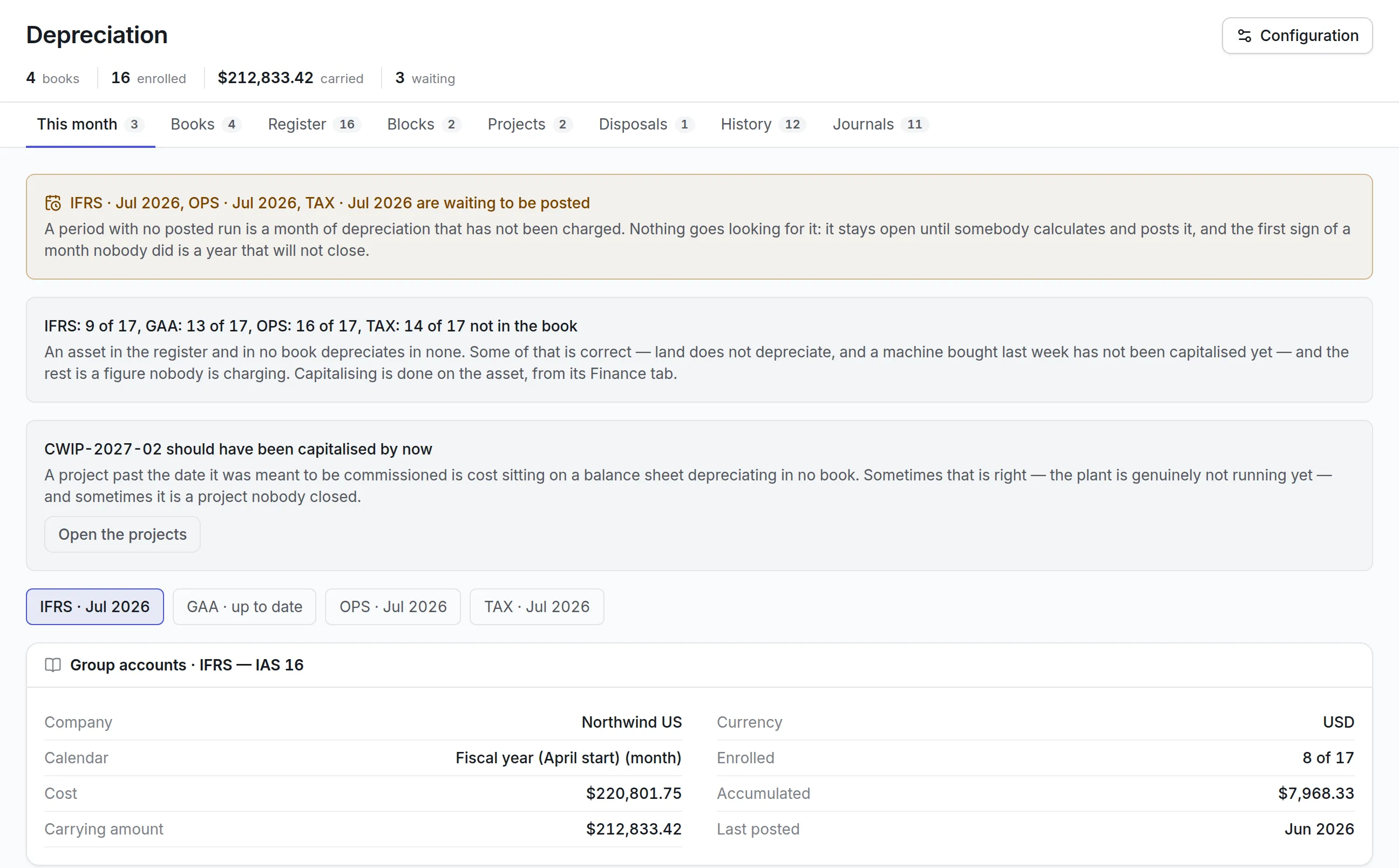
Keep a book for capital asset reporting on your own fiscal calendar, with straight-line lives by asset class and a write-off threshold for low-cost items.
Counts an auditor can follow
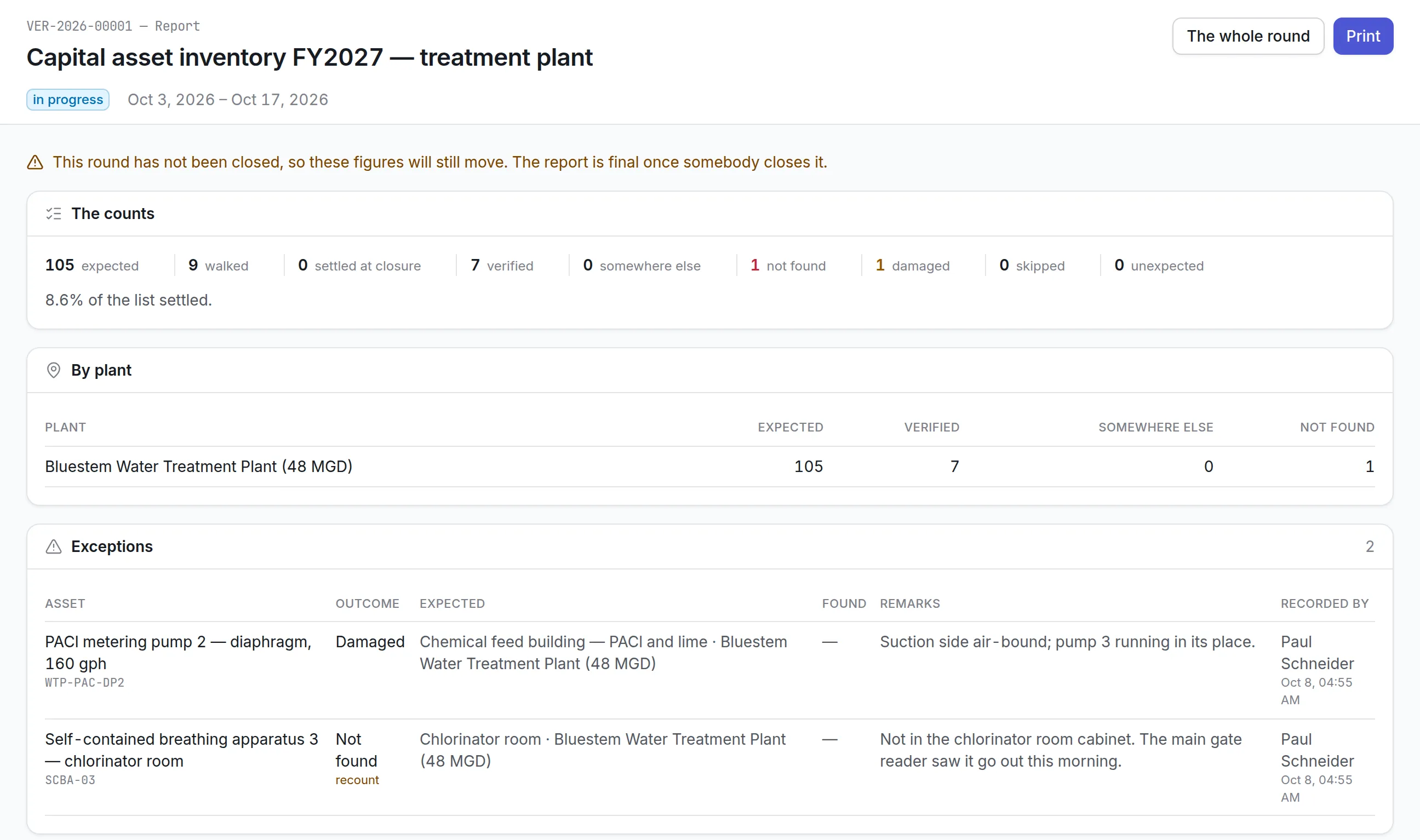
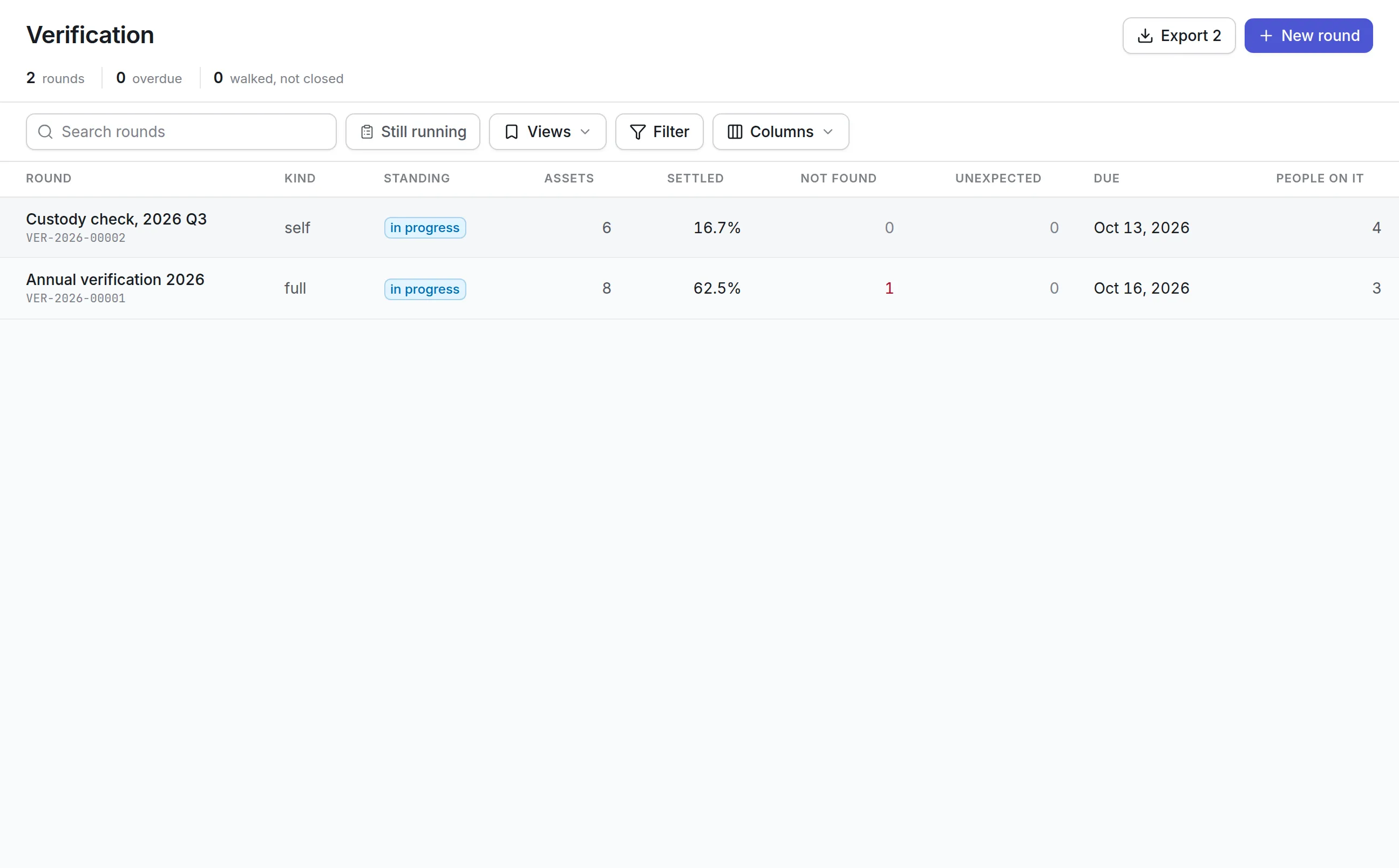
Verification rounds count everything, a recorded random sample, a targeted list or custodians confirming by email. What was not found stays on the record.
Requests in one inbox
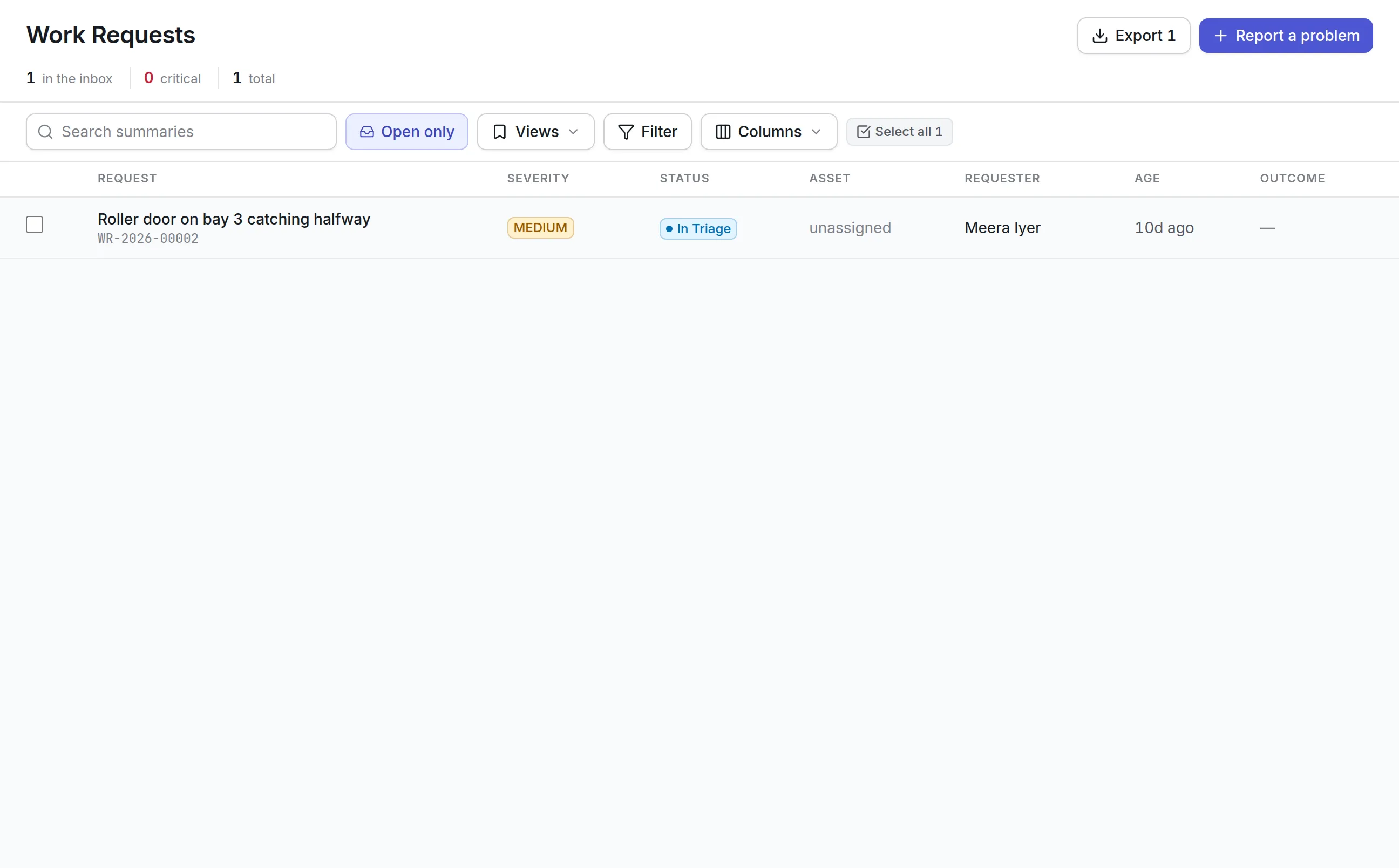
Staff report a broken light, a leaking roof or a dead projector from a browser or by email. Planners triage, merge duplicates and convert the right ones into work orders.
Capital plans tied to budgets
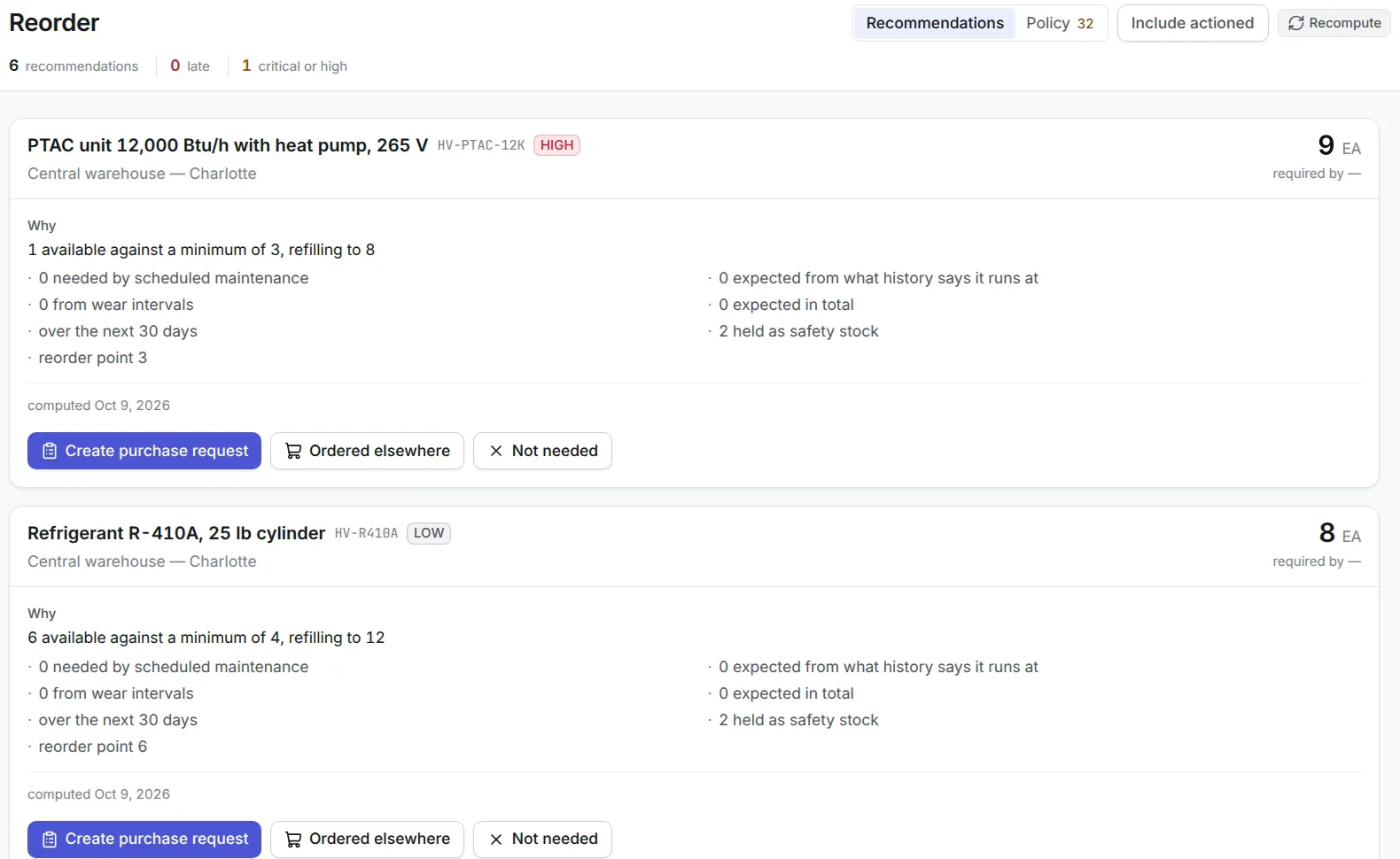
Departments submit capital requests for the coming fiscal year, approvers decide line by line, and approved money opens as budget lines that orders are charged against.
Maintenance on a schedule
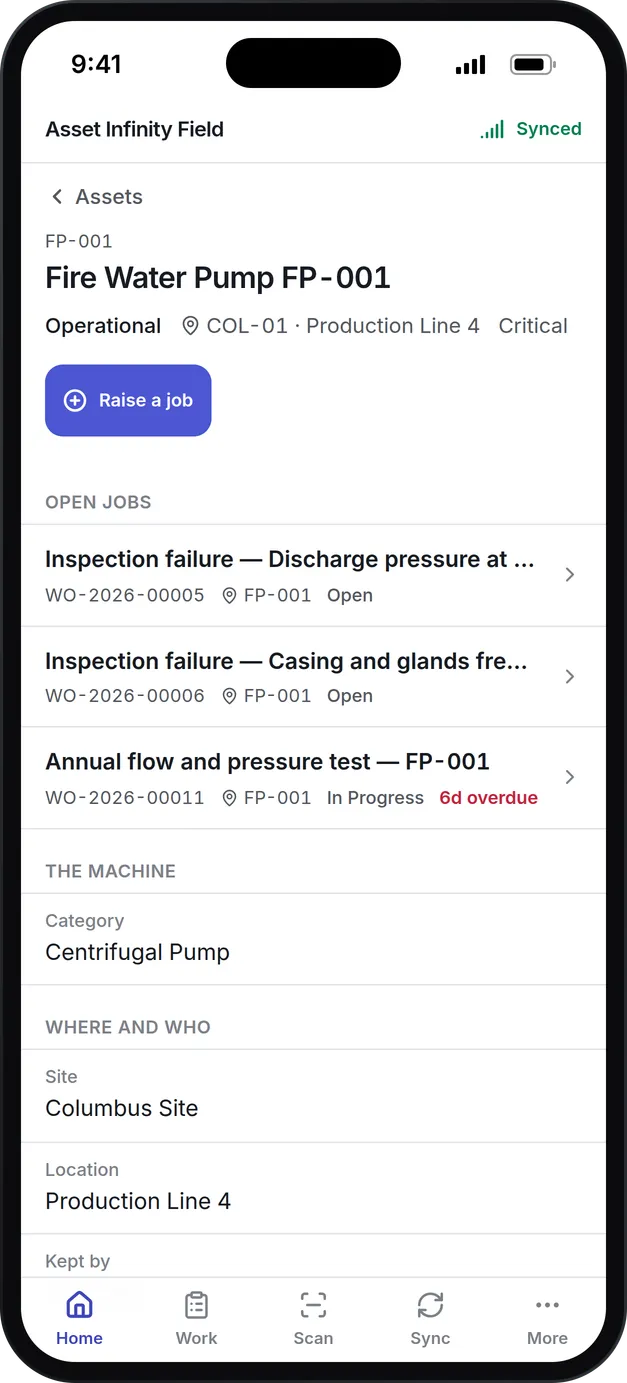
Plans fall due by date, mileage or run hours, whichever comes first, and technicians work from the mobile app with or without signal.
What is government asset management software?
Government asset management software is a system a city, county, state agency or special district uses to keep one register of what it owns: public buildings, parks equipment, streetlights, vehicles and IT equipment. It records where each asset is, who is responsible for it, the maintenance done on it and what it is worth after depreciation, so the same list serves operations, finance and the auditor.
Public agencies buy it when their lists stop agreeing. Public works tracks equipment in one spreadsheet, finance carries capital assets in another, IT has a third, and every year-end the auditor asks for a count that takes weeks to reconcile. A shared register ends most of that work, because the truck a mechanic serviced is the truck the controller depreciates.
How government asset management software works in Asset Infinity
Here is how a city might set up its register and run its first year, using the screens the product has today.
Build the sites and locations
City hall, the public works yard, each park, each library branch and the fire stations become sites, with buildings, floors and rooms beneath them. A spreadsheet imports into the asset register without retyping.
Tag what you can reach
Vehicles, mowers, generators, laptops and furniture get barcode or QR labels, so a scan on the mobile app opens the right record. Streetlights and park fixtures can be recorded against their location without a label.
Set the classes and the fiscal calendar
Finance opens a calendar that starts in the month your fiscal year does, then sets asset classes such as buildings, improvements, machinery and equipment, vehicles and infrastructure.
Open a depreciation book
A book records the framework it follows in your own words, such as “GASB 34”, and a policy per class sets the method, useful life, residual and first-period convention.
Take requests and plan the work
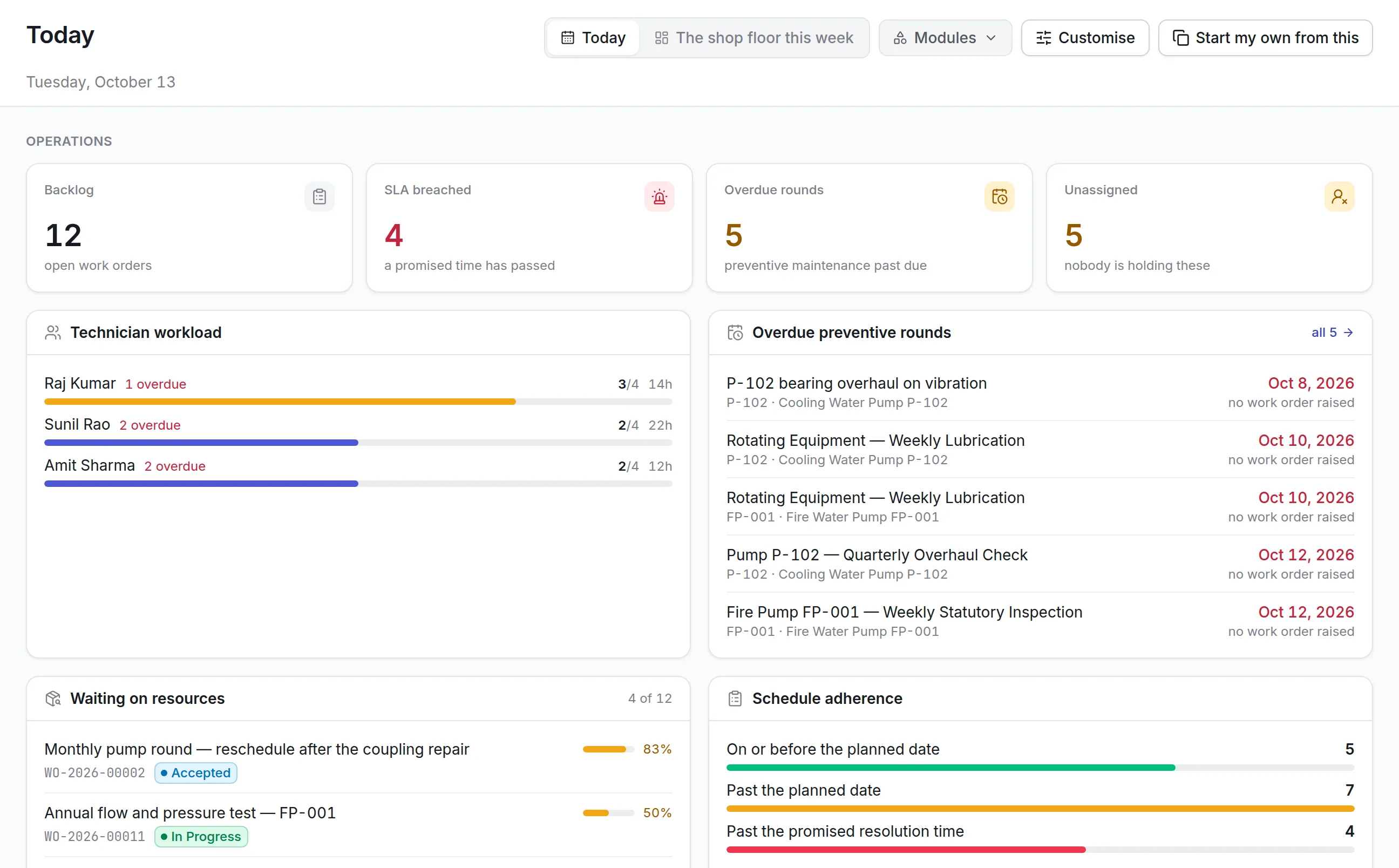
Staff report faults into one inbox, planners convert them into work orders, and preventive plans fall due by date, mileage or run hours.
Count it every year
A verification round checks that what is on the register is where the register says, and anything missing stays on the record until someone with authority accepts it.
Your words matter to the people using it. If your staff say “facility” instead of “site” or “unit” instead of “asset”, labels can be changed on the Localization screen.
Depreciation books for capital asset reporting
Governmental reporting under GASB Statement No. 34 asks for capital assets, including infrastructure, to be reported net of accumulated depreciation. Asset Infinity keeps that schedule on the same records the field crews maintain. It computes and posts the depreciation; it does not prepare your financial statements or certify compliance, which stays with your finance team and auditor.
More detail
What a finance office sets up:
The full set of methods and conventions is on our fixed asset management software page.
Physical verification that stands up to an audit
An auditor asks two questions about a capital asset list: does each item exist, and is it where the list says? Verification rounds answer both. The list is fixed when a round is published, so “not found” means an asset was expected there and nobody scanned it.
More detail
A round can take four forms:
An asset found somewhere the round did not expect is recorded as unexpected beside the rest. Equipment bought with federal awards carries record-keeping and inventory rules under 2 CFR 200.313, and a round on that equipment, with the funding source held in a custom field on the asset, gives your grants office the count it needs. More on running counts is on our asset inventory software page.
Work requests from every department
Most maintenance in a public agency starts with someone noticing a problem: a park restroom that will not flush, a flickering light in the council chamber, a projector out in a meeting room. Each department reports it the same way, and the maintenance team works from one inbox.
- Staff report from a browser on any device, or by email from a known address, with a photo and the asset if they know it
- A clerk logs a resident’s phone call as a request on their behalf
- Ten reports of the same broken streetlight are merged into one request and stay linked
- A request that will not be done is rejected with a reason, and the record of why is kept
- A request’s category sets its default priority and work order type
- People with the Requester role follow their own requests without seeing the rest of the system
More detail
With maintenance request software in place:
Requests come from staff with a sign-in. There is no public resident portal today.
Capital plans and budgets on the same record
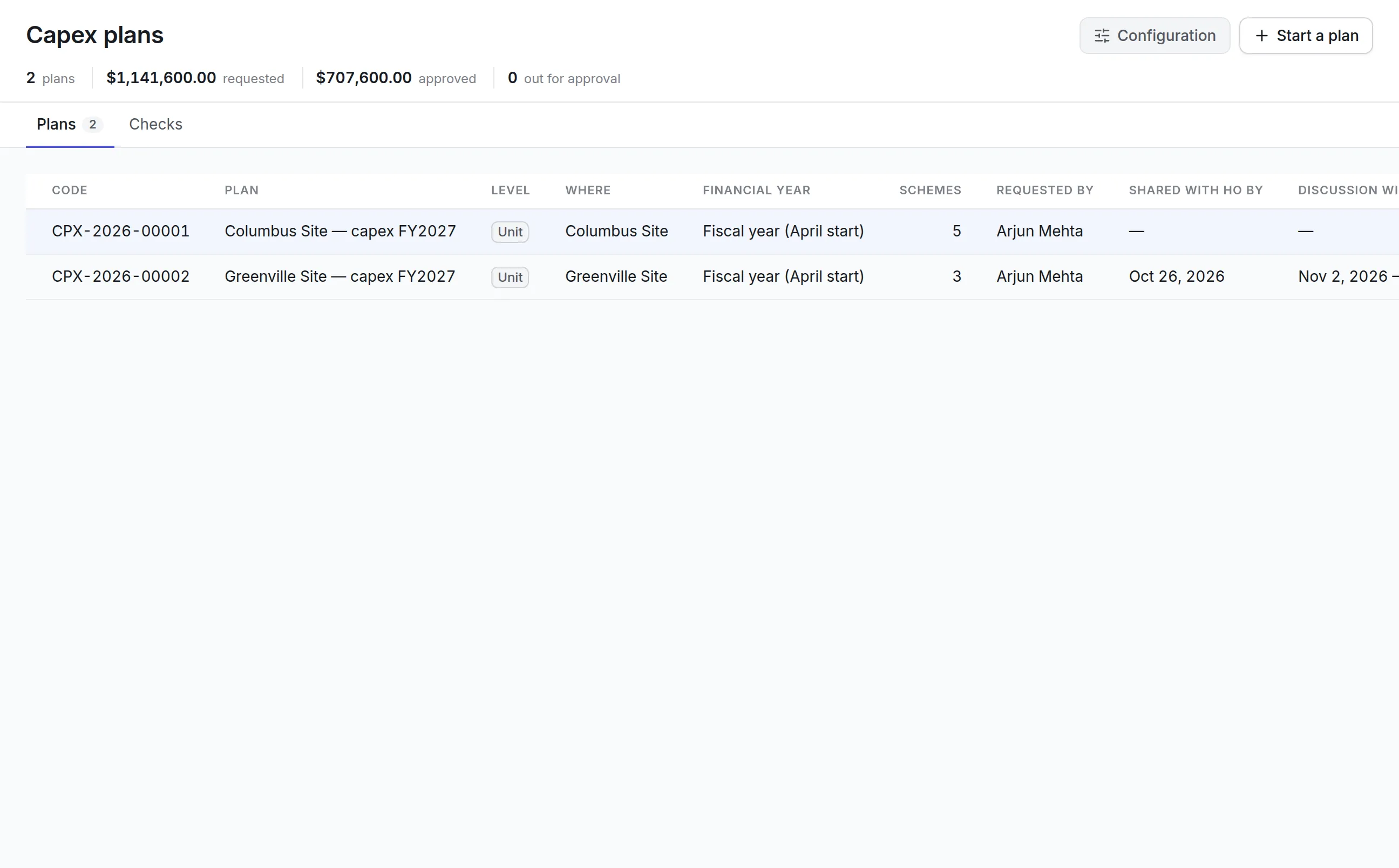
Each year departments ask for money to replace roofs, trucks, HVAC units and playground equipment. The capital planning round collects those requests, prices and phases them, and keeps what was approved tied to what is spent.
How it runs in capital planning software:
Departments add capital requests
Each records what is wanted, quantity, priority, location, cost center and asset class, with a written justification.
Phase the spend
A monthly grid covers cash flow and depreciation for the plan year and the four years after it.
Approve line by line
Approvers decide each capital request and can approve less than was asked.
Open the money
Approved capital requests open as budget lines showing approved, released, committed, spent and available.
Hold orders to it
A purchase order commits its value when submitted, and a budget line set to block refuses an order once its money runs out.
What should you look for when choosing government asset management software?
Use this table to compare products on the things a public agency is audited on.
- One shared registerSeparate lists for operations and finance drift apartIn Asset InfinityOne asset record for maintenance, counts and depreciation
- Depreciation booksCapital assets are reported net of depreciationIn Asset InfinityBooks on your own fiscal calendar, with policies by class
- Write-off thresholdLow-cost items should not be depreciated one by oneIn Asset InfinityA set amount below which an asset is charged in full
- Physical verificationAuditors and grantors expect periodic countsIn Asset InfinityFull, sample, targeted and custodian self-check rounds
- Construction in progressA building under construction is not yet in serviceIn Asset InfinityProjects that collect cost and are capitalized on commissioning
- DisposalsSurplus sales need a gain or loss and a recordIn Asset InfinityOne disposal record, a result in every book
- Capital planningRequests should be tied to what is spentIn Asset InfinityPlans, line-by-line approval and budget lines
- Access by siteDepartments should see their own assetsIn Asset InfinityAccess limited by site, with organization-wide roles
- Audit trailChanges to public records must be traceableIn Asset InfinityChanges are recorded with who and when
- Hosting choiceSome agencies require their own serversIn Asset InfinityCloud, or on-premise on your servers
See it on your own assets, or price it in two minutes.
Government asset management software by department
Each agency starts from the same product and switches on what its departments need.
Public works and facilities
Public buildings, parks and streetlights hold the most assets. Facilities set preventive plans for HVAC, generators, elevators and roofs, and parks crews record playground and irrigation equipment by park. Requests from other departments land in one inbox, and the technician app works in basements and parks with no signal.
Fleet
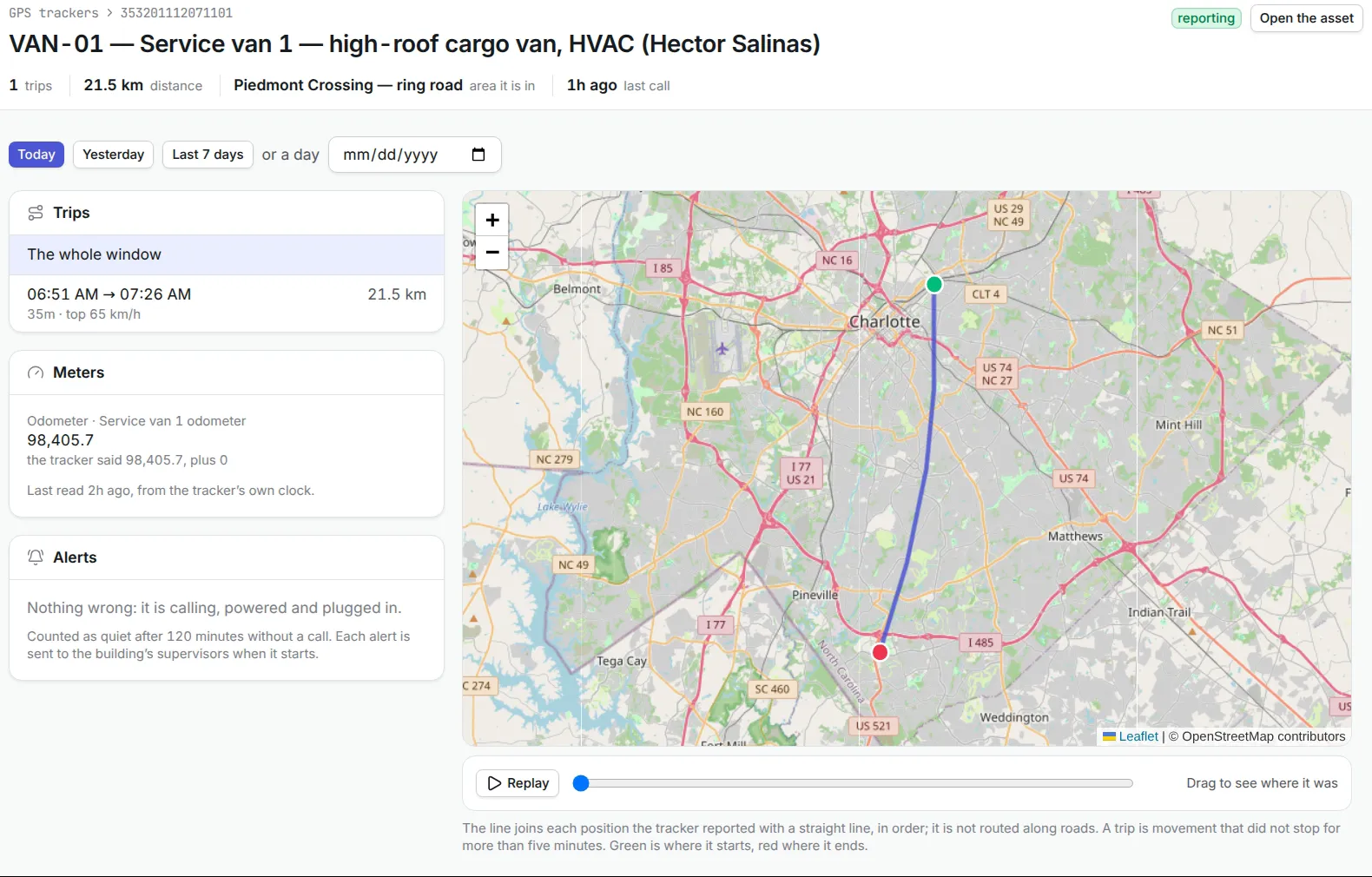
Police cars, plows, refuse trucks and mowers are maintained by mileage, run hours or date, whichever comes first. GPS trackers can show where a vehicle is, and mileage can drive units-of-production depreciation. See fleet maintenance software for service intervals and meters.
Information technology
Laptops, desktops, network gear and phones sit on the same register as everything else, assigned to named staff. Self-check rounds email each holder the devices recorded against them. See IT asset management software for discovery and software licenses.
Finance and the auditor
The finance office keeps the depreciation book, posts each month, reviews disposals and runs the year-end count. Each posted journal and each correction stays on the record, so an auditor can trace a figure back to the assets and periods behind it.
What government asset management software costs with Asset Infinity
The asset register starts at $130 a month for up to 500 assets, with unlimited users. Maintenance is $25 per user per month and Finance, which holds the depreciation books, is $30 per user per month. Add-ons a public agency typically chooses are flat per organization:
- Maintenance requests, $75 a month
- Budgets, $150 a month
- Capital planning, $200 a month
Build a quote for your agency. There is no government trial with sample data yet, so a trial starts with your own sites and assets.
Getting started with one department
Most agencies go live with one department first, often facilities or fleet:
- Import that department’s assets and print labels for what can be tagged.
- Set up the fiscal calendar and asset classes with finance, and open the first book.
- Load opening balances for assets already on your capital asset list.
- Turn on requests so other departments can report faults to that team.
- Run a first verification round to confirm the imported register matches what is there.
Then add the next department. To see it with your own assets, book a demo.
What teams in this industry use most
Common questions
What is government asset management software?
Government asset management software keeps a public agency's register of buildings, vehicles, equipment and IT, and records the maintenance, depreciation and physical counts behind each one. It gives operations and finance one list of what the agency owns, where it is and what it is worth.
Does Asset Infinity support GASB 34 depreciation?
You can set up a depreciation book for capital asset reporting on your own fiscal calendar, with straight-line policies by asset class, residual values and a write-off threshold. The product keeps the records and produces the journals; it does not prepare your financial statements or certify GASB compliance.
Can it run a physical inventory of capital assets?
Yes. A verification round can count every asset in its scope, a random sample whose draw is recorded, a targeted list, or ask each custodian to confirm their items by email. It closes with a report of what was verified, moved, damaged or missing.
Can our fiscal year start in July?
Yes. A fiscal calendar can start in any month and is divided into monthly or quarterly periods. Depreciation books, budgets and capital plans are all counted on it.
Can each department see only its own assets?
Yes. Access can be limited by site, so a parks crew or a library branch sees its own assets and work, while finance and the fleet manager see across the organization.
Is there a government edition with sample data?
Not yet. Agencies use the same product as every other customer and set up their own sites, asset classes and categories. Field names and labels can be changed on the Localization screen to match the words your staff use.
See it with your own assets
A demo walks you through the product with our team. Or start the trial and import your own asset list from a spreadsheet.