


In this article
- What Is Preventive Maintenance?
- What Is Condition-Based Maintenance?
- Preventive Maintenance vs Condition-Based Maintenance
- What Is a CMMS?
- Why Organizations Need Both Maintenance Strategies
- How CMMS Supports Preventive Maintenance
- Centralized Asset Register
- Maintenance Schedule Creation
- Automatic Work Order Generation
- Preventive Maintenance Checklists
- Maintenance Calendar
- Meter-Based Maintenance
- Automatic Reminders and Escalations
- How CMMS Supports Condition-Based Maintenance
- Condition Data Collection
- Condition Monitoring Parameters
- Threshold Management
- Condition-Triggered Work Orders
- Inspection Findings
- Trend Analysis
- Sensor and IoT Integration
- Preventive Maintenance Program Development
- Step 1: Build an Accurate Asset Register
- Step 2: Assess Asset Criticality
- Step 3: Review Manufacturer Guidance
- Step 4: Identify Failure Modes
- Step 5: Define Maintenance Tasks
- Step 6: Select the Trigger
- Step 7: Create Standard Checklists
- Step 8: Estimate Labor and Parts
- Step 9: Configure the CMMS
- Step 10: Review Program Performance
- Condition-Based Maintenance Program Development
- Step 1: Select Suitable Assets
- Step 2: Identify Relevant Failure Modes
- Step 3: Select Monitoring Techniques
- Step 4: Establish Baselines
- Step 5: Define Thresholds
- Step 6: Define Response Actions
- Step 7: Configure Data Collection
- Step 8: Link Alerts with Workflows
- Step 9: Review Results
- Benefits of CMMS for Preventive Maintenance
- Reduces Missed Maintenance
- Reduces Unexpected Breakdowns
- Improves Asset Reliability
- Extends Asset Life
- Improves Technician Productivity
- Standardizes Maintenance Work
- Improves Compliance
- Improves Spare Parts Planning
- Reduces Emergency Maintenance Costs
- Improves Maintenance Reporting
- Benefits of CMMS for Condition-Based Maintenance
- Maintenance Based on Actual Need
- Earlier Failure Detection
- Reduced Secondary Damage
- Better Use of Maintenance Resources
- Lower Downtime
- Better Replacement Decisions
- Improved Safety
- Better Asset Performance
- Preventive Maintenance Challenges
- Over-Maintenance
- Under-Maintenance
- Generic Schedules
- Incomplete Checklists
- Missed Tasks
- Poor Asset Data
- Limited Technician Feedback
- Poor Coordination with Operations
- Condition-Based Maintenance Challenges
- High Initial Setup Effort
- Sensor and Monitoring Costs
- Poor Data Quality
- Too Many Alerts
- Inappropriate Thresholds
- Skill Requirements
- Integration Complexity
- Connectivity Limitations
- Lack of Actionable Workflows
- Common CMMS Program Mistakes
- Treating Every Asset the Same
- Copying Manufacturer Schedules Without Review
- Creating Too Many Preventive Tasks
- Ignoring Failure History
- Failing to Record Measurements
- Closing Work Orders Without Details
- Not Updating Thresholds
- Installing Sensors Without a Business Case
- Ignoring User Training
- Measuring Activity Instead of Results
- CMMS Features for Preventive and Condition-Based Maintenance
- Maintenance Workflow in a CMMS
- Condition Monitoring Methods Supported by CMMS
- Visual Inspections
- Vibration Monitoring
- Thermal Imaging
- Oil Analysis
- Ultrasonic Testing
- Electrical Testing
- Performance Monitoring
- Maintenance KPIs
- Preventive Maintenance Compliance
- Scheduled Maintenance Percentage
- Emergency Work Percentage
- Mean Time Between Failures
- Mean Time to Repair
- Asset Availability
- Repeat Failure Rate
- Maintenance Cost per Asset
- Preventive Maintenance Cost
- Corrective Work Generated from Inspections
- Condition Alert Response Time
- False Alarm Rate
- Work Order Backlog
- Planned vs Unplanned Downtime
- Reporting for Preventive and Condition-Based Maintenance
- Industry Use Cases
- Manufacturing
- Healthcare
- Hospitality
- Utilities
- Food and Beverage
- Logistics and Warehousing
- Property and Facility Management
- Energy and Renewable Operations
- How to Implement CMMS for Preventive and Condition-Based Maintenance
- Step 1: Define Maintenance Objectives
- Step 2: Clean the Asset Register
- Step 3: Classify Asset Criticality
- Step 4: Review Existing Maintenance Plans
- Step 5: Define Standard Job Plans
- Step 6: Configure Preventive Schedules
- Step 7: Select Condition Monitoring Candidates
- Step 8: Define Monitoring Parameters
- Step 9: Establish Baselines and Thresholds
- Step 10: Configure Alert Workflows
- Step 11: Integrate Sensors Where Needed
- Step 12: Configure Mobile Forms
- Step 13: Add Spare Parts
- Step 14: Train Employees
- Step 15: Run a Pilot
- Step 16: Validate the Results
- Step 17: Expand Gradually
- Step 18: Review KPIs Regularly
- Best Practices
- Match the Strategy to the Asset
- Use Criticality to Set Priorities
- Keep Job Plans Clear
- Record Actual Findings
- Capture Meter and Condition Readings
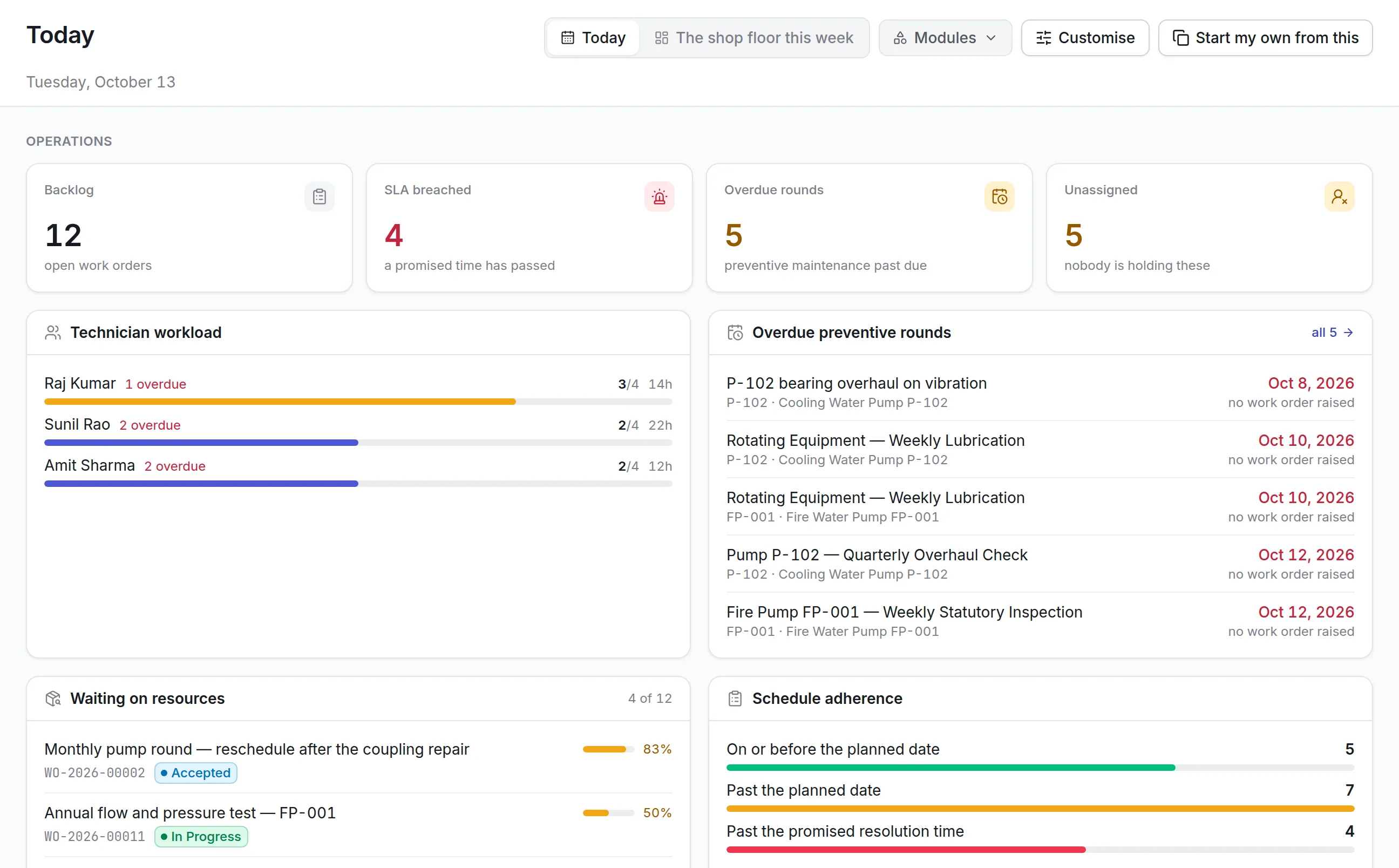
- Review Overdue Maintenance Daily
- Investigate Repeat Failures
- Review Alert Quality
- Link Parts and Labor to Assets
- Involve Operators
- Review the Program Regularly
- Why Choose Asset Infinity for Preventive and Condition-Based Maintenance?
- Conclusion
- Frequently Asked Questions
Equipment rarely fails without warning.
A machine may begin vibrating more than usual. A motor may run hotter. A pump may lose pressure. A compressor may consume more energy. A bearing may produce unusual noise. These early signs often appear before a complete breakdown, but they are easy to miss when maintenance teams rely only on fixed schedules, paper inspections, or reactive repair requests.
Preventive maintenance helps organizations service assets at planned intervals before failure occurs. Condition-based maintenance goes further by using actual asset condition to determine when maintenance is needed.
Both strategies can reduce breakdowns, extend asset life, and improve reliability. However, they also require accurate asset data, clear maintenance plans, inspection records, condition thresholds, technician discipline, and consistent follow-up.
A CMMS for preventive and condition-based maintenance brings these activities into one centralized system. It automates recurring maintenance, records equipment readings, generates work orders from condition alerts, stores maintenance history, and helps teams evaluate whether their maintenance programs are delivering the expected results.
This guide explains how CMMS software supports preventive and condition-based maintenance, including program design, benefits, workflows, features, implementation steps, KPIs, challenges, and best practices.
What Is Preventive Maintenance?
Preventive maintenance is planned maintenance performed at predetermined intervals to reduce the likelihood of equipment failure.
The schedule may be based on:
- Calendar time
- Operating hours
- Production cycles
- Distance
- Usage
- Manufacturer recommendations
- Regulatory requirements
- Historical failure patterns
Typical preventive maintenance tasks include:
- Lubrication
- Cleaning
- Inspection
- Filter replacement
- Belt adjustment
- Electrical testing
- Calibration
- Fluid replacement
- Fastener tightening
- Safety checks
- Planned component replacement
The objective is to complete maintenance before failure interrupts operations.
What Is Condition-Based Maintenance?
Condition-based maintenance is performed when actual asset condition indicates that intervention is needed.
Instead of servicing equipment only because a date has arrived, maintenance teams review information such as:
- Temperature
- Vibration
- Pressure
- Flow
- Noise
- Oil quality
- Electrical current
- Battery health
- Corrosion
- Energy consumption
- Equipment output
- Visual condition
Maintenance is triggered when a reading, inspection result, or performance trend crosses an approved threshold.
Condition-based maintenance helps avoid both premature servicing and delayed repair.
Preventive Maintenance vs Condition-Based Maintenance
Both strategies aim to prevent unexpected failures, but they use different triggers.
Preventive Maintenance
Maintenance is triggered by a predefined schedule.
For example:
- Service a compressor every 90 days
- Replace a filter every 500 operating hours
- Inspect a generator every month
- Calibrate an instrument every six months
Condition-Based Maintenance
Maintenance is triggered by the actual condition of the asset.
For example:
- Inspect a motor when vibration exceeds the normal range
- Replace a filter when pressure drop reaches the limit
- Service a pump when efficiency begins to decline
- Replace a battery when capacity falls below the approved level
Preventive maintenance is easier to establish, while condition-based maintenance can provide more targeted intervention when reliable condition data is available.
What Is a CMMS?
A Computerized Maintenance Management System, commonly called a CMMS, is software used to manage maintenance activities, assets, work orders, schedules, spare parts, technicians, inspections, costs, and reports.
A CMMS for preventive and condition-based maintenance acts as the central platform for:
- Creating maintenance programs
- Defining schedules
- Recording meter readings
- Managing inspection checklists
- Setting condition thresholds
- Generating work orders
- Assigning technicians
- Tracking parts and labor
- Maintaining asset history
- Monitoring maintenance KPIs
- Analyzing failure trends
Why Organizations Need Both Maintenance Strategies
Using only reactive maintenance means waiting for assets to fail.
Using only fixed preventive schedules may lead to unnecessary work on equipment that remains in good condition.
A balanced maintenance program uses:
- Preventive maintenance for routine, statutory, safety, and predictable tasks
- Condition-based maintenance for equipment whose condition can be measured reliably
- Corrective maintenance for defects discovered during inspections
- Reactive maintenance for unpredictable or low-risk failures
- Predictive maintenance where sufficient data and analytics are available
A CMMS helps coordinate these strategies without forcing every asset into the same maintenance approach.
How CMMS Supports Preventive Maintenance
A CMMS automates the complete preventive maintenance process.
Centralized Asset Register
Every preventive maintenance plan should be linked to an asset record.
The record may include:
- Asset ID
- Asset name
- Category
- Location
- Manufacturer
- Model
- Serial number
- Criticality
- Warranty
- Maintenance history
- Operating status
- Meter information
This ensures that maintenance work is connected to the correct equipment.
Maintenance Schedule Creation
Teams can create recurring schedules based on:
- Daily intervals
- Weekly intervals
- Monthly intervals
- Quarterly intervals
- Annual intervals
- Operating hours
- Production counts
- Mileage
- Machine cycles
- Seasonal requirements
The CMMS automatically calculates the next due date or meter value.
Automatic Work Order Generation
When a preventive task becomes due, the system can automatically create a work order.
The work order may contain:
- Asset details
- Maintenance instructions
- Priority
- Assigned technician
- Checklist
- Estimated duration
- Required tools
- Spare parts
- Safety instructions
- Documents
- Due date
This reduces the risk of missed maintenance.
Preventive Maintenance Checklists
Digital checklists standardize maintenance quality.
A checklist may ask technicians to:
- Inspect bearings
- Check temperature
- Record pressure
- Replace filters
- Lubricate components
- Test alarms
- Verify guards
- Inspect cables
- Record wear
- Capture photographs
Mandatory fields help ensure that important tasks are not skipped.
Maintenance Calendar
A maintenance calendar provides visibility into:
- Upcoming work
- Overdue tasks
- Technician assignments
- Equipment shutdowns
- Site activities
- Inspection due dates
- Planned maintenance windows
This helps planners balance workload and avoid production conflicts.
Meter-Based Maintenance
Some preventive tasks are better scheduled by usage than time.
Examples include:
- Forklift service every 500 hours
- Vehicle servicing every 10,000 kilometres
- Machine overhaul after a defined number of cycles
- Filter replacement after a specific volume of output
Technicians or connected systems can update meter readings in the CMMS.
Automatic Reminders and Escalations
The system may send alerts when maintenance is:
- Approaching due
- Due today
- Overdue
- Unassigned
- Incomplete
- Waiting for parts
- Delayed by approval
Escalation rules improve accountability.
How CMMS Supports Condition-Based Maintenance
Condition-based maintenance requires accurate observations, readings, thresholds, and response workflows.
Condition Data Collection
Condition information may be entered through:
- Manual inspections
- Mobile applications
- Meter readings
- Technician observations
- IoT sensors
- Building management systems
- Industrial control systems
- Monitoring platforms
- Laboratory testing
Condition Monitoring Parameters
Common parameters include:
- Vibration
- Temperature
- Pressure
- Flow rate
- Oil quality
- Noise
- Voltage
- Current
- Battery capacity
- Humidity
- Corrosion level
- Equipment efficiency
- Output quality
The appropriate parameter depends on the asset and failure mode.
Threshold Management
The organization can define acceptable, warning, and critical ranges.
For example:
- Normal temperature
- Warning temperature
- Critical temperature
- Normal vibration
- Alarm vibration
- Shutdown vibration
When a reading exceeds a threshold, the CMMS can trigger an action.
Condition-Triggered Work Orders
A condition alert may automatically create a work order.
Examples include:
- High motor temperature creates an inspection task
- Excessive vibration creates a bearing check
- Low battery health creates a replacement request
- Pressure loss creates a leak inspection
- Abnormal energy use creates a performance investigation
Inspection Findings
Technicians may identify condition issues during routine rounds.
A digital inspection form can allow them to:
- Select condition status
- Record measurements
- Add notes
- Upload photographs
- Create follow-up work
- Change asset condition
- Escalate critical defects
Trend Analysis
A single reading may not show the full picture.
Trend analysis helps teams identify:
- Gradual temperature increases
- Declining output
- Increasing vibration
- Repeated pressure fluctuations
- Reduced battery capacity
- Rising energy consumption
This provides earlier warning than waiting for a fixed limit to be exceeded.
Sensor and IoT Integration
Connected sensors can continuously send data to monitoring systems or the CMMS.
Potential benefits include:
- Faster fault detection
- Reduced manual inspection effort
- Continuous visibility
- Earlier intervention
- Automated work order creation
- Better historical analysis
Not every asset requires sensors. Organizations should use them where the business value justifies the investment.
Preventive Maintenance Program Development
A preventive maintenance program should be designed around asset needs rather than copied from generic schedules.
Step 1: Build an Accurate Asset Register
Record all maintainable assets with complete identification, location, category, and ownership details.
Step 2: Assess Asset Criticality
Prioritize assets based on:
- Safety impact
- Operational impact
- Revenue impact
- Quality impact
- Environmental impact
- Compliance requirements
- Backup availability
- Repair lead time
Critical assets require stronger maintenance controls.
Step 3: Review Manufacturer Guidance
Use recommended maintenance intervals as a starting point.
The actual program may need adjustment based on:
- Usage
- Environment
- Load
- Age
- Failure history
- Maintenance experience
Step 4: Identify Failure Modes
Understand how the asset can fail.
Examples include:
- Bearing wear
- Lubrication failure
- Overheating
- Electrical connection failure
- Corrosion
- Pressure loss
- Seal failure
- Calibration drift
Maintenance tasks should address realistic failure modes.
Step 5: Define Maintenance Tasks
Each plan should clearly state:
- What must be done
- How it should be done
- Who should perform it
- Which tools are required
- Which parts may be needed
- What safety precautions apply
- What result should be recorded
Step 6: Select the Trigger
Choose whether the task should be triggered by:
- Time
- Usage
- Condition
- Regulation
- Event
- Production cycle
- Seasonal need
Step 7: Create Standard Checklists
Checklists improve consistency across technicians and locations.
Step 8: Estimate Labor and Parts
Add expected labor time, skill requirements, tools, and materials.
Step 9: Configure the CMMS
Create maintenance schedules, work order templates, reminders, priorities, and approvals.
Step 10: Review Program Performance
Adjust schedules based on:
- Failure trends
- Maintenance findings
- Work order history
- Cost
- Downtime
- Technician feedback
- Condition data
Condition-Based Maintenance Program Development
A condition-based program requires a clear connection between condition information and maintenance action.
Step 1: Select Suitable Assets
Good candidates usually have:
- High operational impact
- Measurable deterioration
- Detectable warning signs
- Expensive failure consequences
- Sufficient maintenance history
- Reliable monitoring methods
Step 2: Identify Relevant Failure Modes
Monitoring should focus on failure modes that provide measurable warning.
For example:
- Bearing wear monitored through vibration
- Lubricant degradation monitored through oil analysis
- Filter blockage monitored through pressure difference
- Electrical overheating monitored through thermal imaging
- Battery deterioration monitored through capacity testing
Step 3: Select Monitoring Techniques
Possible techniques include:
- Visual inspection
- Vibration analysis
- Thermal imaging
- Oil analysis
- Ultrasonic testing
- Motor current analysis
- Pressure monitoring
- Flow monitoring
- Electrical testing
- Corrosion inspection
- Performance monitoring
Step 4: Establish Baselines
Teams need to know what normal operation looks like.
Baseline data may include:
- Normal temperature
- Normal vibration
- Standard energy use
- Expected pressure
- Typical output
- Acceptable noise
- Normal oil condition
Step 5: Define Thresholds
Thresholds should be realistic and based on engineering knowledge, historical data, or manufacturer guidance.
Step 6: Define Response Actions
Every alert should have a clear next step.
Possible actions include:
- Reinspect
- Create a corrective work order
- Increase monitoring frequency
- Order spare parts
- Reduce load
- Schedule shutdown
- Stop the equipment immediately
Step 7: Configure Data Collection
Define:
- Reading frequency
- Data source
- Responsible employee
- Instrument
- Unit of measurement
- Approval requirement
- Data retention
Step 8: Link Alerts with Workflows
The CMMS should route warnings and critical conditions to the right team.
Step 9: Review Results
Evaluate whether the program is reducing failures, downtime, and maintenance cost.
Benefits of CMMS for Preventive Maintenance
Reduces Missed Maintenance
Automatic schedules, alerts, and work orders help teams complete tasks on time.
Reduces Unexpected Breakdowns
Planned servicing addresses wear and deterioration before failure.
Improves Asset Reliability
Consistent maintenance improves equipment performance.
Extends Asset Life
Proper servicing can delay replacement and reduce severe damage.
Improves Technician Productivity
Technicians receive complete instructions, asset history, and required checklists.
Standardizes Maintenance Work
Teams follow consistent procedures across assets and locations.
Improves Compliance
Inspection and maintenance records remain available for audits.
Improves Spare Parts Planning
Planned work gives inventory teams time to prepare required materials.
Reduces Emergency Maintenance Costs
Organizations can reduce overtime, urgent purchasing, and emergency contractor fees.
Improves Maintenance Reporting
Managers gain visibility into completed, overdue, and upcoming work.
Benefits of CMMS for Condition-Based Maintenance
Maintenance Based on Actual Need
Teams avoid unnecessary servicing when equipment remains in good condition.
Earlier Failure Detection
Condition trends provide warning before complete breakdown.
Reduced Secondary Damage
Early intervention can prevent one failing component from damaging other equipment.
Better Use of Maintenance Resources
Technicians focus on assets showing real deterioration.
Lower Downtime
Maintenance can be planned before the asset fails unexpectedly.
Better Replacement Decisions
Condition history supports repair, overhaul, and replacement planning.
Improved Safety
Critical changes can trigger immediate alerts and escalation.
Better Asset Performance
Teams can address efficiency decline before output is seriously affected.
Preventive Maintenance Challenges
A preventive maintenance program can fail when it is poorly designed or maintained.
Over-Maintenance
Servicing assets too frequently increases labor, parts use, and downtime without delivering additional value.
Under-Maintenance
Intervals that are too long increase the risk of failure.
Generic Schedules
Using the same schedule for every asset ignores differences in usage, age, environment, and criticality.
Incomplete Checklists
Poorly written work instructions create inconsistent maintenance quality.
Missed Tasks
Weak scheduling and follow-up can allow important work to remain overdue.
Poor Asset Data
Incorrect location, asset category, or maintenance history weakens planning.
Limited Technician Feedback
Schedules remain ineffective when findings are not used to improve the program.
Poor Coordination with Operations
Maintenance may be delayed because equipment is not released at the planned time.
Condition-Based Maintenance Challenges
High Initial Setup Effort
The organization must identify failure modes, monitoring methods, baselines, and thresholds.
Sensor and Monitoring Costs
IoT devices, testing tools, software, and integration may require investment.
Poor Data Quality
Incorrect readings can create false alarms or missed warnings.
Too Many Alerts
Excessive notifications may cause alert fatigue.
Inappropriate Thresholds
Limits that are too strict create unnecessary work. Limits that are too broad may miss deterioration.
Skill Requirements
Condition monitoring may require specialized knowledge.
Integration Complexity
Sensor platforms, control systems, and CMMS software may use different data structures.
Connectivity Limitations
Remote facilities may not have reliable network access.
Lack of Actionable Workflows
Collecting data without defining response actions does not improve reliability.
Common CMMS Program Mistakes
Treating Every Asset the Same
Critical and noncritical assets should not receive identical maintenance strategies.
Copying Manufacturer Schedules Without Review
Manufacturer guidance should be adjusted using actual operating experience where appropriate.
Creating Too Many Preventive Tasks
A large schedule is not necessarily an effective schedule.
Ignoring Failure History
Repeated failures should lead to program changes.
Failing to Record Measurements
Without readings and findings, teams cannot analyze asset condition.
Closing Work Orders Without Details
Missing notes, parts, labor, and failure codes weaken future decisions.
Not Updating Thresholds
Condition limits should be reviewed as equipment and operating conditions change.
Installing Sensors Without a Business Case
Monitoring technology should solve a defined reliability or cost problem.
Ignoring User Training
Technicians and supervisors need to understand both the software and the maintenance strategy.
Measuring Activity Instead of Results
A high number of completed work orders does not automatically mean reliability is improving.
CMMS Features for Preventive and Condition-Based Maintenance
An effective system should provide:
- Centralized asset register
- Asset hierarchy
- Preventive maintenance scheduling
- Calendar-based triggers
- Meter-based triggers
- Condition-based triggers
- Work order automation
- Digital checklists
- Inspection forms
- Meter readings
- Condition fields
- Threshold alerts
- IoT integration
- Mobile access
- Offline capability
- Spare parts management
- Technician assignment
- Failure codes
- Root cause tracking
- Maintenance history
- Cost tracking
- Downtime recording
- Dashboards
- Reports
- Notifications
- Escalation
- Role-based access
- Audit trails
- Multi-location support
- API integration
Maintenance Workflow in a CMMS
A typical preventive maintenance workflow includes:
- Maintenance plan created
- Schedule becomes due
- Work order generated
- Technician assigned
- Parts reserved
- Work completed
- Readings recorded
- Supervisor reviews results
- Asset history updated
- Next due date calculated
A condition-based workflow may include:
- Reading or sensor value recorded
- Threshold exceeded
- Alert generated
- Work order created
- Technician investigates
- Corrective action completed
- Condition verified
- Asset returned to service
- Root cause recorded
- Monitoring threshold reviewed
Condition Monitoring Methods Supported by CMMS
Visual Inspections
Technicians record wear, leaks, corrosion, damage, looseness, and cleanliness.
Vibration Monitoring
Useful for:
- Motors
- Pumps
- Fans
- Compressors
- Gearboxes
- Rotating machinery
Thermal Imaging
Useful for identifying:
- Electrical overheating
- Bearing temperature
- Insulation problems
- Heat loss
- Mechanical friction
Oil Analysis
Useful for monitoring:
- Contamination
- Wear particles
- Viscosity
- Lubricant degradation
- Moisture
Ultrasonic Testing
Useful for detecting:
- Air leaks
- Steam trap issues
- Electrical discharge
- Bearing problems
Electrical Testing
May include:
- Voltage
- Current
- Resistance
- Insulation condition
- Power quality
- Battery capacity
Performance Monitoring
Tracks changes in:
- Output
- Efficiency
- Energy use
- Pressure
- Flow
- Cycle time
- Product quality
Maintenance KPIs
Organizations should monitor both process and outcome metrics.
Preventive Maintenance Compliance
Measures scheduled work completed on time.
PM Compliance = Preventive Tasks Completed on Time ÷ Scheduled Preventive Tasks × 100
Scheduled Maintenance Percentage
Measures the share of maintenance work completed through planned activities.
Emergency Work Percentage
Measures reactive work compared with total maintenance work.
Mean Time Between Failures
MTBF measures average operating time between failures.
Mean Time to Repair
MTTR measures average repair duration.
Asset Availability
Measures the percentage of planned operating time during which an asset is available.
Repeat Failure Rate
Tracks recurring faults affecting the same asset or component.
Maintenance Cost per Asset
Measures labor, parts, contractor, and related costs.
Preventive Maintenance Cost
Tracks the cost of scheduled maintenance activities.
Corrective Work Generated from Inspections
Measures how often inspections identify defects requiring follow-up.
Condition Alert Response Time
Measures how quickly teams act after a threshold alert.
False Alarm Rate
Tracks alerts that do not result in a valid condition issue.
A high rate may indicate poor thresholds or sensor problems.
Work Order Backlog
Tracks incomplete maintenance work.
Planned vs Unplanned Downtime
Shows whether maintenance planning is reducing unexpected interruptions.
Reporting for Preventive and Condition-Based Maintenance
Useful reports include:
- Preventive maintenance schedule report
- Overdue maintenance report
- PM compliance report
- Condition reading report
- Threshold exception report
- Asset condition report
- Work order report
- Failure trend report
- Repeat failure report
- Maintenance cost report
- Downtime report
- Technician productivity report
- Spare parts usage report
- Inspection findings report
- Asset reliability report
- Sensor alert report
Industry Use Cases
Manufacturing
Manufacturers use CMMS software to manage production machines, conveyors, pumps, motors, compressors, utilities, and packaging equipment.
Condition monitoring can identify vibration, heat, and performance changes before production stops.
Healthcare
Hospitals use preventive schedules for medical devices, backup systems, HVAC, sterilization equipment, and facility assets.
Condition-based workflows help monitor batteries, temperatures, calibration, and equipment performance.
Hospitality
Hotels use preventive maintenance for HVAC, elevators, kitchens, laundry equipment, pools, and safety systems.
Condition readings help identify inefficient or deteriorating equipment.
Utilities
Utilities monitor transformers, pumps, pipelines, generators, meters, valves, and substations.
Condition-based maintenance can use temperature, pressure, vibration, and electrical data.
Food and Beverage
Food facilities manage refrigeration, ovens, mixers, conveyors, packaging equipment, and cleaning systems.
Preventive maintenance supports hygiene, quality, and production continuity.
Logistics and Warehousing
Warehouses maintain conveyors, forklifts, dock equipment, scanners, and facility systems.
Usage-based maintenance is especially useful for mobile equipment.
Property and Facility Management
Facility teams manage HVAC, electrical systems, plumbing, elevators, fire equipment, and generators.
A CMMS helps coordinate inspections, service contracts, and condition alerts.
Energy and Renewable Operations
Organizations monitor turbines, inverters, batteries, generators, motors, and electrical infrastructure.
Condition trends support better maintenance and replacement timing.
How to Implement CMMS for Preventive and Condition-Based Maintenance
Step 1: Define Maintenance Objectives
Clarify whether the main goals are:
- Reducing downtime
- Improving PM compliance
- Extending asset life
- Reducing emergency work
- Improving condition visibility
- Controlling maintenance cost
- Improving safety
- Supporting compliance
Step 2: Clean the Asset Register
Remove duplicate, inactive, and incomplete records.
Step 3: Classify Asset Criticality
Prioritize the assets that create the greatest risk.
Step 4: Review Existing Maintenance Plans
Identify tasks that are missing, duplicated, outdated, or unnecessary.
Step 5: Define Standard Job Plans
Create instructions, checklists, labor estimates, and parts requirements.
Step 6: Configure Preventive Schedules
Add calendar, meter, usage, and seasonal triggers.
Step 7: Select Condition Monitoring Candidates
Choose assets with measurable deterioration and significant failure consequences.
Step 8: Define Monitoring Parameters
Select temperature, vibration, pressure, oil, electrical, or other relevant measurements.
Step 9: Establish Baselines and Thresholds
Document normal, warning, and critical levels.
Step 10: Configure Alert Workflows
Define who receives alerts and what action should follow.
Step 11: Integrate Sensors Where Needed
Connect appropriate monitoring systems and confirm data quality.
Step 12: Configure Mobile Forms
Allow technicians to record readings and complete inspections in the field.
Step 13: Add Spare Parts
Link planned maintenance and corrective jobs with required materials.
Step 14: Train Employees
Train planners, supervisors, technicians, operators, and administrators.
Step 15: Run a Pilot
Begin with one asset group, line, department, or facility.
Step 16: Validate the Results
Review task completion, alert quality, failure reduction, cost, and technician feedback.
Step 17: Expand Gradually
Apply the refined program to other suitable assets.
Step 18: Review KPIs Regularly
Use performance data to improve schedules, thresholds, and work instructions.
Best Practices
Match the Strategy to the Asset
Use preventive, condition-based, predictive, or reactive maintenance according to risk and business value.
Use Criticality to Set Priorities
High-impact assets should receive stronger maintenance control.
Keep Job Plans Clear
Technicians should know exactly what to inspect, measure, replace, and record.
Record Actual Findings
Avoid closing work orders with generic comments such as “completed.”
Capture Meter and Condition Readings
Structured data supports trend analysis.
Review Overdue Maintenance Daily
Critical overdue tasks should be escalated quickly.
Investigate Repeat Failures
Recurring faults often indicate poor maintenance strategy or unresolved root causes.
Review Alert Quality
Remove unnecessary alarms and improve weak thresholds.
Link Parts and Labor to Assets
Accurate cost data supports budgeting and replacement decisions.
Involve Operators
Operators often notice early changes in noise, output, temperature, and performance.
Review the Program Regularly
Maintenance strategies should evolve with asset age, usage, failure history, and technology.
Why Choose Asset Infinity for Preventive and Condition-Based Maintenance?
Asset Infinity helps organizations manage preventive, corrective, and condition-based maintenance through one centralized asset and maintenance management platform.
With Asset Infinity, businesses can:
- Create a complete asset register
- Build asset hierarchies
- Classify asset criticality
- Create preventive maintenance schedules
- Generate recurring work orders
- Configure meter-based maintenance
- Record equipment readings
- Create digital inspection checklists
- Capture asset condition
- Attach photographs and documents
- Track warning and critical findings
- Assign work to technicians
- Manage maintenance calendars
- Track labor and spare parts
- Monitor equipment downtime
- Maintain complete asset history
- Track warranties and service contracts
- Generate maintenance alerts
- Use mobile devices to complete work
- Manage maintenance across multiple locations
- Generate preventive maintenance and asset performance reports
- Maintain audit-ready records
- Integrate maintenance with inventory, procurement, and asset management workflows
By combining maintenance schedules, condition records, digital work orders, asset history, cost tracking, and reporting, Asset Infinity helps organizations improve reliability while reducing unnecessary maintenance and emergency repairs.
Conclusion
Preventive and condition-based maintenance are essential strategies for organizations that want to reduce failures, extend asset life, and improve maintenance efficiency.
Preventive maintenance ensures that routine servicing, inspections, calibration, and component replacements are completed at planned intervals. Condition-based maintenance uses actual equipment condition to determine when intervention is necessary.
A CMMS connects both strategies through centralized asset records, automated schedules, digital inspections, condition readings, threshold alerts, work orders, maintenance history, and performance reports.
However, software alone does not create an effective maintenance program. Organizations must also classify asset criticality, understand failure modes, create practical job plans, establish reliable thresholds, train technicians, and review performance continuously.
Poorly designed preventive programs may create unnecessary work. Poorly designed condition monitoring may create false alarms, weak data, and additional complexity. The best results come from selecting the right maintenance strategy for each asset.
With Asset Infinity, organizations can automate preventive maintenance, record asset condition, manage digital work orders, track costs, monitor performance, and connect maintenance with inventory and procurement through one centralized platform.
This structured approach helps reduce downtime, improve maintenance compliance, control costs, strengthen asset reliability, and make maintenance decisions based on real operational data.
Frequently Asked Questions
1. What is a CMMS for preventive and condition-based maintenance?
It is a computerized maintenance management system that helps organizations schedule preventive maintenance, record condition data, generate work orders, manage inspections, track asset history, and monitor maintenance performance.
2. What is the difference between preventive and condition-based maintenance?
Preventive maintenance is performed at planned time or usage intervals, while condition-based maintenance is triggered by the actual condition or performance of an asset.
3. How does CMMS software support condition-based maintenance?
A CMMS can record readings, store inspection results, manage condition thresholds, receive monitoring alerts, create corrective work orders, assign technicians, and maintain complete condition and repair history.
4. What are the main challenges of condition-based maintenance?
Common challenges include monitoring costs, poor data quality, incorrect thresholds, excessive alerts, integration complexity, skill requirements, and collecting data without defining clear response actions.
5. How does Asset Infinity support preventive and condition-based maintenance?
Asset Infinity supports preventive maintenance schedules, meter-based triggers, digital inspections, asset condition records, recurring work orders, mobile maintenance, spare parts tracking, downtime monitoring, maintenance history, and performance reporting through one centralized platform.