






Construction equipment management software that follows every machine from yard to job site
Asset Infinity is construction equipment management software for contractors whose machines, tools and kits never stay in one place. GPS trackers report where each one is and feed engine hours into the service plans.
- OSHA 29 CFR 1926 (safety and health regulations for construction)
- OSHA 29 CFR 1926 Subpart CC (cranes and derricks)
- ANSI/SAIA A92 (mobile elevating work platforms)
- ISO 55001 (asset management)
What our construction equipment management software does for contractors
Where every machine is
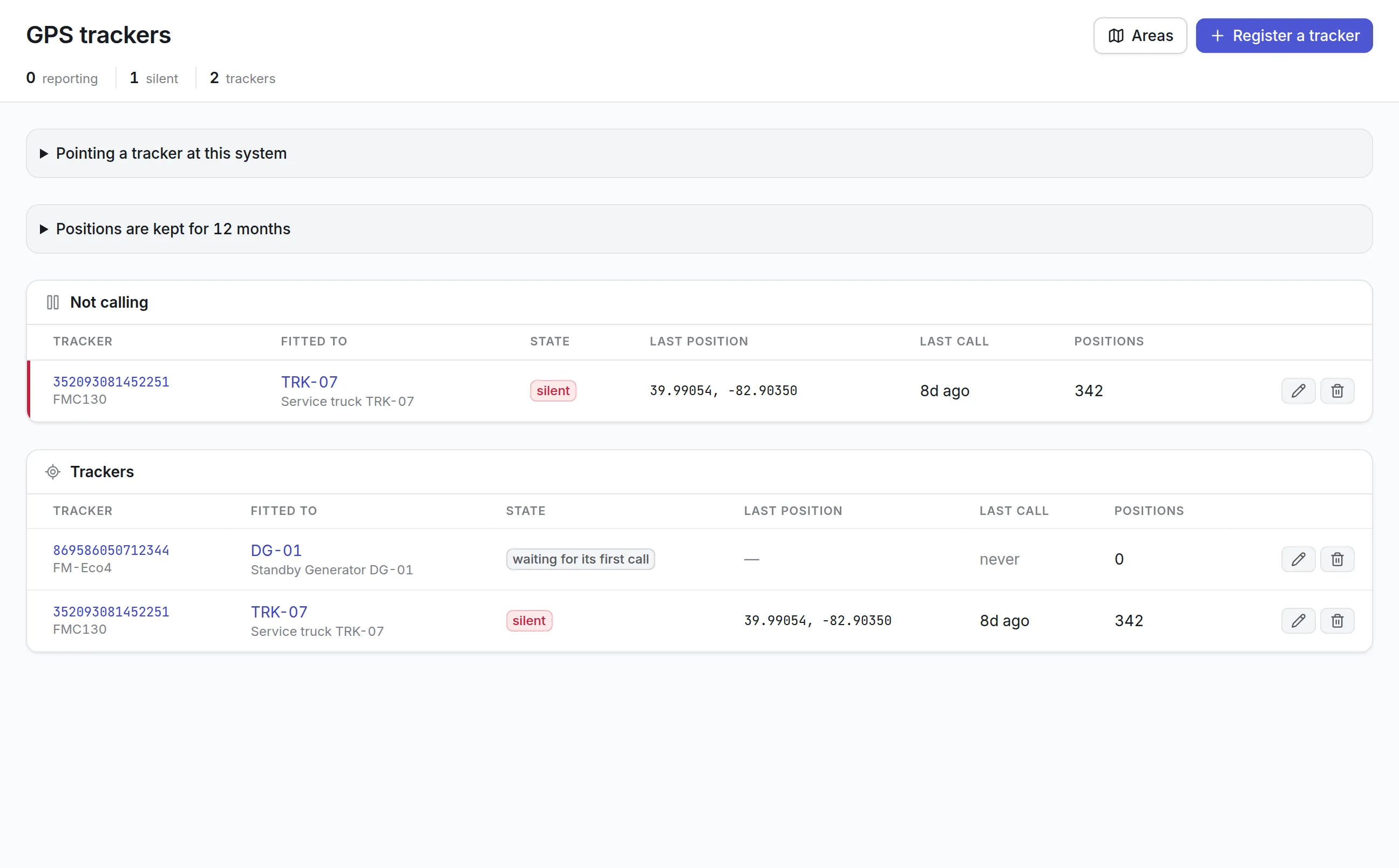
GPS trackers on loaders, trucks and generators report position and trips. Drawn areas around yards and job sites move the asset's location when it arrives.
Service by engine hours
The tracker's engine hours and odometer feed the asset's meters, so a 500-hour service falls due when the machine has actually worked 500 hours.
Tools signed out by name
Every tool has a number, a status and a calibration date. Check-out records who took it, and the register says who has it now.
Kits that travel whole
A kit of assets, tools and parts moves as one. A kit missing a required item cannot be handed to a person.
Transfers with paperwork
Moving a machine to another site changes its site, custodian and status in one step, and produces a handover or gate pass to sign.
Cost by project
Equipment bookings and parts issued from stores can be charged to a project, so each job carries what its equipment cost.
What is construction equipment management software?
Construction equipment management software is a system that records a contractor’s heavy equipment, vehicles and small tools, shows where each one is and who has it, schedules servicing by engine hours or miles, and keeps inspections and repairs on each machine’s record. It answers the questions a yard manager gets every morning: where is it, who has it, and is it safe to send.
Contractors buy it when equipment spreads across too many job sites to keep track of by phone. A loader sits idle on a finished job while another crew rents one. A generator misses its service because nobody wrote down the hours. A torque wrench disappears between two sites and nobody signed for it. Each of these costs money, and each comes from not having one record that follows the machine.
How construction equipment management software works in Asset Infinity
Asset Infinity is general asset and maintenance software, and there is no construction template yet. Its tracking, metering, tool and transfer features fit the way contractors already work. A typical setup runs like this:
Set up the yard and the job sites
Each yard, depot and job site is a site in the asset register, with locations inside it such as a laydown area or a lockup. Machines, vehicles and attachments import from a spreadsheet with their make, model, serial number and purchase cost.
Label everything
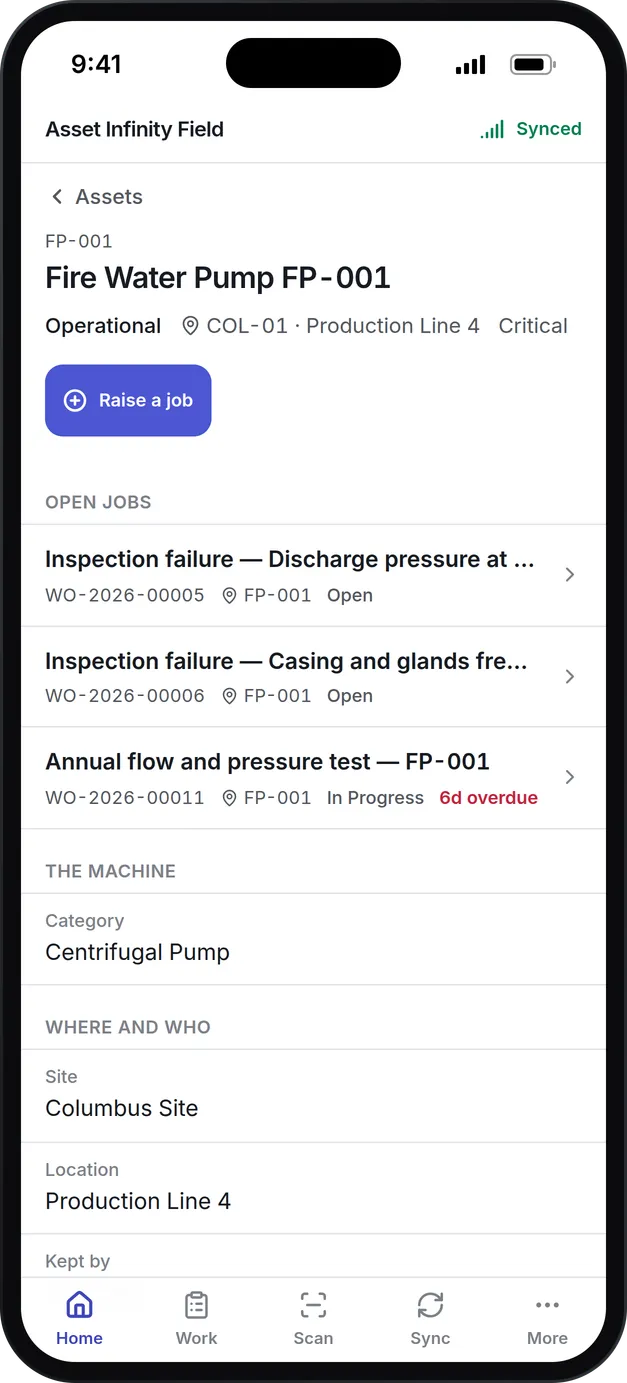
Print QR, barcode or RFID labels so anyone on site can scan a machine or tool with the mobile app and open its record, see its open jobs, or raise a new one.
Fit GPS trackers to the machines that move
A tracker is registered against an asset. Areas drawn on the map around each yard and site move the asset’s location when it arrives, and leaving can notify the site’s supervisors.
Map engine hours to meters
The tracker’s engine hours and odometer feed the asset’s meters once a day, with an offset so the reading matches the hour meter in the cab.
Load the service plans
A 250-hour service, a 500-hour service and an annual inspection each become a plan that falls due by hours, by calendar or by whichever comes first, and raises its own work order with a task list.
Run inspections in the field
Operators and mechanics fill in graded inspection rounds on the phone, and a failed check raises a corrective job against the machine.
Move equipment and charge it to the job
A transfer records the move to another site with a handover or gate pass, and bookings charge the equipment’s time to the project using it.
GPS trackers that turn engine hours into service due
Most GPS tools stop at the dot on the map. For a contractor, the more useful answer is what the hours mean for the machine, which is why trackers in Asset Infinity write their readings into the same meters the service plans run on. GPS asset tracking covers the device setup in detail.
More detail
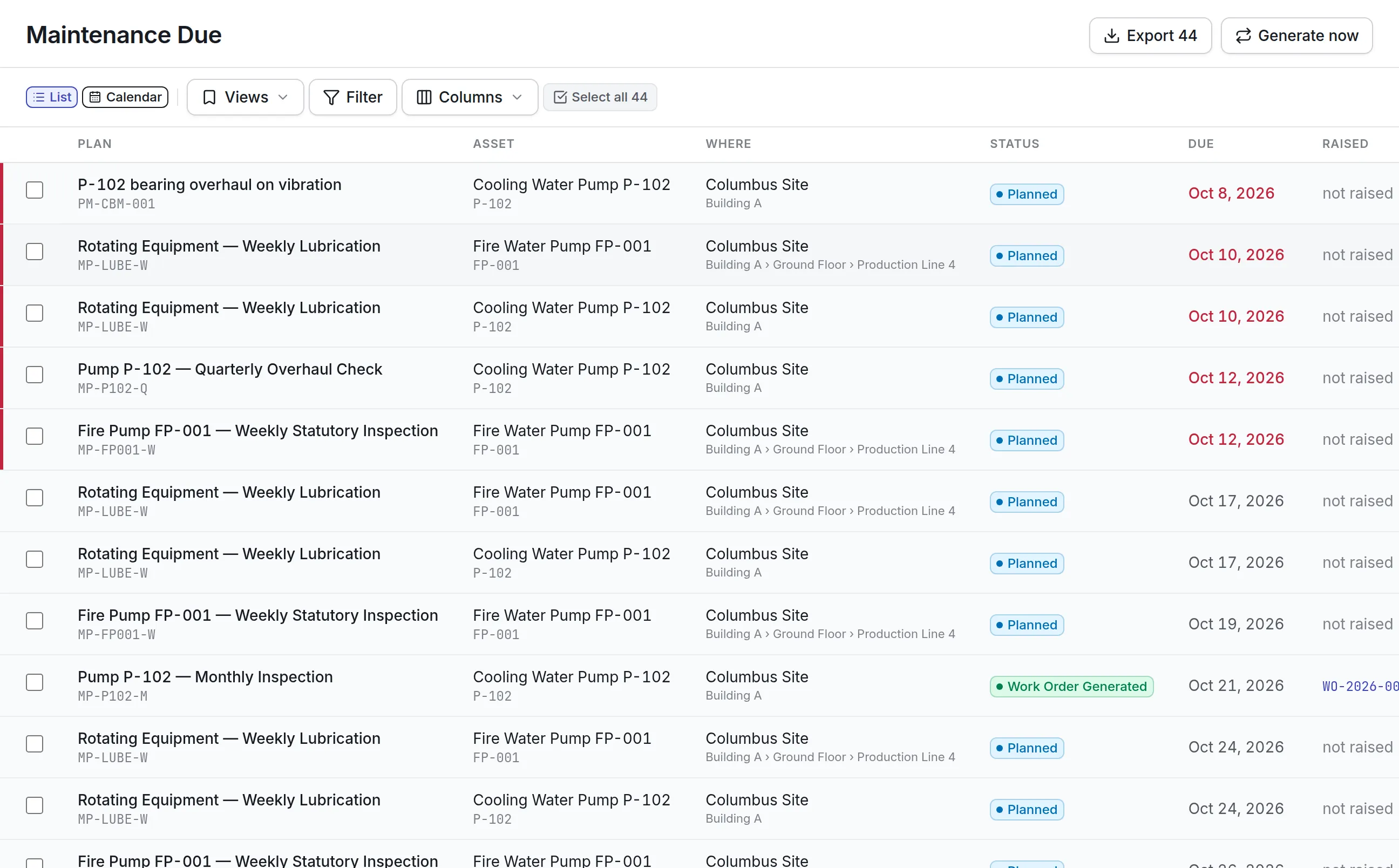
What a yard manager gets from the trackers:
Machines without a tracker still run on hours. A mechanic reads the hour meter on the phone, the reading lands on the asset, and plans fall due from it the same way.
Small tools and kits that come back
Heavy equipment is easy to spot on a site. Small tools are what go missing: a laser level, a torque wrench, a gas detector. Asset Infinity keeps them in their own register, separate from plant but on the same platform, so a tool crib can run without a sign-out sheet.
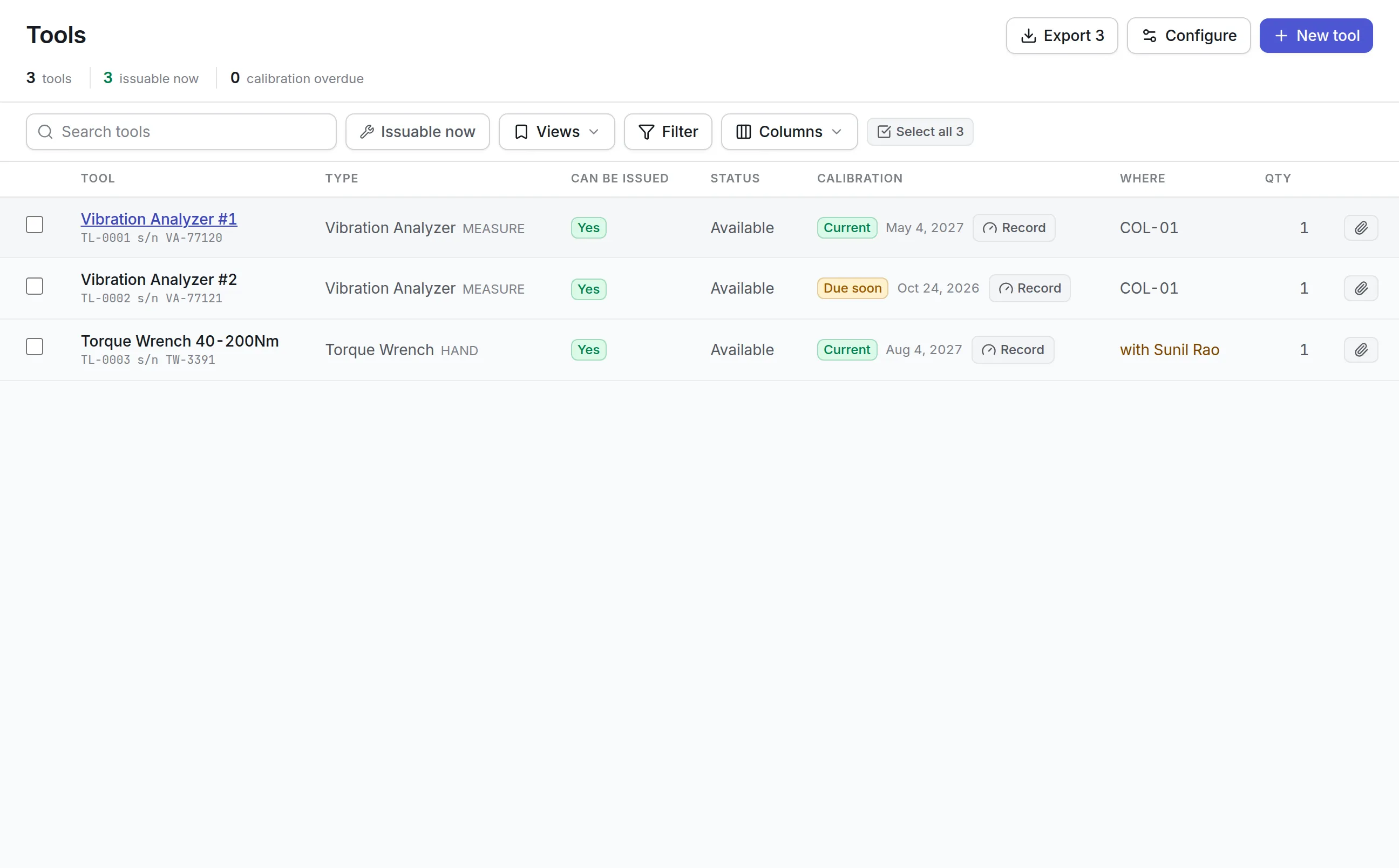
- A number, a type, a serial number, a home location and a cost
- A status (Available, Booked, Checked Out, In Maintenance, Out for Calibration, Lost or Retired) and a condition it came back in
- An optional calibration interval, so a gas detector or a torque wrench that has lapsed cannot be issued
- A Can be issued answer on the register, and when it is no, the reason, such as who has it
More detail
With tool tracking software, each tool has:
Tools go out against a work order or on a quick check-out, and they come back with their condition recorded. When a crew needs a set rather than one tool, equipment kit tracking keeps assets, tools and parts together as one kit built from a template. A kit missing a required item cannot be handed to a person, and moving a kit moves everything in it or nothing.
Equipment cost by project and job site
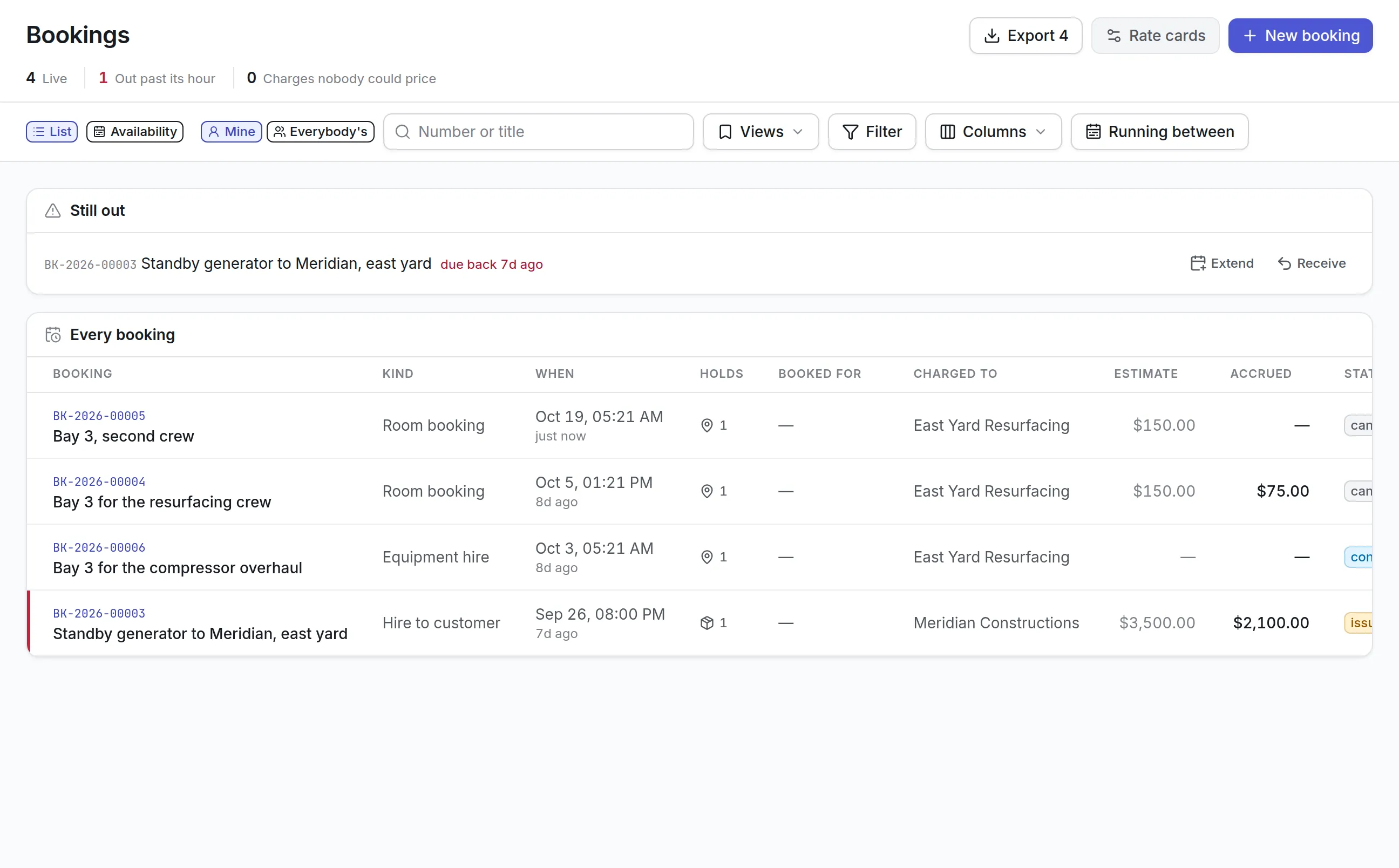
Equipment that sits on a job costs money whether it runs or not. Bookings in Asset Infinity hold a machine, a tool, a crew or a bay for a window, refuse a clash with another booking, and price the time on rate cards.
More detail
Equipment checkout software explains bookings, rate cards and charges in full.
Transfers between sites with a handover on paper
Moving a machine from one job site to the next is one event, but it changes three facts: where the machine is, who is responsible for it, and its status. The Transfer action on an asset changes all three at once and keeps a record of where it came from and who had it before.
What should you look for when choosing construction equipment management software?
Contractors compare on the things that cost them money in the yard. Use this table to compare products.
- GPS trackingMachines are spread over many job sitesIn Asset InfinityTeltonika, Concox, Queclink and Ruptela trackers, trips, replay and areas
- Hours-based servicingEquipment wears by engine hours, not by calendarIn Asset InfinityTracker hours and odometer feed meters; plans fall due by hours, miles, calendar or first of these
- Tool check-outSmall tools walk off between sitesIn Asset InfinityA tools register with check-out, return, condition and who has each tool
- KitsCrews need complete sets, not single itemsIn Asset InfinityKits from templates that cannot be handed out short
- InspectionsEquipment must be checked before useIn Asset InfinityGraded rounds on the phone; a failed check raises a corrective job
- TransfersA move needs a record of who handed what to whomIn Asset InfinityOne Transfer action with handover or gate pass documents
- Cost by projectOwners need to know what each job costsIn Asset InfinityBookings and parts charged to projects and tasks
- Offline mobile appJob sites often have weak signalIn Asset InfinityiOS and Android app that syncs when back in range
- Your wordsCrews say job site, not siteIn Asset InfinityTerms can be renamed on the Localization screen
See it on your own assets, or price it in two minutes.
Construction equipment management software by contractor type
Each contractor starts from the same product and switches on what its work needs.
General contractor
A general contractor with a yard and several live projects starts with the asset register, labels and tool check-out. Every project is set up as a project, and equipment bookings and consumables are charged to it. Transfers record each move between sites, so the yard knows what is out and the project manager knows what it is costing.
Heavy civil and earthworks
Excavators, dozers, loaders and haul trucks carry GPS trackers, and engine hours drive the service plans. Areas drawn around quarries and job sites move each machine’s location when it arrives. Daily pre-use checks run as inspection rounds on the phone, and a failed check raises a repair job before the machine works another shift.
Specialty trades
Electrical, mechanical and plumbing contractors own more small tools than heavy machines. They lean on the tools register, calibration dates for testers and torque tools, and kits for each van or crew. A technician scans a kit’s QR label to open it, and returned items are checked back in one by one.
Equipment owner that rents out
A contractor that also rents machines to others uses bookings with rate cards, per day or per engine hour. Anything still out past its return time leads the list, a deposit can be held against damage, and a damaged return raises a work order for the repair.
What construction equipment management software costs with Asset Infinity
The asset register starts at $130 a month for up to 500 assets, with unlimited users. Maintenance, which covers work orders, preventive plans and inspections, is $25 per user per month. Contractor add-ons are flat per organization:
- Tools and calibration, $75 a month
- Bookings and reservations, $150 a month
- Job routing and dispatch, $150 a month
GPS trackers are priced with your tracker model and come from the Asset Infinity store. Build a quote for your own fleet and yard.
Getting started with one yard
Most contractors start with one yard and the machines that cost the most when they stop:
- Import the equipment list and print labels for machines and tools.
- Fit trackers to the machines that move between sites, and map their engine hours.
- Load the service plans your mechanics already follow, starting with hour-based services.
- Open the tools register and check every tool out by name from day one.
There is no construction template yet, so the trial opens on the general product with your own data imported. If you would rather see it with your equipment first, book a demo.
What teams in this industry use most
Common questions
What is construction equipment management software?
Construction equipment management software keeps a register of a contractor's machines, vehicles and tools, records where each one is and who has it, schedules servicing by hours or miles, and keeps inspection and repair history. It replaces whiteboards and spreadsheets in the yard.
Can servicing be scheduled by engine hours?
Yes. A tracker's engine hours or odometer can feed the asset's meter once a day, or readings can be entered on the phone. A maintenance plan can fall due by hours, miles, calendar or whichever comes first.
Which GPS trackers work with it?
Teltonika trackers work out of the box, along with devices that use the Concox GT06, Queclink and Ruptela protocols and phones running OsmAnd or the Traccar Client app.
Can we track small tools and who has them?
Yes. Tools have their own register with check-out and return, bookings, condition and calibration. The register shows whether each tool can be issued today and, if not, why.
Can equipment costs be charged to a project?
Yes. Bookings priced on rate cards, including per day or per engine hour, can be charged to a project and its tasks, and parts issued from stores can be booked to a project too.
Is there a construction trial with sample data?
Not yet. The trial opens on the general product, and you can import your own equipment list from a spreadsheet. Words like Site can be renamed on the Localization screen to match how your crews talk.
See it with your own assets
A demo walks you through the product with our team. Or start the trial and import your own asset list from a spreadsheet.