






Equipment kit tracking that keeps every set together, from the store to the field and back
Equipment kit tracking for the sets your teams hand out, such as a laptop, an analyzer, a torque wrench and a box of gaskets. The kit moves as one, and anything that does not come back is recorded.
What our equipment kit tracking does for your stores and field teams
Templates for each kind
A template lists what a kit of its kind should hold, such as any laptop, a torque wrench and four gaskets. Templates are versioned, and lines can be optional.
Assets, tools and parts
One kit holds registered assets, tool room tools and stock parts. Each keeps its own record, and each record names the kit it is in.
Never handed out short
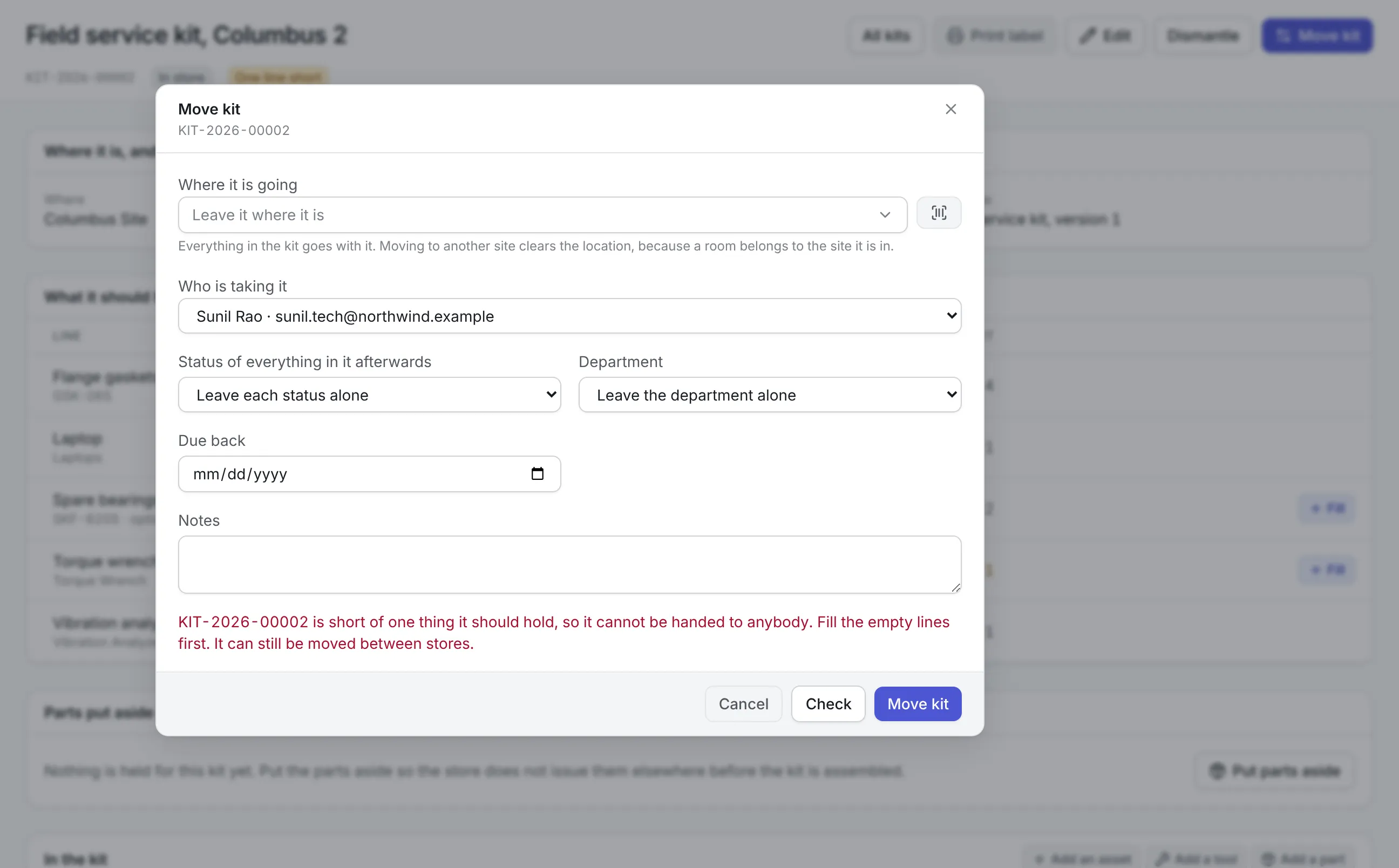
A kit missing a required item cannot be handed to a person. It can still move to the store that has the missing piece.
All or nothing
Moving a kit moves everything in it, or nothing. Check lists every item that would block the move before anyone presses Move.
Checked back in
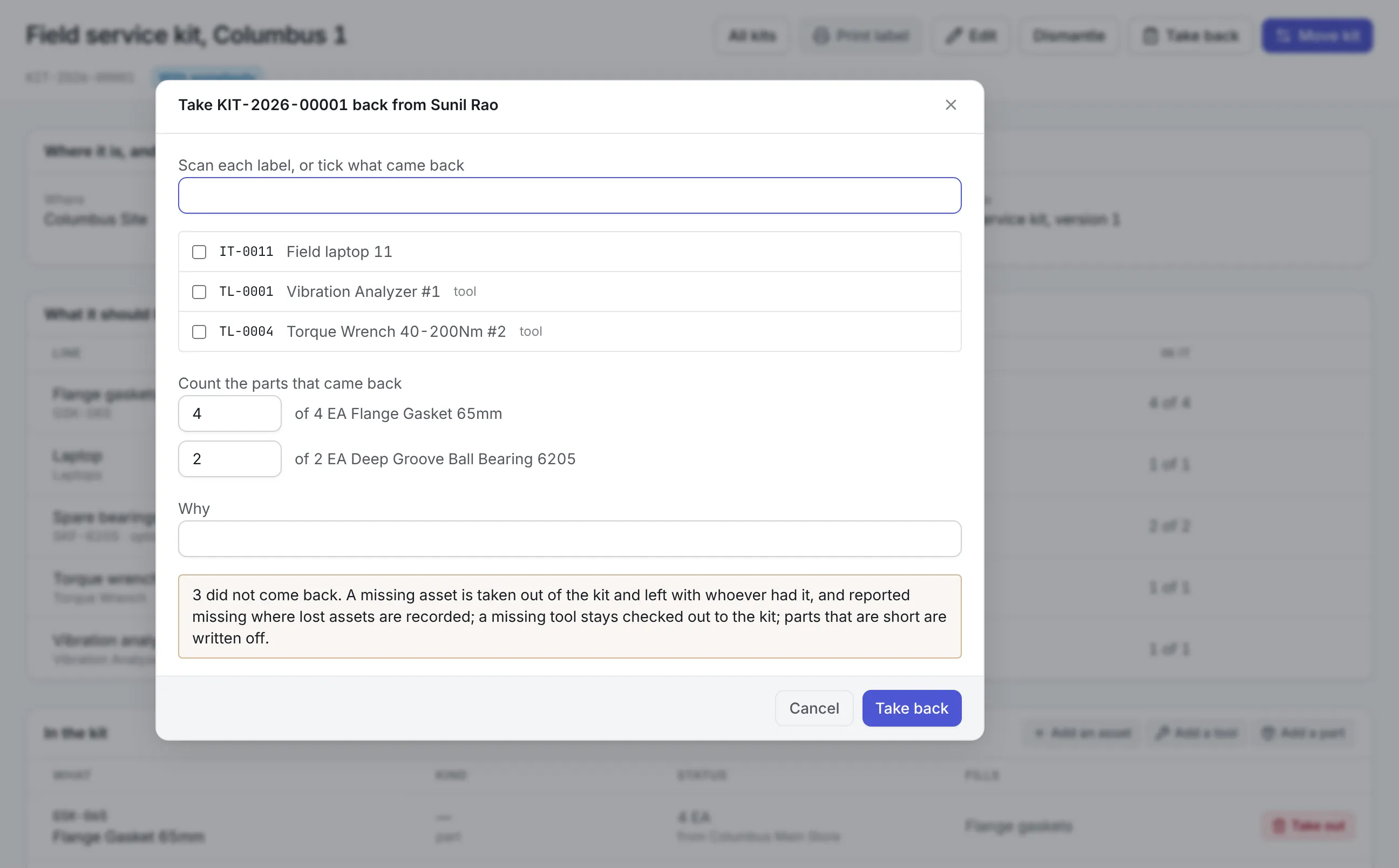
Returned items are scanned or ticked one by one. A missing asset is reported missing, a missing tool stays open in the tool room, and short parts are written off.
A label on the case
Each kit gets a QR label with its number, name and site. Scanning it opens the kit, and on the phone it offers Move this kit.
What is equipment kit tracking?
Equipment kit tracking keeps a set of equipment that is handed out together on one record: what the kit should contain, what it holds now, where it is and who has it. Moving or returning the kit moves or checks in everything in it, so nobody has to remember which laptop went with which analyzer.
Most teams start looking for equipment kit tracking after a field engineer opens a case on site and finds the torque wrench missing. Or a contractor returns a laptop pool one machine short and nobody can say when it went. A spreadsheet of kit contents is wrong the first time someone swaps an item between cases.
How equipment kit tracking works in Asset Infinity
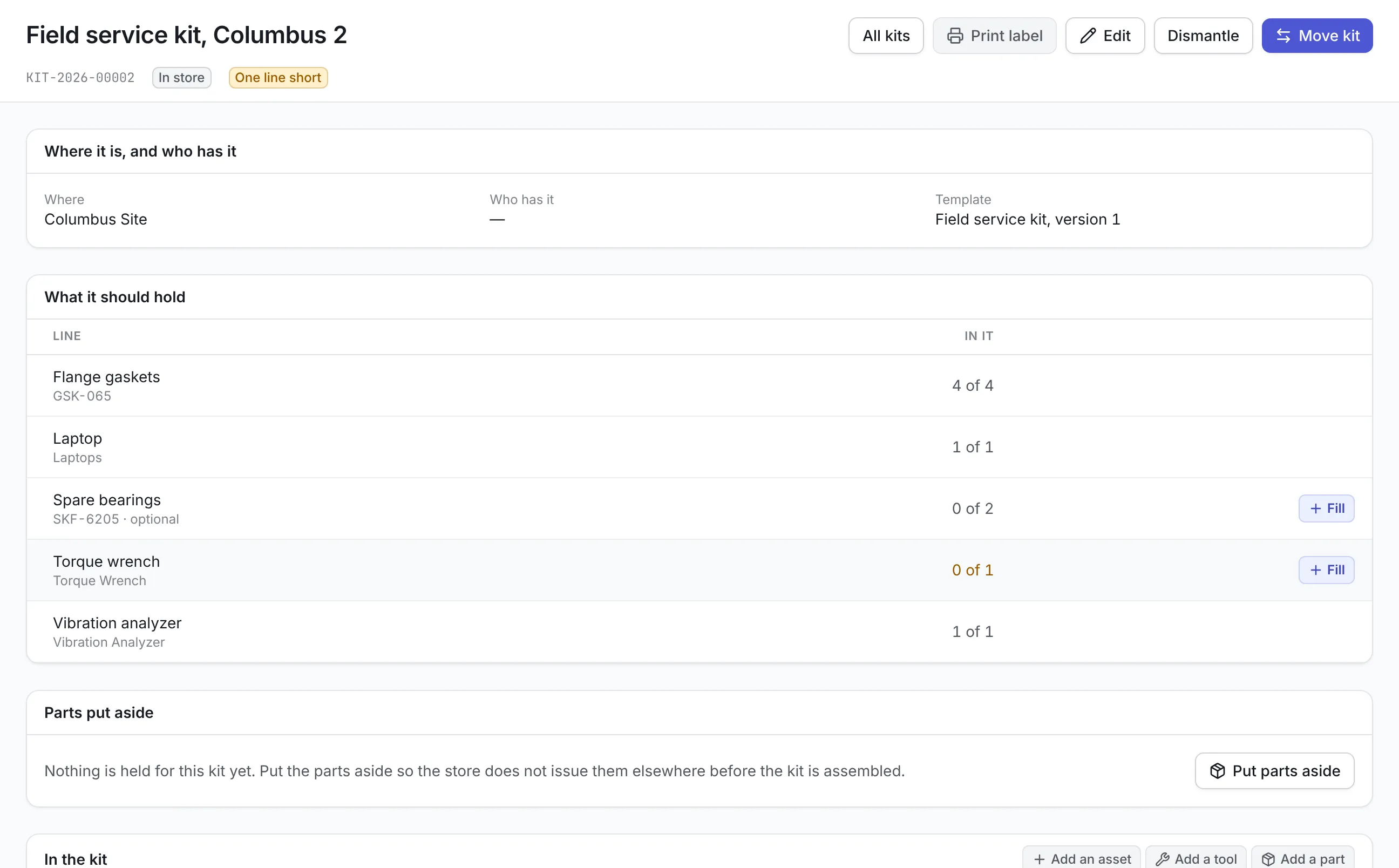
A kit is its own record, separate from the assets, tools and parts in it. Here is a plant that sends technicians out with a field service kit: a laptop, a vibration analyzer, a torque wrench, four flange gaskets and, optionally, two spare bearings.
- Write the template.The template lists what a field service kit holds. A line names a kind of thing: an asset category or model, a tool type, or a part with a quantity. Publish it when it is right, and publish a new version when it changes.
- Create the kit.A new kit starts in store at its site, with a number from your numbering scheme, or the number already painted on the case.
- Put the parts aside.Put parts aside reserves the template’s parts in a store at the kit’s site, so they are not issued to another job before the kit is assembled.
- Fill each line.Fill offers only what can go in. For an asset line that means the right category or model, at the kit’s site and location, held by nobody, in no other kit and not disposed of. Tools and parts follow the same rules.
- Hand it over.Move kit names who is taking it. Check shows whether everything can go, and the kit cannot go to a person while a required line is empty.
- Take it back.The returned items are scanned or ticked, the parts counted, and anything that did not come back is recorded before the kit returns to store.
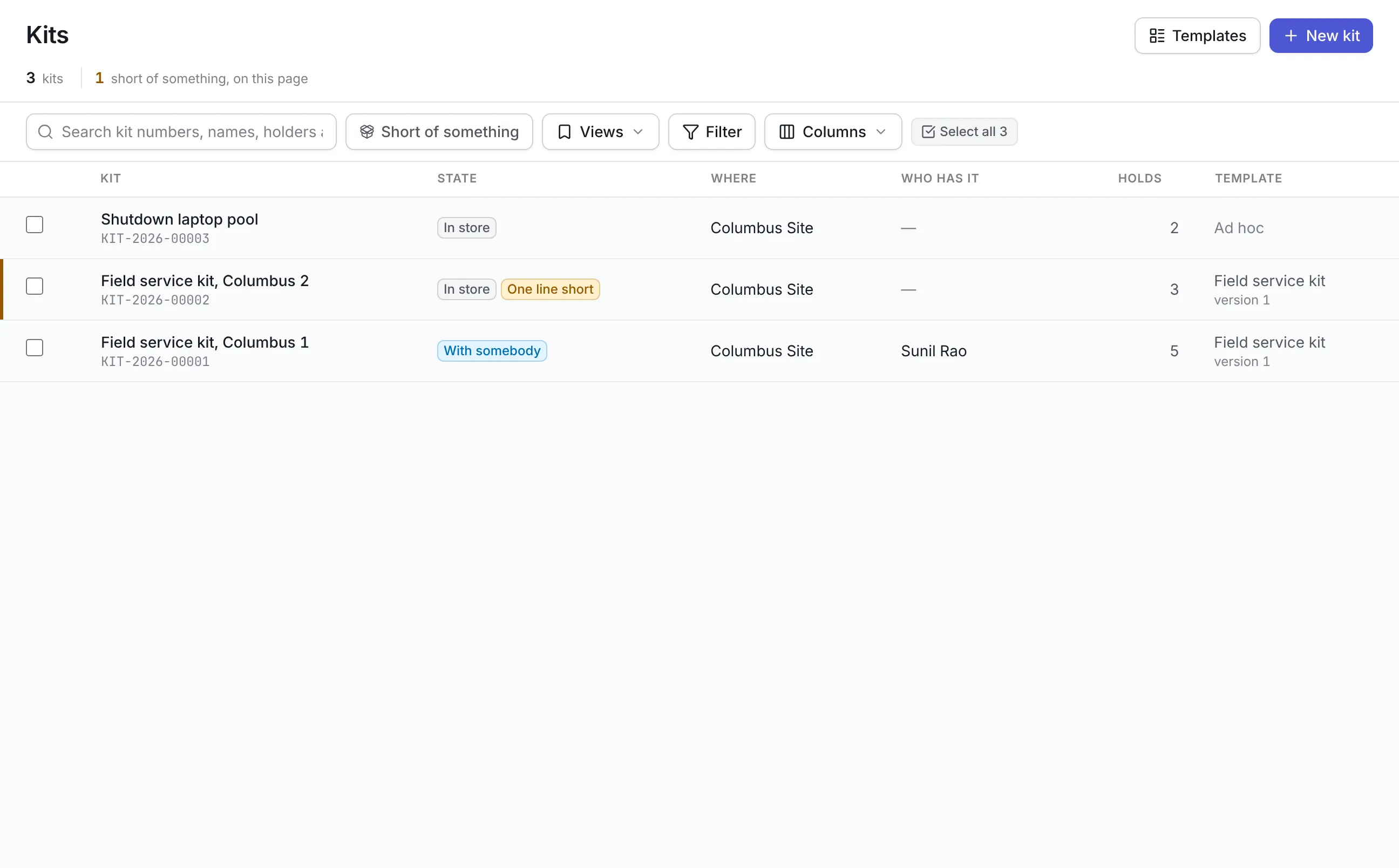
The register shows each kit’s state (in store, with somebody or dismantled), its site, who has it, how many items it holds, its template, and how many lines are short. A Short of something filter lists the kits that need attention.
Assets, tools and parts each keep their own rules
A kit respects how each kind of item is already managed, so the tool room and the storeroom stay in charge of their own stock.
More detail
Kits do not go inside other kits. Where a category is counted, such as forty identical chairs on one asset record, a kit takes a whole line. Split off the number you need first.
Moving a kit as one, with a check first
Moving a kit is a single action that takes everything in it, under one transfer record. There is no way to leave an item behind by accident. Leaving one behind means taking it out of the kit, which is recorded with a reason.
More detail
In the field app, scanning a kit’s label offers Move this kit. It needs a connection because it shows the same check as the web first. The app also stops an offline move of a single asset that belongs to a kit, so the technician learns that in the bay instead of hours later.
Taking a kit back, item by item
A kit that comes back short is what equipment kit tracking exists to catch, and the counter is the place to catch it. Take back starts with nothing ticked.
- An asset that did not come back is taken out of the kit, left with the person who had it, and reported in the missing assets register with the kit named.
- A tool that did not come back stays checked out to the kit. The tool room’s list of what is out shows where it was last.
- A part shortfall is written off against the issue that put it in the kit. It is recorded as a loss and charged to no job.
What should you look for in equipment kit tracking?
| Capability | Why it matters | In Asset Infinity |
|---|---|---|
| Templates by kind | Any laptop of the right model should satisfy the line, not one particular laptop | Lines by asset category or model, tool type, or part and quantity |
| Mixed contents | Real kits hold equipment, instruments and consumables | Assets, tools and parts in one kit, each keeping its own record |
| Completeness | A short kit found on site costs a trip | Required lines checked before any handover |
| All-or-nothing moves | A half-moved kit leaves records that disagree | One move takes everything, with a check first |
| Calibration and condition | An out-of-date instrument gives readings that look good | Tool room checks repeated at every handover |
| Check-in on return | Losses are only caught at the counter | Scan or tick each item, with losses recorded |
| Labels and scanning | Typing kit numbers is slow | A QR label per kit, printed in bulk, opened by scan |
See it on your own assets, or price it in two minutes.
Equipment kit tracking by team
Field service and utilities
Each crew takes a kit with a laptop, a gas detector and a set of fittings. Kits are handed over at the start of a shift and checked back in at the end, with parts written off where they were lost.
Oil and gas site setup
A site-setup kit holds two radios, a first-aid box and a generator. It moves from the main base to a new well pad as one consignment, with a gate pass. See oil and gas asset management.
IT onboarding
IT builds a new-starter kit of a laptop, a monitor and a headset. It is put together ahead of the start date and handed to the person on day one. Save as template captures the first one, so every later kit is built the same way.
A manufacturing tool crib
Torque wrenches and analyzers go out in calibrated sets for a shutdown. A wrench whose calibration lapsed while the kit was in store is refused at handover. See tool tracking software.
What equipment kit tracking costs
Kits come with the asset register, which starts at $130 a month for up to 500 assets with unlimited users. Putting tools in kits uses tools and calibration, an add-on at $75 a month. Putting parts in kits uses parts and stock at $20 per user per month. Build a quote to see your total.
Getting started with kits
Write one template for the kit your teams use most, build two or three kits to it, and print asset tags for each case. Hand them out through the kit’s own Move button for a week. Kits that turn out to differ can be built ad hoc and saved as templates. Day-to-day loans of single items stay with equipment checkout, and stock for kits is planned in parts inventory management.
More in Track
Common questions
What is equipment kit tracking?
Equipment kit tracking records a set of equipment that is issued together as one kit, with what it should contain, what it holds now, where it is and who has it. Moving or returning the kit moves or checks in every item in it.
Can a kit hold tools and spare parts as well as assets?
Yes. A kit can hold registered assets, tools from the tool room and parts issued from stock. Each item keeps its own record and history, and that record shows which kit it is in.
What happens when a kit comes back with something missing?
Take back asks for each item to be scanned or ticked and each part counted. A missing asset is reported in the missing assets register, a missing tool stays checked out to the kit until it turns up, and a part shortfall is written off as a loss.
Can we move one item out of a kit on its own?
No. An item in a kit goes where the kit goes, and moving, splitting or disposing of it alone is refused with the kit's number. Take it out of the kit first, which is recorded.
Do we have to use templates?
No. An ad-hoc kit holds whatever you put in it. Save as template turns it into a draft template by kind, so the next kit can be built the same way.
Can kits be moved from a phone?
Yes. Scanning a kit's label in the iOS and Android field app offers Move this kit. It shows the same check as the web before anything moves, so it needs a connection.
See it with your own assets
A demo run on an example from your industry. Or start the trial and look around on your own.