






A procurement catalog your people shop like a store, at the prices you agreed
A procurement catalog of the parts, services and equipment your organization has agreed to buy. People pick from shelves and check out, and checkout raises a purchase request that is approved and sourced like any other.
What our procurement catalog does for requesters and buyers
Shelves people browse
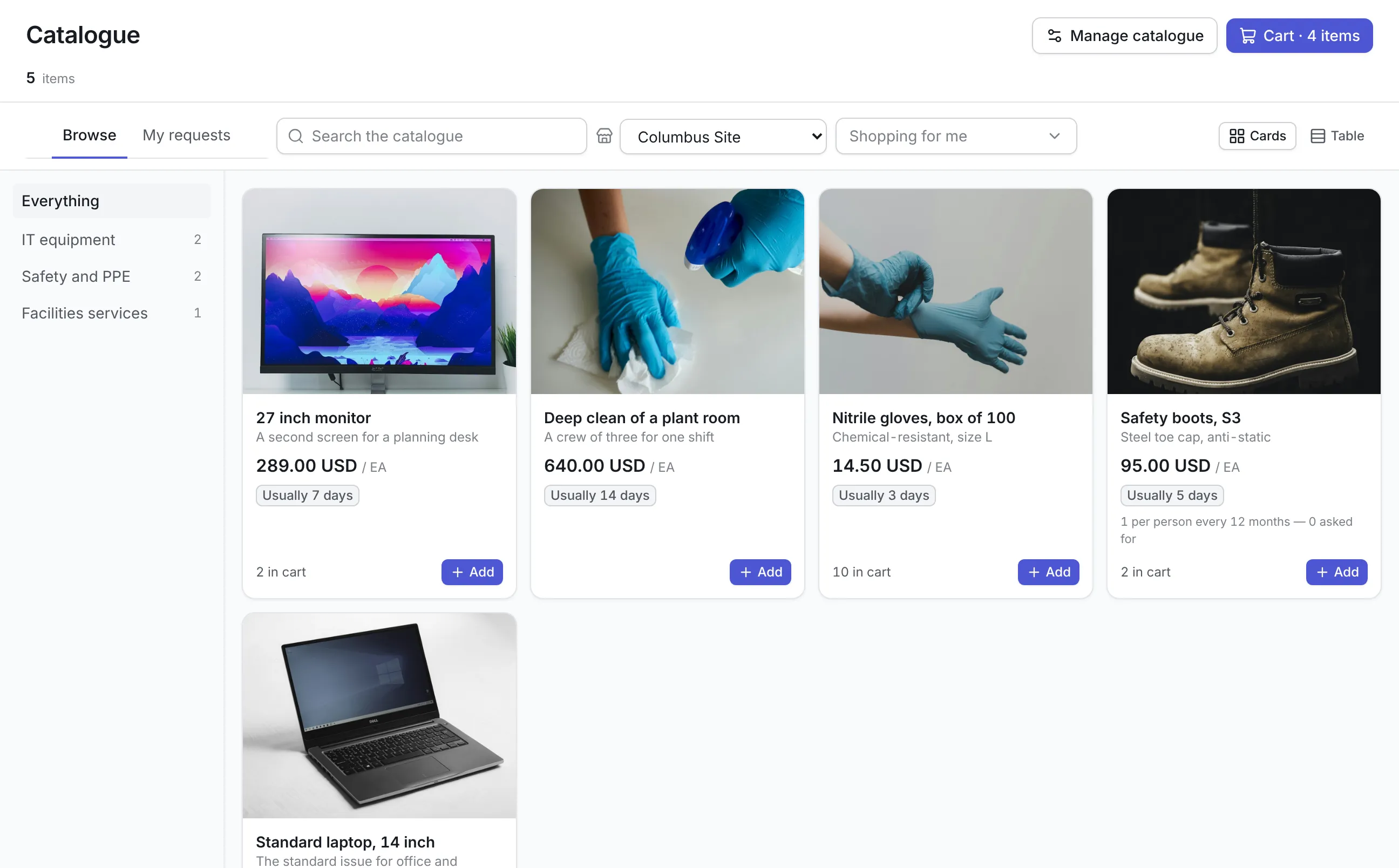
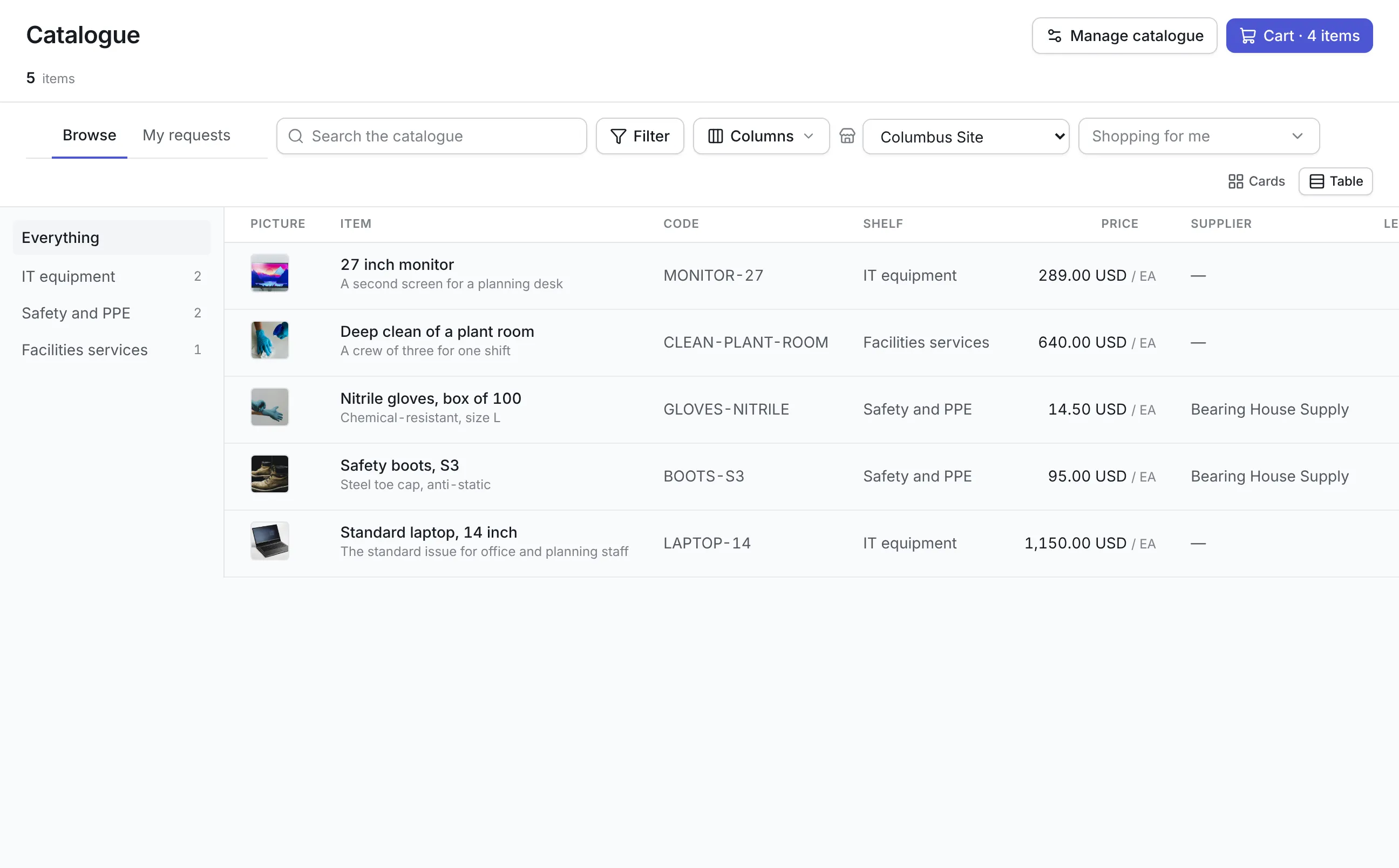
Items sit on shelves such as IT equipment, Safety and PPE or Facilities services, as cards with a picture or as a table, with search across them all.
Agreed prices, locked
The catalog price becomes the request's price, and a requester can change the quantity but not the price or the supplier.
The right items for each person
An item can be offered only at some sites, to some departments or to some roles. It is not offered to anyone else, and the server refuses it if they try.
Allowances that hold
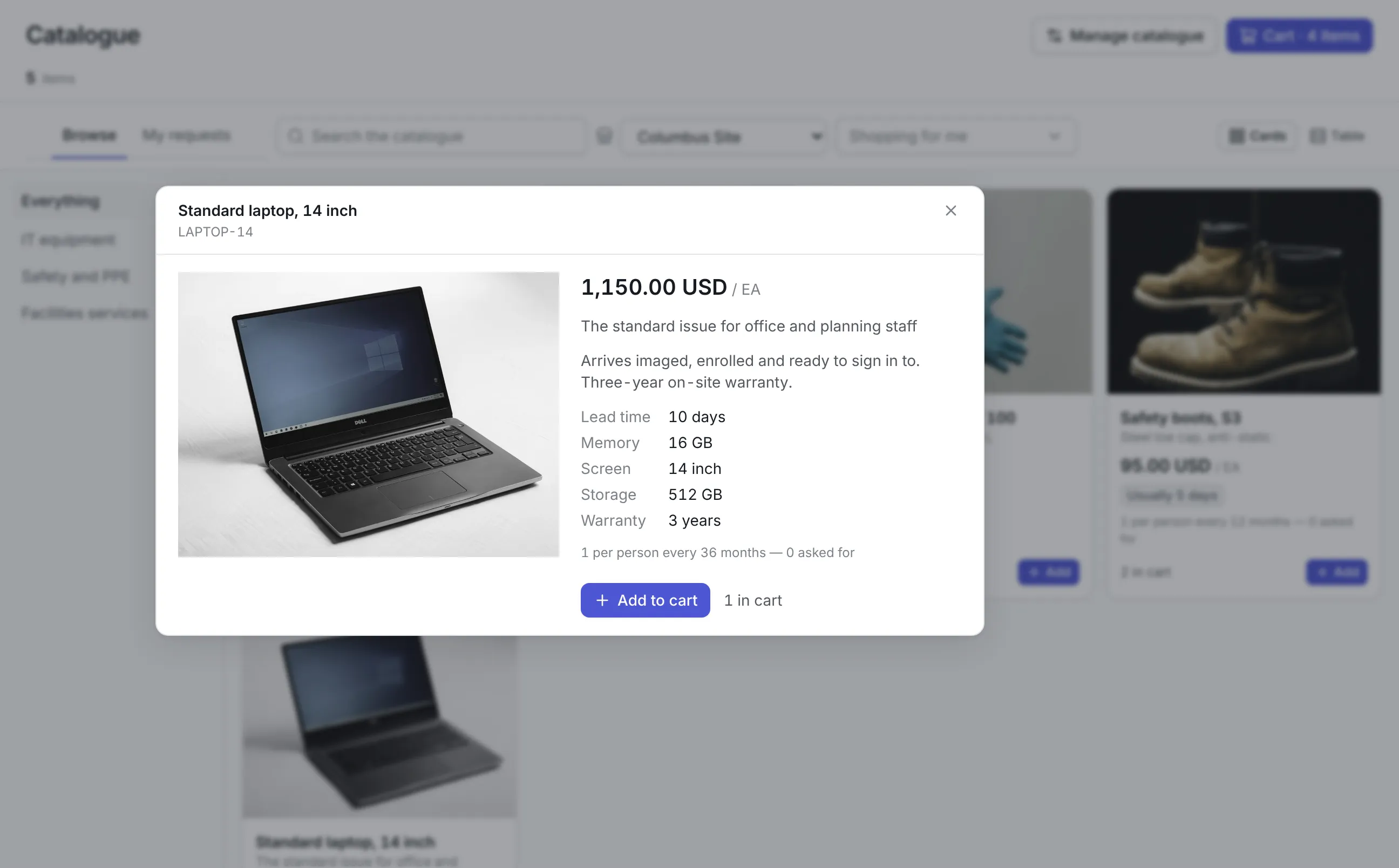
Set a minimum and maximum per request, and an allowance per person over a period, such as one laptop every 36 months.
A cart that follows you
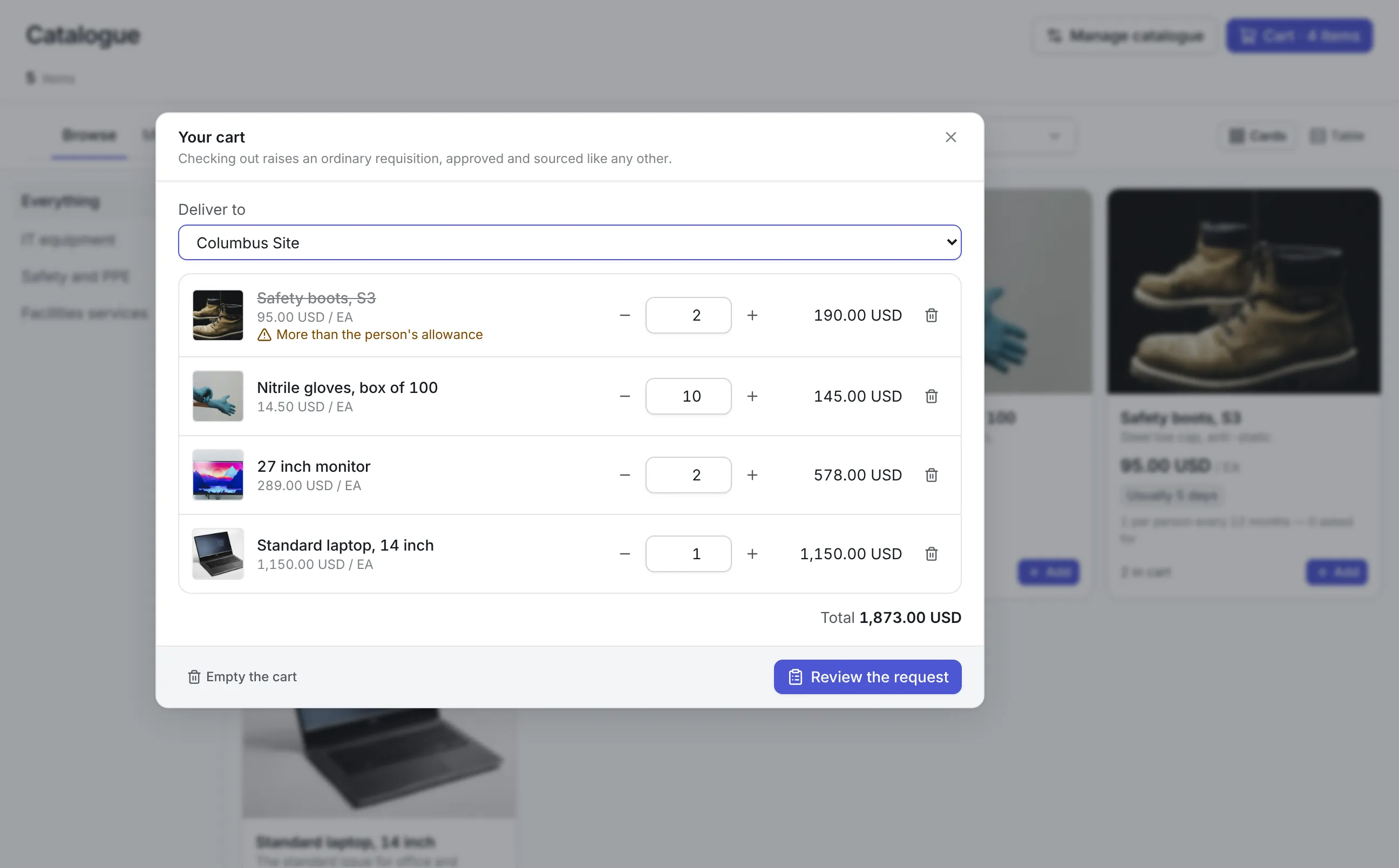
The cart is kept on the server, so a cart filled on a phone can be checked out at a desk. Lines that would be refused are struck out with the reason.
Checkout is a purchase request
Checkout fills in the purchase request form, so approvals, quotes, purchase orders, receiving and budgets work exactly as they do for any request.
What is a procurement catalog?
A procurement catalog is the list of goods and services an organization has agreed to buy, with the price and supplier for each. Employees choose from it the way they would in an online store, instead of describing what they need on a blank request form and leaving purchasing to guess the model.
Teams usually want one when the same requests keep arriving in a dozen different spellings. A standard laptop gets requested as five different models, and safety boots get bought from whoever the requester found first. Purchasing then spends its week rewriting requests before it can source them.
How the procurement catalog works in Asset Infinity
The catalog sits in front of the purchase request you already use. Here is a plant where a supervisor needs a laptop and two monitors for a new planning desk.
- Pick where it is going.Deliver to names the site, because what is offered can depend on it. The choice is remembered on that computer.
- Browse the shelves.The shelf rail on the left narrows the list, and search covers every item. Cards show a picture, a one-line summary, the price per unit and how many days it usually takes. Part items say when a store already holds some.
- Open an item.The detail shows every picture, the description, the specifications, the limits in words and who the item is offered to.
- Add to cart.Add puts in one pack, and the cart button in the header counts what is in it.
- Review the request.The cart opens the purchase request form with the lines filled in. Answer the usual questions (site, location, cost center, the date it is needed and why), add free-text lines for anything that is not in the catalog, and submit.
- Follow it.The My requests tab lists what you raised and what was raised for you, with each request’s status.
Who may order each item, and how many
Restrictions are set per item. An item with none is offered to everyone in the organization.
More detail
A limit is a refusal. There is no approval path that waves it through. A person who really needs a second laptop asks on a free-text line with a justification, and the approver sees it is not a catalog line. The same rules run on the server when a request is submitted, so a hidden item cannot be ordered by other means.
From cart to purchase order
A catalog checkout is a purchase request, so everything after it is the purchase order software you already run.
- The catalog price becomes the line’s estimated cost, which keeps the request’s total accurate. In the form the quantity can change, but the price and supplier cannot, and the line says why.
- A request keeps the price it was raised at. Repricing an item next month does not change a request already approved.
- Approval follows your chain by value, and approvers can decide from the email.
- Sourcing offers a part item from stores first and an asset item from spare assets of its category. Everything else goes to a quote or a purchase order, with the item’s supplier already suggested.
- One request carries one currency. Items priced in another currency go on a request of their own, and the cart says so.
Keeping the procurement catalog up to date
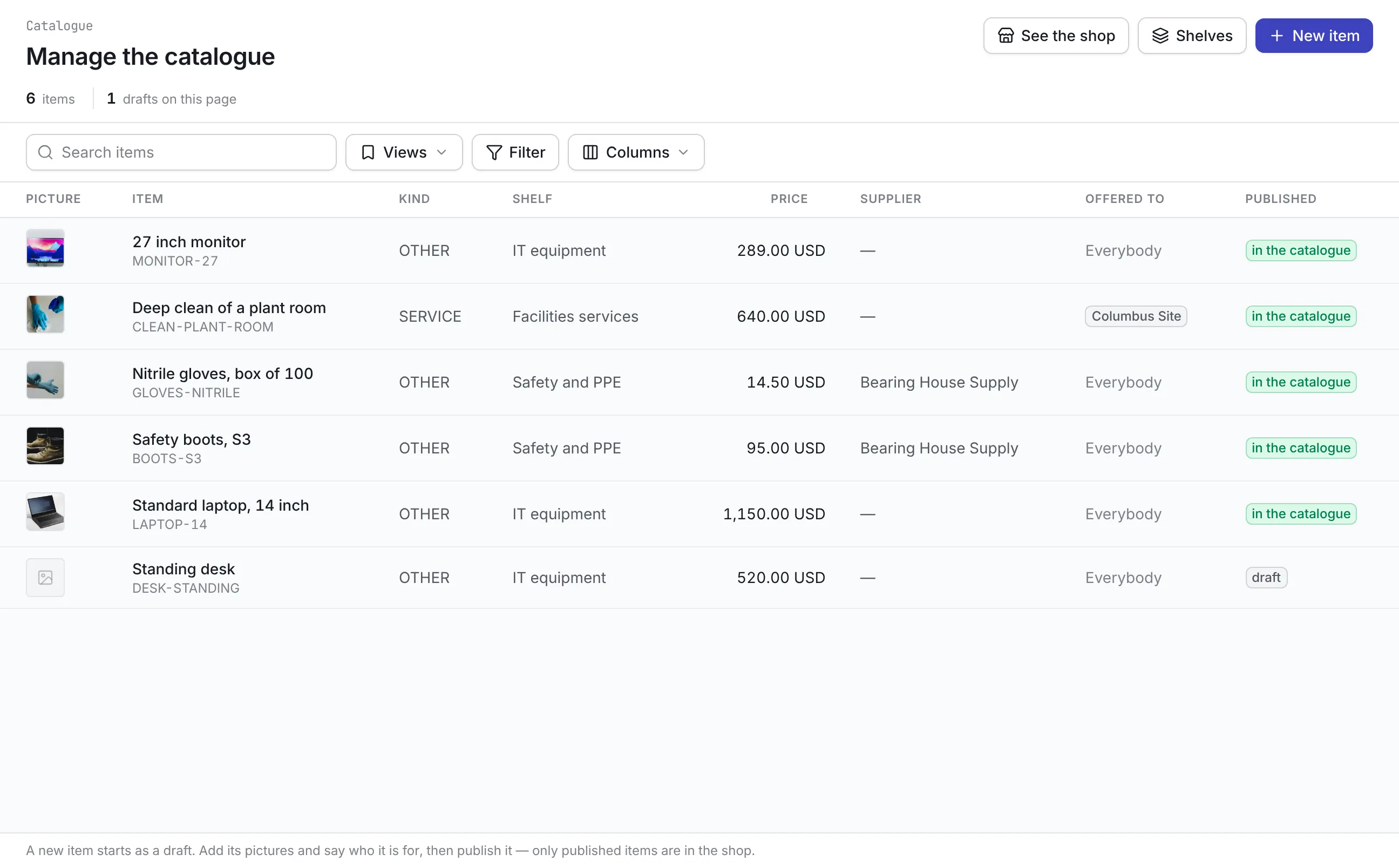
The procurement team maintains the catalog on its own screen. Changes take effect at once and are audited like every other purchasing record.
- A new item starts as a draft. Add its pictures, its price, how long the price is valid, and say who it is for, then publish it.
- Each item can carry a preferred supplier, the contract its price came from, the supplier’s part number, the unit and the pack size.
- Shelves are managed from the same screen, with their own order.
- Unpublishing takes an item out of the store. Requests that already carry it still show it.
What should you look for in a procurement catalog?
| Capability | Why it matters | In Asset Infinity |
|---|---|---|
| Goods and services | Cleaning, courier runs and training are bought as often as boots | Parts, services, assets and other items on the same shelves |
| Agreed prices | A price the requester can edit is only a suggestion | Price and supplier locked on the request line |
| Who may order | Not every item is for every site or team | Items limited by site, department or role, enforced on the server |
| Allowances | Equipment policies need numbers, not reminders | Per-request limits and per-person allowances over a period |
| Ordering for others | Managers equip new starters | Requests on someone’s behalf, with their own permission |
| Normal approvals | A second approval route is a second set of rules to keep | Checkout raises the same purchase request, approved by value |
| Stock awareness | Buying what the storeroom already holds wastes money | An “in stores now” hint, and sourcing from stores first |
See it on your own assets, or price it in two minutes.
Procurement catalog examples by team
A manufacturing plant
Safety and PPE shelves hold boots, gloves and glasses with a yearly allowance per person. Gloves come in packs of 100, and sourcing issues them from the main store before anyone orders more.
A hospital or campus IT team
Standard laptops, monitors and docks are offered by role, with a laptop every three years per person. Managers order a new starter’s equipment before the start date. See asset management for education.
A facilities team across many buildings
Deep cleans, pest-control visits and waste removal sit on a Facilities services shelf at the contracted rate, each offered only at the sites its contract covers. See maintenance contract management.
A group with several countries
Each country’s items are priced in its own currency and offered only at its sites, so the store offers each requester the items for the office they are ordering for.
What the procurement catalog costs
The catalog comes with Purchasing at no extra charge. Purchasing is $25 per user per month and also covers purchase requests, purchase orders, vendors and contracts. Build a quote to see your total.
Getting started with the catalog
Most teams begin with the twenty items they are asked for most often: the standard laptop, safety wear and one or two recurring services. Set up three or four shelves, add pictures and agreed prices, set the allowances your policy already states, and publish. Stock items link to the part in parts inventory management, so the store can answer them first. The rest of procurement software for maintenance carries on unchanged.
More in Supply
Common questions
What is a procurement catalog?
A procurement catalog is a list of the goods and services an organization has agreed to buy, with approved prices and suppliers. Employees choose from it instead of describing what they need on a blank request.
Does a catalog order skip approval?
No. Checking out raises an ordinary purchase request, which goes through the same approval chain, set by value, as any other request.
Can a manager order for a new starter?
Yes, if they have permission to request on someone else's behalf. Who the item is for decides whether it is offered to them, and their allowance is the one counted.
What happens when someone asks for more than their allowance?
The catalog refuses the line and says why. If there is a real need, the person asks on a free-text line with a justification, and the approver can see it is not a catalog line.
Can a catalog item be a service?
Yes. An item can be a part, a service, an asset or anything else, so a quarterly pest-control visit or a deep clean sits on the shelf beside safety boots.
Does it support punch-out to supplier websites?
Not today. Items are the ones your procurement team maintains, each with its own price, supplier and supplier part number.
See it with your own assets
A demo run on an example from your industry. Or start the trial and look around on your own.