

Capital planning software that turns approved requests into budgets you can spend against
Capital planning software where sites build next year's capex plan request by request, checked before anyone sends it. Once approved, the money becomes budget lines, and every order and project charged to them shows what is committed, spent and left.
What our capital planning software does from request to spend
Plans built from requests
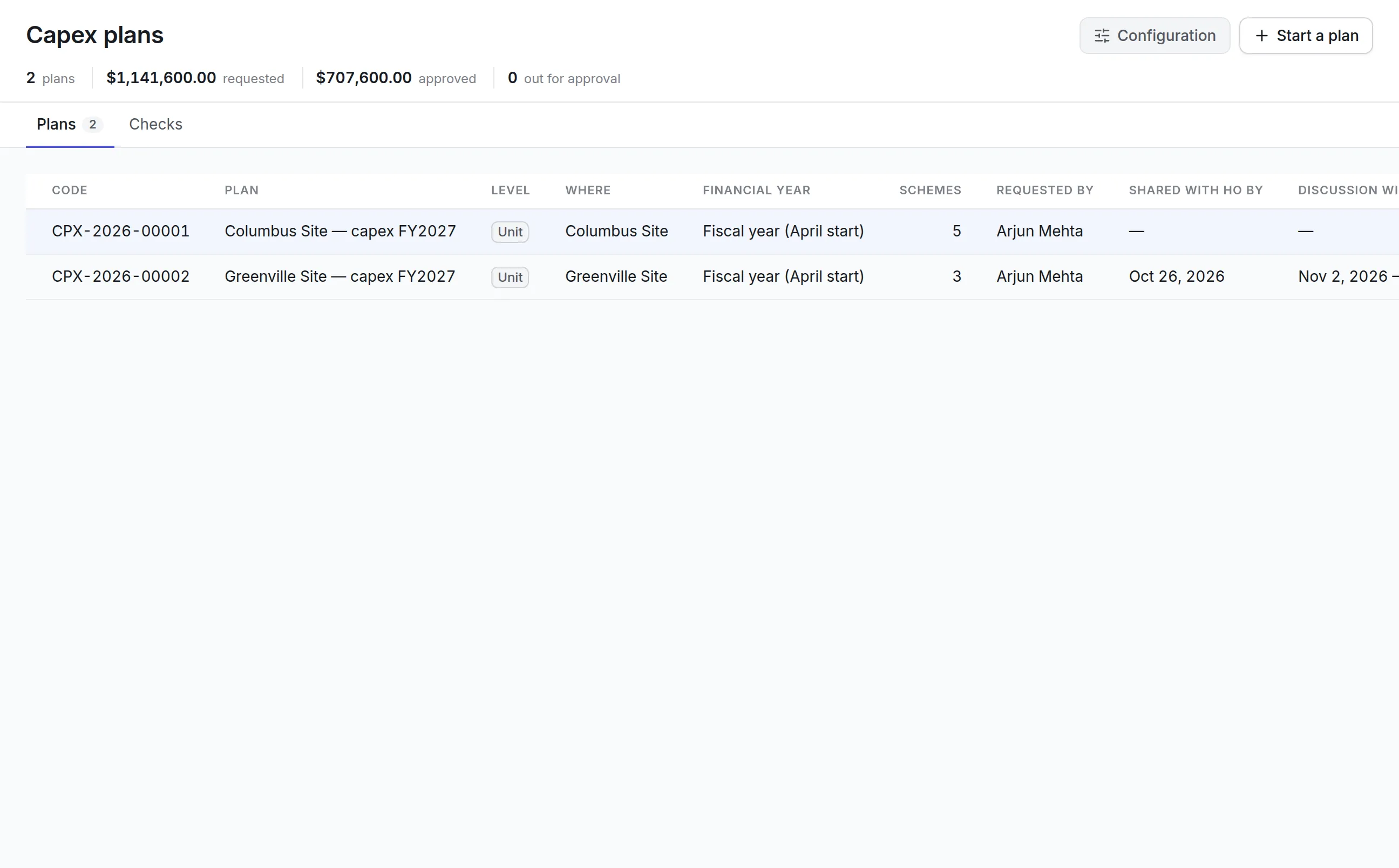
Each site or department lists its requests with value, quantity, nature of investment and justification. Division plans consolidate the unit plans beneath them.
Phased by period
Spend is phased across the plan year's periods and up to four years beyond, so the cash flow is part of the request.
Checked before it is sent
Blocking checks run while the plan is still a draft, so a plan that would be refused says so before the deadline day. A plan that passes every check says that too.
Approval with a calendar
Set the dates proposals are shared with head office, discussed and shortlisted, and route each plan through its approvers. A reviewer can approve a smaller amount than was asked.
Budgets that hold
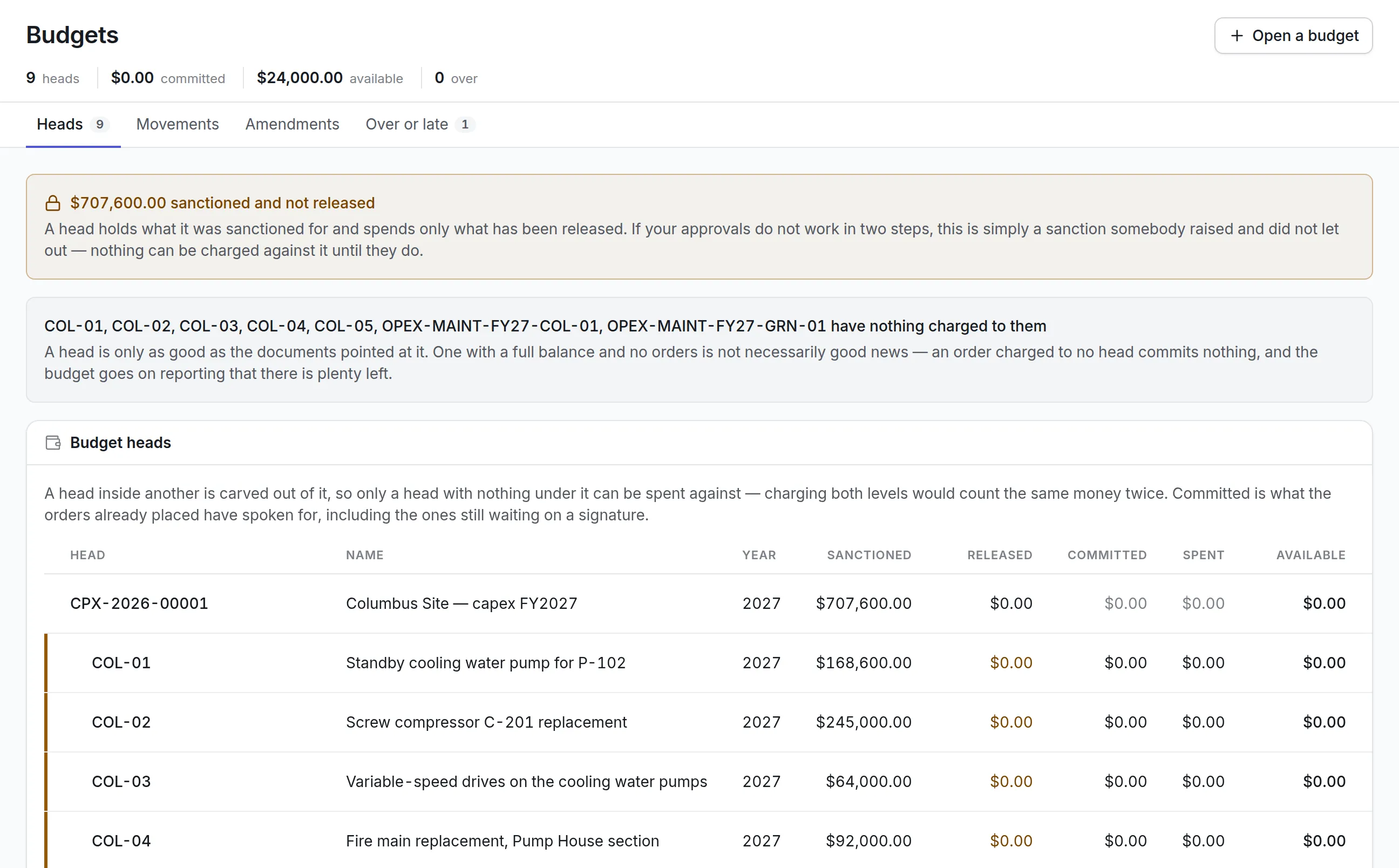
Approved requests become budget lines. Money is approved, then released, and orders charged to a budget line commit it before it is spent.
Changes on the record
Increases, decreases and transfers between budget lines are documents with their own approval. An overrun is approved before it is carried out.
What is capital planning software?
Capital planning software collects the investments an organization wants to make in the coming fiscal year, prices and phases them, routes them for approval and then tracks what was approved against what is actually spent. Maintenance and finance teams use capital planning software to replace the spreadsheet round that ends the day the plan is signed.
The usual round runs on workbooks emailed between sites and head office. Versions multiply, a request with no cash flow behind it is found on the deadline day, and once approval comes nobody can tell whether purchase orders are being charged to the money that was granted.
How capital planning works in Asset Infinity
Each department or site builds a unit plan for the coming fiscal year, a division consolidates the approved unit plans beneath it, and approvers decide request by request. What is approved is opened as budget lines that orders and projects are charged against.
- Start the plan with its calendar.Name the plan, the level (unit or division), the site, the fiscal calendar and the year. Set the dates proposals go to head office, the discussion window and when the shortlist comes back. Starting the plan mails that timeline to the roles you choose, with the supporting files attached.
- Add requests.Each request records what is wanted, the specification, quantity, the fresh money asked for this year, any approved carryover, priority, nature of investment, budget category, project coordinator, location, cost center and asset class. A justification is written in a full document editor with tables and pictures.
- Phase the spend.A grid for cash flow, capitalization, book depreciation and tax depreciation, month by month for the plan year and then the next four years.
- Let the checks run.Blocking checks refuse a request with a value and no cash flow, or one in another currency. Warnings flag a request with no category or a carry forward that points at nothing.
- Submit and approve.Approvers decide each request as a line and can approve less than was asked. Requested and approved stay separate figures everywhere.
- Open the money.Open budget lines on the approved plan, and each request shows the budget line it can be charged to.
Categories, windows and spreadsheets
A request’s category is worked out, not chosen. It is the request value divided by its quantity, read against value bands that finance sets per division, which decides the approval chain it goes to. Only an approver can mark a request Flexible, and that mark is recorded with who and when.
More detail
Planning rounds have rules your finance team sets once:
Budgets that hold orders to the money released
Budgets are a tree of budget lines for a fiscal year, each either capital or operating spend, and each scoped to a site and cost center if you need it. Every budget line shows five figures: approved, released, committed, spent and available. Approved money is released in a deliberate second step, so the controller decides when it can be spent.
More detail
A purchase order charged to a budget line commits its value when it is submitted for approval, so nobody else can spend the same money while it waits for a signature. Capital projects funded from a budget line add each cost as spend, and when a project is commissioned it becomes assets in your fixed asset management software. A budget line can be set to block, warn or report only, and the register flags budget lines that nothing has been charged to, because an order charged to no budget line leaves the budget looking healthier than it is.
Changes are documents with reasons. An amendment moves money between budget lines, increases a budget line, surrenders part of one or replaces one created in error, and waits for its own approval where a chain is configured. Budget lines spent past their release and projects past their budget or commissioning date are listed for an overrun request.
What should you look for when choosing capital planning software?
| Capability | Why it matters | In Asset Infinity |
|---|---|---|
| Unit and division plans | Head office needs one view of many sites | Division plans consolidate approved unit plans |
| Phasing by period | Approval without cash flow is a promise without a date | Monthly grid plus four further years |
| Checks before submission | Errors found on the deadline day cost a cycle | Blocking checks and warnings on the draft |
| Approval per request | Plans are rarely approved whole | Line-by-line decisions with cut amounts |
| Spreadsheet in and out | Sites already work in Excel | Template download and checked upload |
| Plan to budget in one step | A signed plan with no budget is not funded | Open budget lines from approved requests |
| Commitments at submission | Spend is found too late at month end | Orders reserve money when submitted |
| Audited changes | Moving money should leave a trail | Amendments and overrun requests with reasons |
See it on your own assets, or price it in two minutes.
Capital planning software by industry
Manufacturing
Each plant submits a unit plan for line upgrades, compressors and drives, and the division consolidates them. Orders for approved requests are charged to their budget lines through your purchase order software. See maintenance software for manufacturing.
Water and wastewater utilities
Pump station and treatment upgrades are phased over several years so the cash flow sits beside the request. Capital and operating budget lines are kept apart, and finance releases money in stages. More on water utility maintenance software.
Facilities and real estate teams
Building systems that are reaching end of life, such as chillers, roofs and elevators, become requests with a justification, quotes and photographs attached. Each request names the building or floor it equips. Contractor spend for routine work is forecast separately in maintenance contract management software, so the capital plan stays about investment.
Your first capital planning round
- Set up the fiscal calendar.Every plan and budget line is counted on one, which also fixes the currency.
- Agree the value bands.Finance sets which value per unit puts a request in each category, per division where the ladders differ.
- Open a planning window.Give units the days they may enter plans, and set the reminders.
- Start the unit plans.Sites add requests in the product or upload last year’s workbook against the template.
- Approve and open budget lines.Approvers decide each request, and finance opens budget lines from what was approved and releases the money.
The capital planning software then shows every order and project against the money granted for the rest of the year.
Capital planning software pricing
Asset Infinity starts with the asset register at $130 a month for up to 500 assets, with unlimited users. Capital planning is a $200 monthly add-on, and budgets, which turn approved requests into budget lines you spend against, are $150 a month. Both are flat prices for the whole organization. Build a quote, and see the figures together in your maintenance reporting.
More in Account
Guides on this topic
Common questions
What is capital planning software?
Capital planning software collects, prices and approves the investments an organization plans to make, usually for the coming fiscal year. It helps compare requests, phase the spending and track what was approved against what is spent.
What is the difference between capex planning and budgeting?
Capex planning decides which investments get money and when it will be spent. Budgeting holds the approved money and tracks what orders and projects commit and spend against it. In Asset Infinity an approved plan opens budget lines, so one leads into the other.
Can a budget stop an order that would overspend it?
Yes. Each budget line can be set to warn or to block. A budget line set to block refuses a charge larger than what it has left, and one set to warn accepts it and shows the overspend.
How do approved capex plans become budgets?
Each approved request becomes a budget line under the plan. The register flags approved plans that have no budget lines yet, so a signed plan does not sit with nothing to charge against.
Can requests carry over into next year?
Yes. An approved plan can be carried forward to next year's plan, and what is left of each request becomes its approved carryover amount, with no fresh money until it is approved again.
Can we build a capex plan from a spreadsheet?
Yes. Download a template with your plan's own columns, fill in one row per request and upload it. The file is checked row by row and written in one go only when every row passes.
See it with your own assets
A demo run on an example from your industry. Or start the trial and look around on your own.