






Restaurant maintenance software that keeps the cold room cold and the line cooking
Our restaurant maintenance software puts every walk-in, fryer and espresso machine on a schedule and turns a warm cooler on the opening check into a job with a clock running. Every location reports problems into one queue.
- FDA Food Code (cold and hot holding temperatures)
- NFPA 96 (commercial kitchen ventilation and hood cleaning)
- State and local health department inspections
What our restaurant maintenance software does for kitchens and outlets
Refrigeration on a schedule
Walk-in chillers, freezers, reach-ins and ice machines get a quarterly service with coil cleaning, gasket checks and a pull-down temperature reading against its range.
Cold-holding logs that act
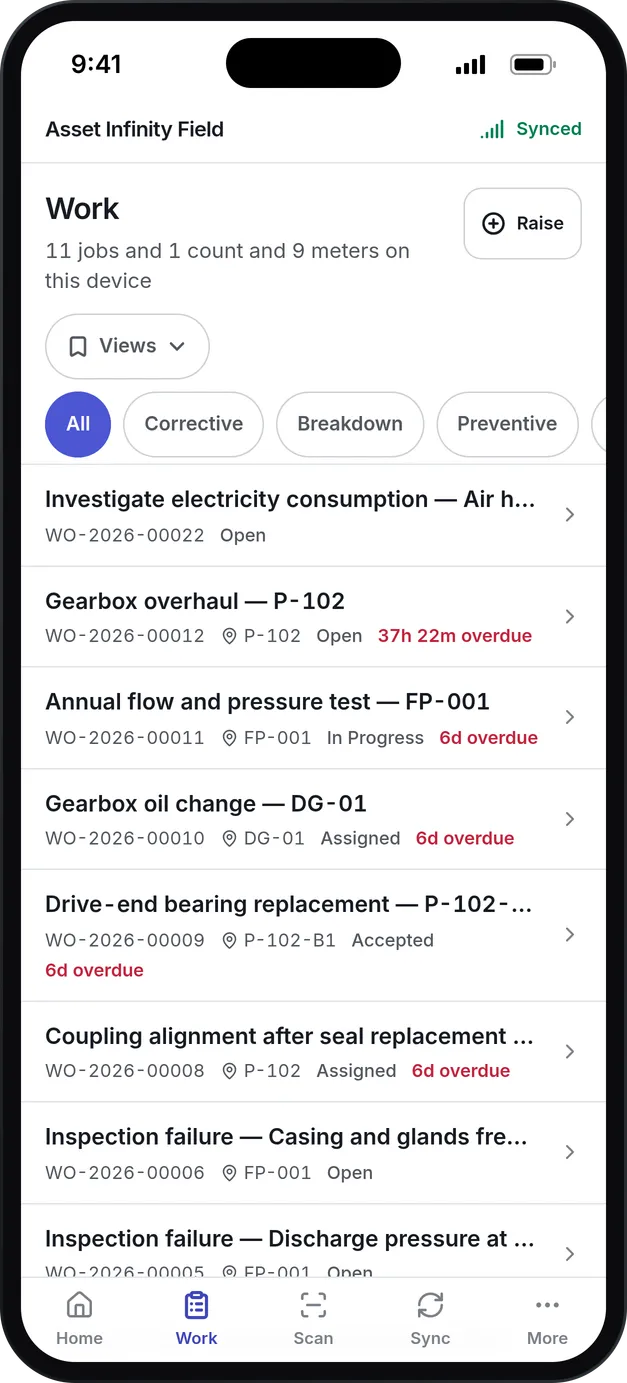
Twice-daily temperature logs and opening checks run on the phone. A critical item that fails raises a corrective work order on that unit.
Sensors on the cold room
Temperature sensors report against limits you set, and a breach opens an alert before the morning shift finds warm stock.
Records for the inspector
Food-safety audits, hood-cleaning visits and service records are kept with who did them and when, ready to show at a health inspection.
Every location in one queue
Each restaurant or café is its own location. Staff report a fault from the web or by email, and the request lands in one queue for the facilities team.
Contractors held to time
Refrigeration, coffee equipment and duct-cleaning agreements record their response times, so a contractor who misses one shows up on the job.
What is restaurant maintenance software?
Restaurant maintenance software is a system a facilities or operations team uses to record every walk-in, fryer, oven, coffee machine and air conditioner across its restaurants, cafés and bars, schedule the preventive maintenance each one needs, take repair requests from kitchen and front of house staff, and keep temperature logs and food-safety records ready for an inspector.
Food and beverage operators buy it because equipment failures cost them twice. When the walk-in chiller warms up overnight, the stock goes in the bin and the morning prep stops. When the espresso machine fails at 8 a.m., the line walks to the café next door. A schedule that catches the worn gasket, and a record that shows who checked the cooler, cost far less than either.
How restaurant maintenance software works in Asset Infinity
Each restaurant or café is a site, which the food and beverage trial calls an outlet. Inside it are the places your team already names: front of house with the dining room, counter and bar; the kitchen with the hot line, prep area, pastry section and wash-up; the store room and cold room corridor; the service yard; and the roof where the extract fan sits.
Here is how a warm cooler becomes a closed job:
The opening check finds it
The first shift runs the morning opening checklist on the phone. The walk-in chiller display reads outside its range, and that item is marked critical.
A work order raises itself
Because the critical item failed, a corrective work order is raised on the walk-in chiller, with the inspection it came from recorded on the job.
The clock starts
A refrigeration failure carries its own response and resolution targets. With escalations on, a job that runs late climbs a ladder and tells the people you choose.
The right person goes
The job is assigned to a technician or to the refrigeration contractor. On the dispatch board, dropping a job onto a technician shows the distance, both SLA promises, skills, parts and workload before you confirm.
The fix is recorded
The technician records the cause, the parts used and the time in the mobile app, which works in a cold room with no signal and syncs later.
The history is there next time
The chiller’s record shows the excursion, the repair and the quarterly services before it, so a second failure is easy to compare with the first.
Requests from staff run the same way. Someone at the counter reports that soft drinks are pouring flat, picks the bar equipment category, and the request lands in the facilities team’s queue to be triaged into a work order. Maintenance request software covers request intake in detail.
Kitchen and refrigeration equipment on a planned schedule
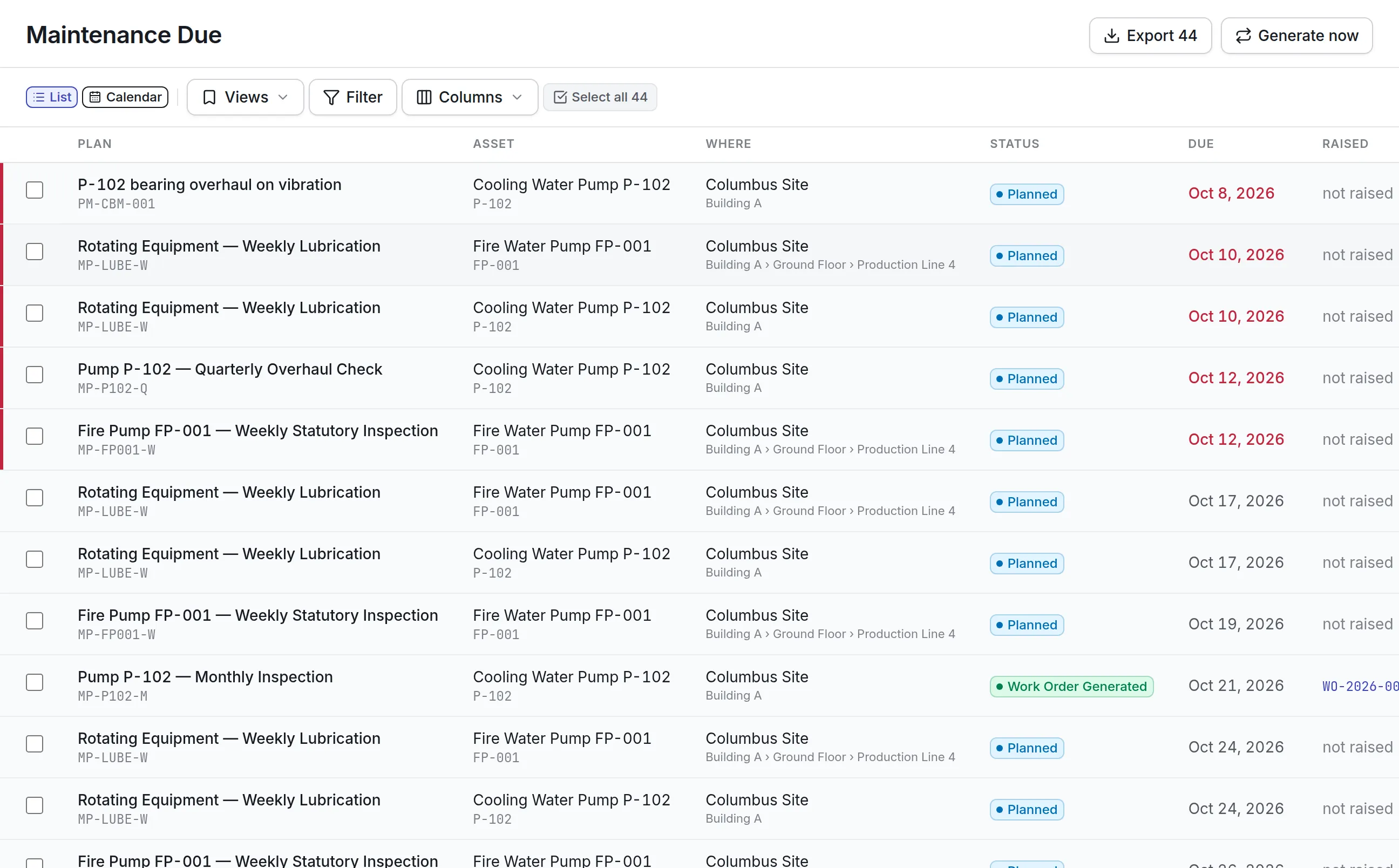
A commercial kitchen runs on a small number of machines that cannot be down at service time. Each one gets a plan that falls due by calendar or by meter readings, and each plan carries a checklist so the job is done the same way at every location.
More detail
The food and beverage trial loads these plans with their task lists:
A reading outside its range on any of these steps is visible on the job. Plans can also come due on meter readings such as compressor run hours, dishwasher cycles or shots pulled on the espresso machine. Preventive maintenance software explains calendar and meter triggers.
Cold-holding temperature logs and sensors
Cold holding is the line an inspector checks first. In Asset Infinity it is recorded two ways, and most operators use both.
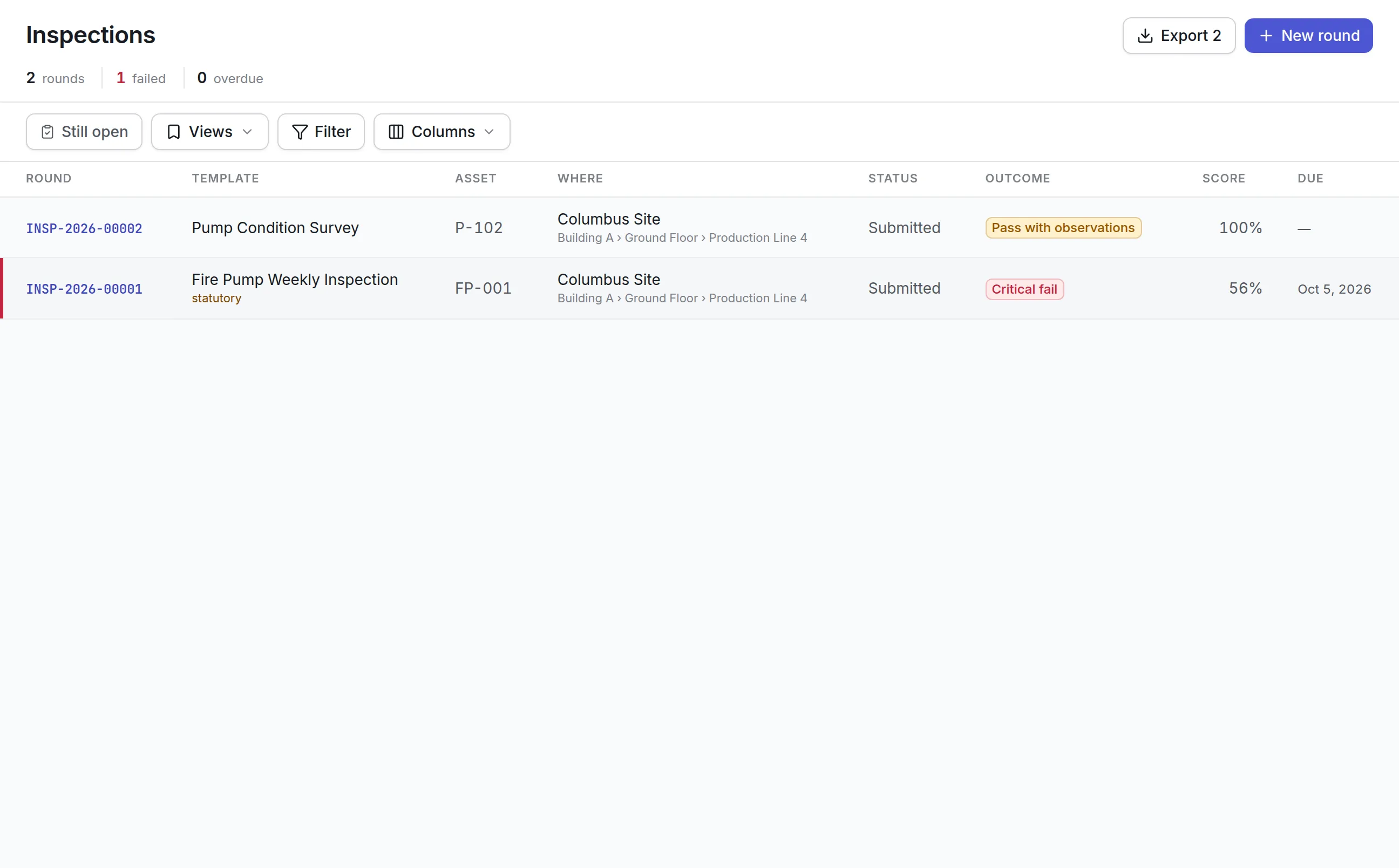
Logs on the phone. The twice-daily temperature log is a graded inspection round. It starts with a probe check in iced water, then records chilled food, frozen food and hot-held food, each against its limit and each marked critical. The morning opening checklist covers the walk-in chiller and freezer displays, the reach-in fridges and their door seals, extraction running before any gas appliance is lit, and hand-wash basins. The closing checklist confirms fryers are off, gas is isolated and the cold room doors are shut and latched.
More detail
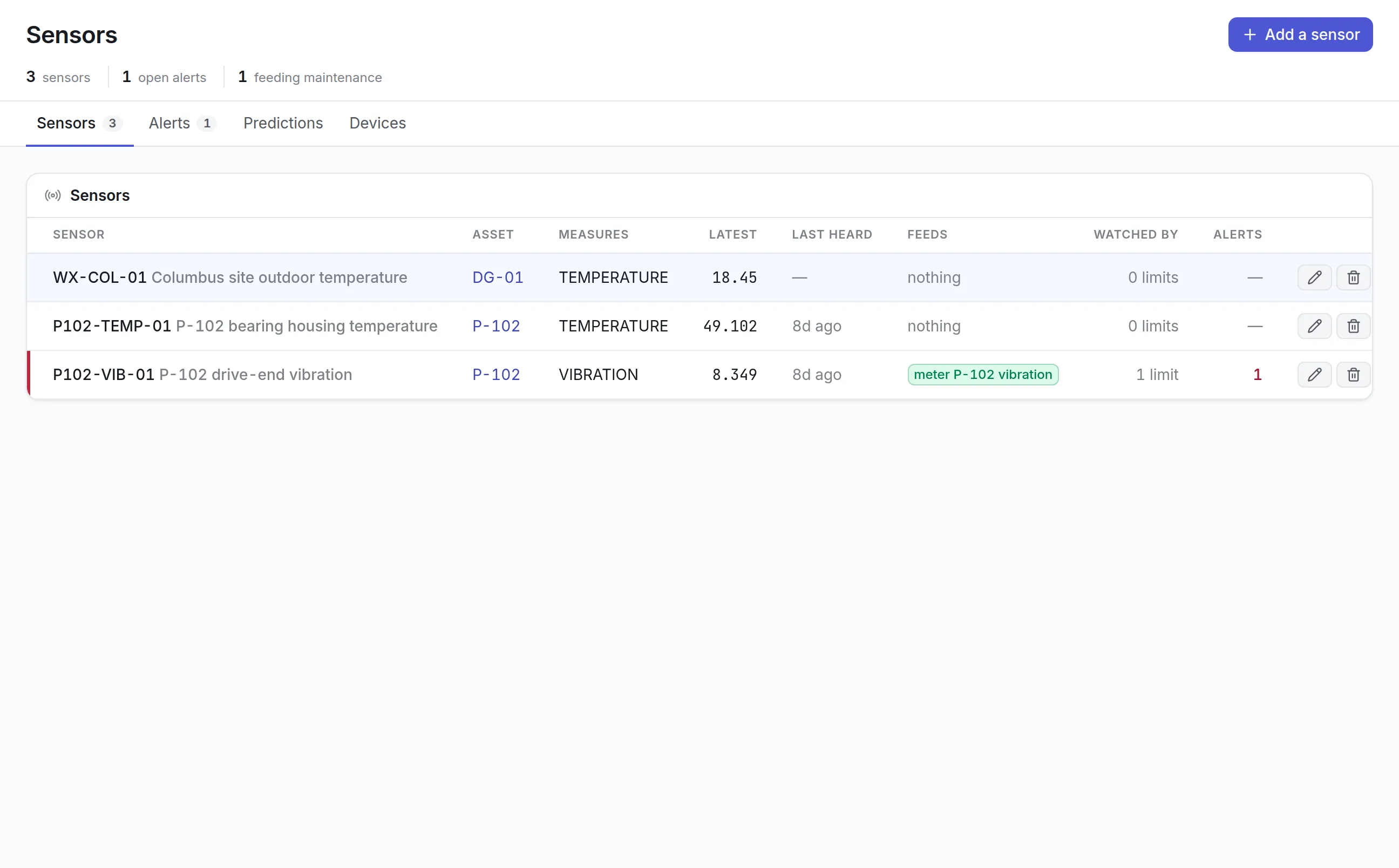
Sensors on the units. A temperature sensor on a walk-in reports its readings to the Sensors screen shown at the top of this page. You set limits on each sensor, and a reading past a limit opens an alert. Acknowledging the alert records that somebody has seen it; the alert clears only when the reading comes back inside the limit, so a warm cooler cannot be dismissed. A sensor can also feed an asset’s meter, which lets maintenance plans set against that meter come due on their own. Predictive maintenance software covers sensors, limits and condition-based plans in more depth.
Health-inspection records in one place
When the health inspector arrives, the questions are about records: when was the cooler last checked, who checked it, what happened when it failed, and when was the hood last cleaned.
- Every opening, closing and temperature round with the readings, the person who took them and the time, frozen once the round is submitted
- The monthly food-safety audit: pests and bait points, date labels and rotation, raw and ready-to-eat storage, the cleaning schedule and allergen information against the current menu
- Photos, notes and signatures on any check
- Each failed item and the corrective work order it raised, with how the job was closed
- Contractor visits such as the twice-yearly extract duct clean, with the visit recorded on the asset’s history
- Documents with expiry dates, such as permits and service certificates, in the document library, which shows what has lapsed first
More detail
Here is what Asset Infinity keeps for each location:
Inspection management software describes graded rounds, scoring and corrective work. Asset Infinity keeps these records; it does not certify that a restaurant complies with the FDA Food Code, NFPA 96 or any local health code.
Requests and work across every location
A chain with ten kitchens can end up with ten ways of reporting a fault, and a facilities team that cannot see which location has been waiting longest.
Each location is a site with its own assets, places and history. Staff at any of them report a fault from the web or by email, choosing from categories that match a kitchen: dining room too hot or too cold, bar or coffee equipment, till or menu screen, fridge or freezer not cold, cooking equipment, and water, drains or leaks. Every request lands in one queue, and the work orders it becomes show which location they belong to. The operations team reads open and overdue work for one location or for all of them.
More detail
Where one technician covers several outlets, the dispatch board shows every job and every technician together, so the job goes to whoever is free and nearest. Energy readings by location show which outlet is using more than its peers; see energy management software.
Contractors held to their response times
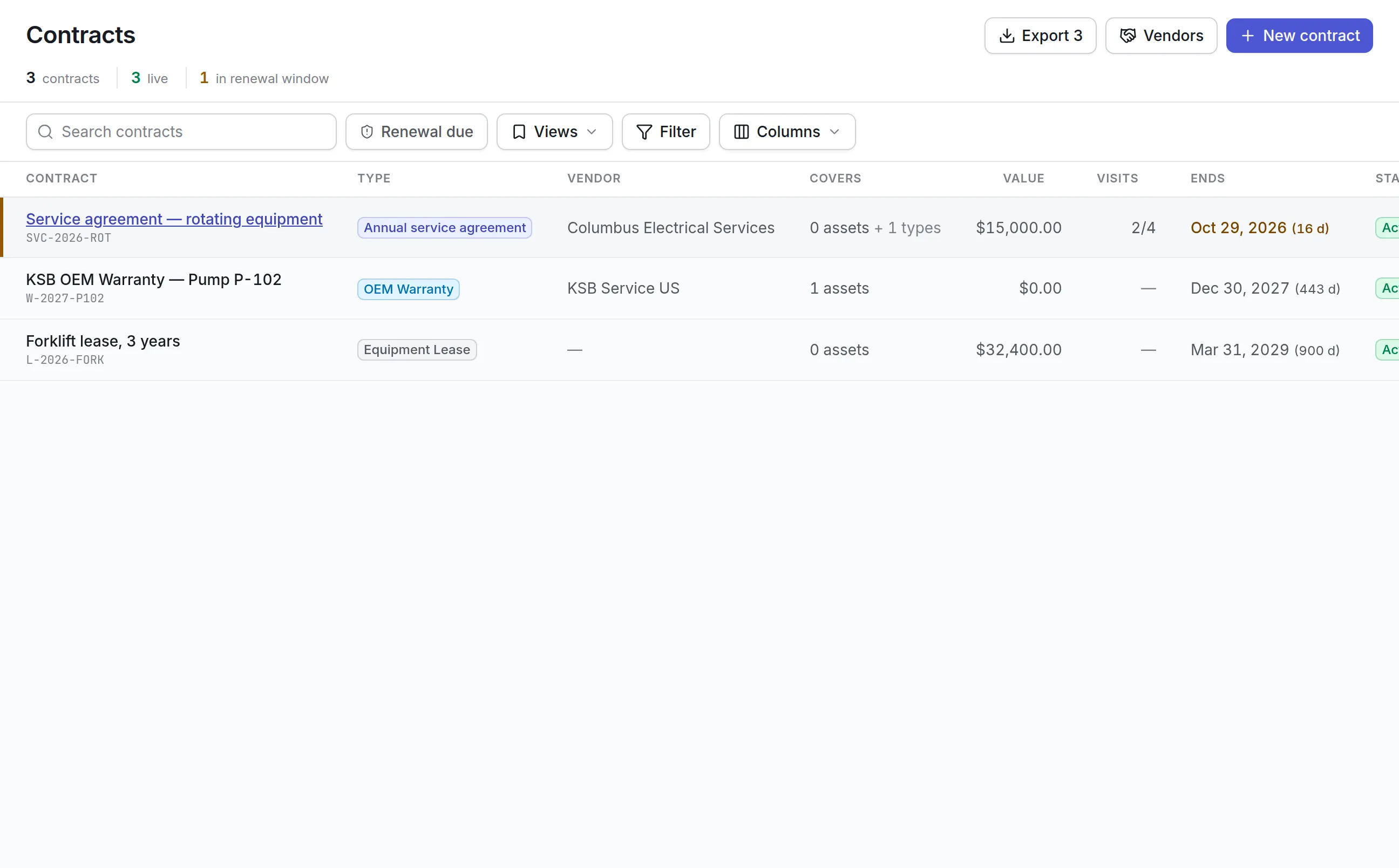
Most restaurant groups contract out refrigeration, coffee equipment and extract cleaning. Each agreement sits on the contract register with the assets it covers, what it includes, its value, its end date and its response and resolution times by priority.
More detail
When a coffee machine at one outlet waits past the contractor’s agreed response time, the job shows it, and the renewal window warns you before an agreement lapses. Maintenance contract management covers coverage, visits and renewals.
What should you look for when choosing restaurant maintenance software?
- Refrigeration PM with readingsA failed cold room loses the week’s stockIn Asset InfinityQuarterly service checklist with a pull-down temperature reading against its range
- Temperature logs that actA log nobody acts on proves nothingIn Asset InfinityGraded rounds where a failed critical item raises a work order
- Sensor limits and alertsCoolers fail overnight when nobody is thereIn Asset InfinityLimits on each sensor, alerts that clear only when the reading recovers
- Food-safety auditsInspectors ask for a record, not a promiseIn Asset InfinityA monthly audit checklist with photos, notes and signatures
- Requests from staffCooks and baristas will not learn new softwareIn Asset InfinityWeb and email requests with kitchen and front of house categories
- Response clocksA broken espresso machine costs the morningIn Asset InfinityResponse and resolution targets by priority and equipment, with escalation
- Multi-location viewOperations needs one picture of every outletIn Asset InfinityEach location a site, with work filtered for one or all
- Contractor agreementsMost kitchen trades are contracted outIn Asset InfinityCoverage, response times and renewal notice on each contract
- Offline mobile appCold rooms and basements have no signalIn Asset InfinityiOS and Android app that syncs when back in range
See it on your own assets, or price it in two minutes.
Restaurant maintenance software by type of operation
Full-service restaurant
A full-service kitchen runs the full schedule: quarterly refrigeration, weekly fryer boil-out, combi oven and chargrill repairs, monthly hood and grease trap cleans, and the twice-daily temperature log. The kitchen manager runs the opening and closing checks, and the facilities team sees every failed item as a work order with its clock already running.
Café and coffee chain
For a coffee-led chain, the espresso machine and grinder earn most of the morning’s money. They get their own descale plan, shots-pulled meters and a high-priority response target. One coffee equipment contract can cover the machines at every location, so a missed response time shows on the job.
Bar and late-night venue
A bar adds ice machines, glasswashers, bottle fridges and drinks dispensers to the register. Ice machine cleaning and glasswasher faults are logged against each unit, and the closing checklist confirms the coffee groups are back-flushed and the cold room is shut before the last person leaves.
Multi-site group
A group with a dozen outlets sets up each one as a site, gives staff one way to report faults and uses the dispatch board to route technicians between locations. Group operations compares overdue work, contractor performance and energy use outlet by outlet.
What restaurant maintenance software costs with Asset Infinity
The asset register starts at $130 a month for up to 500 assets, with unlimited users. Maintenance, which covers work orders, preventive maintenance and inspections, is $25 per user per month. Add-ons a restaurant group typically adds are flat per organization:
- Maintenance requests, $75 a month
- Escalations, $75 a month
- Contracts, $100 a month
- Job routing and dispatch, $150 a month
- Energy and utilities, $150 a month
Temperature sensors are priced per device. Build a quote for your locations.
Getting started with the food and beverage trial
The food and beverage trial opens with three sample outlets, about twenty-five kitchen, bar and building assets, the plans and checklists above, refrigeration, coffee equipment and extract cleaning contracts, and eight weeks of history. That history includes a walk-in chiller found warm on the morning check and a coffee machine whose contractor has missed the agreed response time.
To set up your own:
- Import your locations and equipment, starting with refrigeration and the cooking line.
- Set request categories and response times, with refrigeration failures at the top.
- Turn on the opening, closing and temperature checks and show each kitchen manager how to run them on the phone.
- Add your contractors with the response times their agreements promise.
Operators running restaurants inside hotels may also want to read about hotel maintenance software. To see it with your own kitchens, book a demo.
What teams in this industry use most
Common questions
What is restaurant maintenance software?
Restaurant maintenance software records every piece of kitchen, bar and building equipment across your locations and the work done on each. It schedules preventive maintenance, takes repair requests from staff, keeps temperature and food-safety logs and tracks contractors.
Can it keep cold-holding temperature logs?
Yes. A twice-daily temperature log runs as a checklist on the phone with each reading graded against its limit, and a failed critical item raises a work order on the fridge or freezer. Temperature sensors can also report readings against limits and open an alert on a breach.
Does it work for a chain of restaurants or cafés?
Yes. Each location is a site with its own kitchen, front of house and store room, and the operations team sees open and overdue work for one location or all of them. A technician who covers several locations is dispatched to whichever one called.
Will it help with health inspections?
It keeps the records an inspector asks about, such as temperature logs, food-safety audits, cleaning visits and repairs, with who did each and when. Asset Infinity keeps these records; it does not certify that a restaurant complies with any code.
Can kitchen staff report problems without training?
Yes. Staff report a fault from a web form or by email and pick a category such as a fridge not cold, cooking equipment or a leak. The request goes to the facilities team's queue.
How much does restaurant maintenance software cost?
Asset Infinity's asset register starts at $130 a month for up to 500 assets with unlimited users, and maintenance is $25 per user per month. Add-ons such as maintenance requests and escalations are flat monthly prices.
See it with your own assets
A demo run on an example from your industry. Or start the trial and look around on your own.