





Field service maintenance software for equipment at your customers' sites
Our field service maintenance software keeps every unit you installed on a customer's roof or in their mechanical room on one record. Breakdowns go to the right technician with the promised response time running, and the rental fleet is checked before every rental.
- EPA Clean Air Act Section 608 (refrigerant handling records)
- NFPA 110 (emergency and standby power system testing)
- OSHA 29 CFR 1910.147 (lockout/tagout)

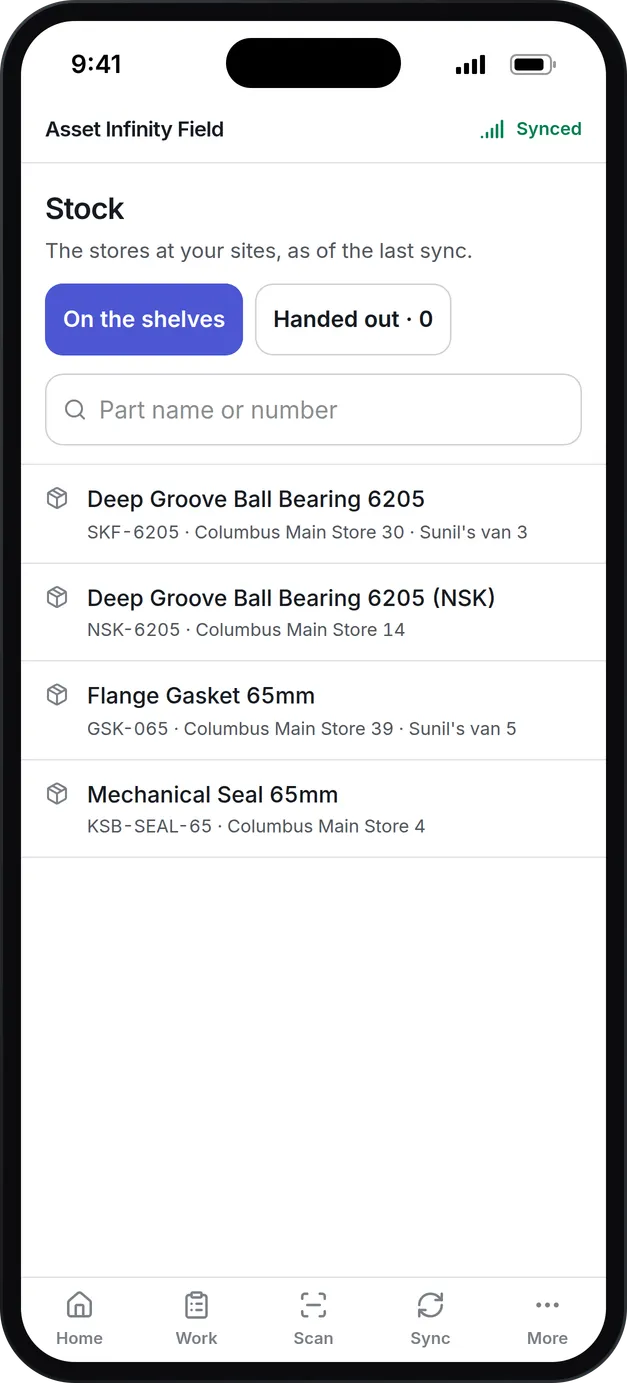
What our field service maintenance software does for your service team
Every unit at every customer
Each customer's premises is a site with the units installed there, their model, serial number, warranty and full service history. The customer register holds their contacts and addresses.
Dispatch to the right technician
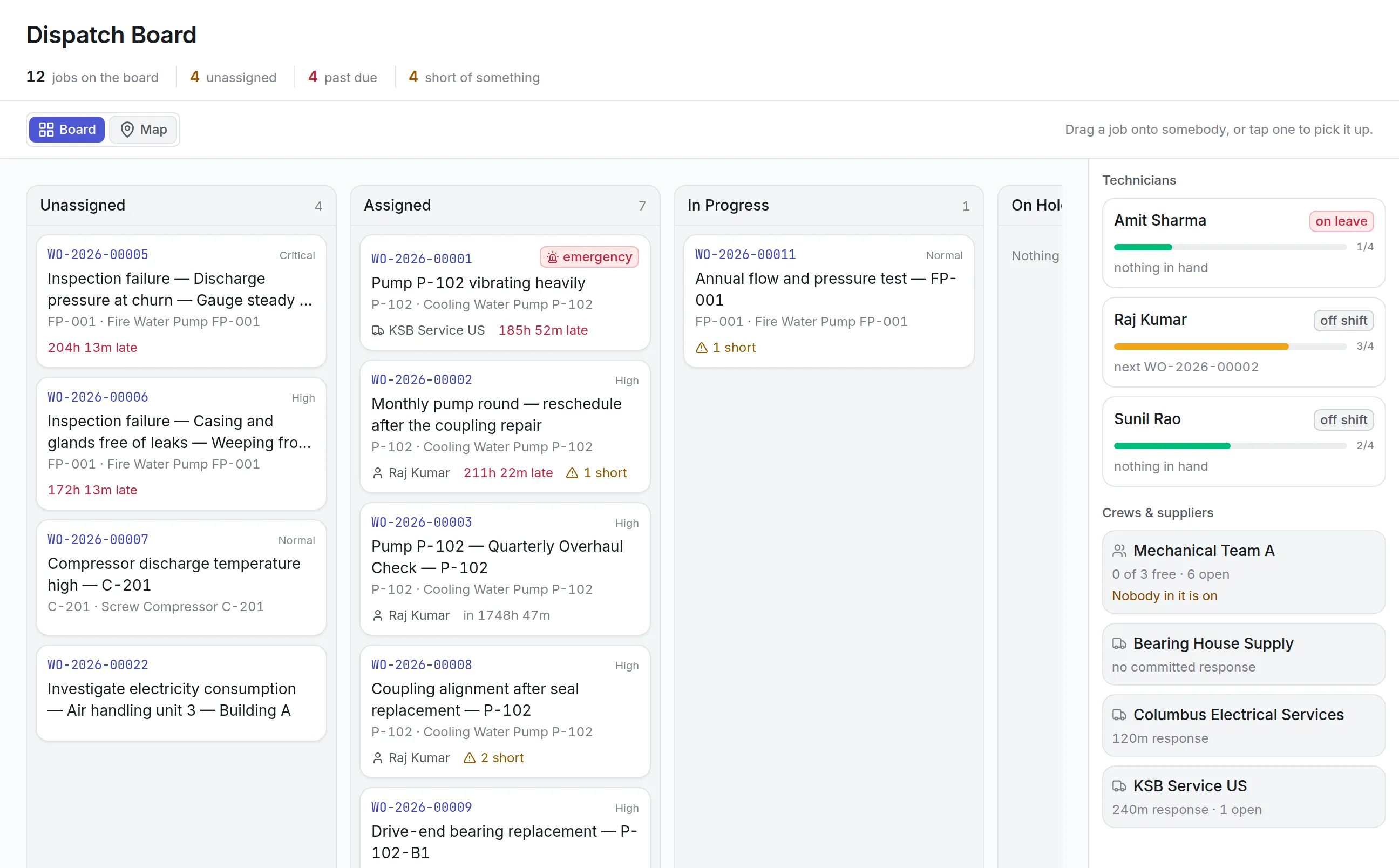
The dispatch board shows unassigned and past-due jobs beside each technician's load, leave and shift. Drag a job onto somebody, or switch to the map.
Response times you promised
Response and fix targets are set by priority and job type, so a critical breakdown at a hospital runs a two-hour clock. Escalations warn before a target is missed.
An app that works offline
Technicians carry their jobs, checklists and meters on the phone, and work in a basement mechanical room with no signal. Everything syncs when they are back in range.
Parts in the van
Each van can be a store of its own. The app asks which store a part came from every time, so van stock and the main store both stay right.
Rental fleet checks
Units out on rent are booked against customers and charged from rate cards. Pre-rental and return inspections catch the generator that will not start before it leaves the yard.
What is field service maintenance software?
Field service maintenance software is a system a service company uses to record the equipment it maintains at customer sites, send technicians to breakdowns and planned visits, track the parts in each van and keep a full history of every unit. Dealers and service contractors use it for HVAC units, chillers, standby generators, UPS systems and water purifiers.
Service companies buy it when the whiteboard and the shared spreadsheet stop scaling. A service manager wants to know which technician is nearest the hospital whose generator just failed, whether the compressor for the rooftop unit has arrived, and which customer’s quarterly visit has slipped. A customer wants to know that somebody is coming within the time their agreement promised.
How field service maintenance software works in Asset Infinity
Every unit you service has one record, at the customer site where it stands. The path from a customer’s call to a closed job runs like this:
Load the installed base
Each customer is in the customer register with contacts and addresses, and each of their premises is a site. Units sit in the location where they run (the roof, the mechanical room, the generator yard) with make, model, serial number and warranty. A spreadsheet imports into the asset register without retyping.
Take the call
A breakdown is raised as a work order on the unit, with a priority and a job type. The response and fix targets for that pair start counting at once.
Send the right technician
The dispatch board lists what is unassigned, past due and short of a part or a skill, beside each technician’s workload and whether they are on leave or off shift. Drag the job onto a person, a crew or a subcontractor.
Do the work on the phone
The technician opens the job in the mobile app, works the checklist, logs readings, takes photos and records the parts used from the van, with or without a signal.
Wait for parts in the open
A job that cannot finish until a compressor arrives goes on hold with a note saying why, so the backlog shows what each stopped job is waiting for.
Close it and keep the history
The resolution, labor and parts cost stay on the unit, so the next technician sent to that roof sees what was done last time.
Dispatch and response times for field service teams
A service manager’s morning starts with the jobs nobody holds and the jobs already late. The dispatch board puts both at the top and every technician down the side.
More detail
What the board gives a dispatcher:
Response targets are set per priority and job type. A critical breakdown can carry a two-hour response and an eight-hour fix, while a low-priority planned visit has days. Escalations warn before a target is missed, so the customer who was promised two hours gets a call before they make one. Technician management software covers skills, shifts and leave, which decide who the board can send.
The offline technician app and parts in the van
Customer sites are where signal goes to die: mechanical rooms, basements, generator yards behind concrete. The Asset Infinity Field app for iOS and Android holds a technician’s jobs, inspection rounds and meters on the phone, shows whether it is synced, and sends everything when it is back in range.
More detail
On the job a technician can:
Van stock is where most field inventory goes wrong. Each van can be set up as a store, and the app asks which store a part came from on every movement, because the main store and the van are often fifty yards apart and the wrong choice leaves one reading three filters short. The stock screen shows what each store holds, and stock can be transferred between them. Parts inventory management adds reorder points, so refrigerant, filters and belts turn into purchase requests before a van runs out.
GPS tracking for vans and units out on site
A GPS tracker fitted to a van or a portable unit reports its position, trips and odometer. Mileage writes straight to the van’s meter, so a service plan by distance falls due without anyone typing a reading, and an alert goes to supervisors when a tracker stops calling. Positions are kept for 12 months. GPS asset tracking explains trackers, areas and alerts, and fleet maintenance software covers servicing the vans themselves.
Rental equipment: bookings, rate cards and inspections
Many dealers rent out what they also service: portable generators, spot coolers, temporary power. A rental unit is a unit like any other, with its own history and meters, and its time out on rent is a booking.
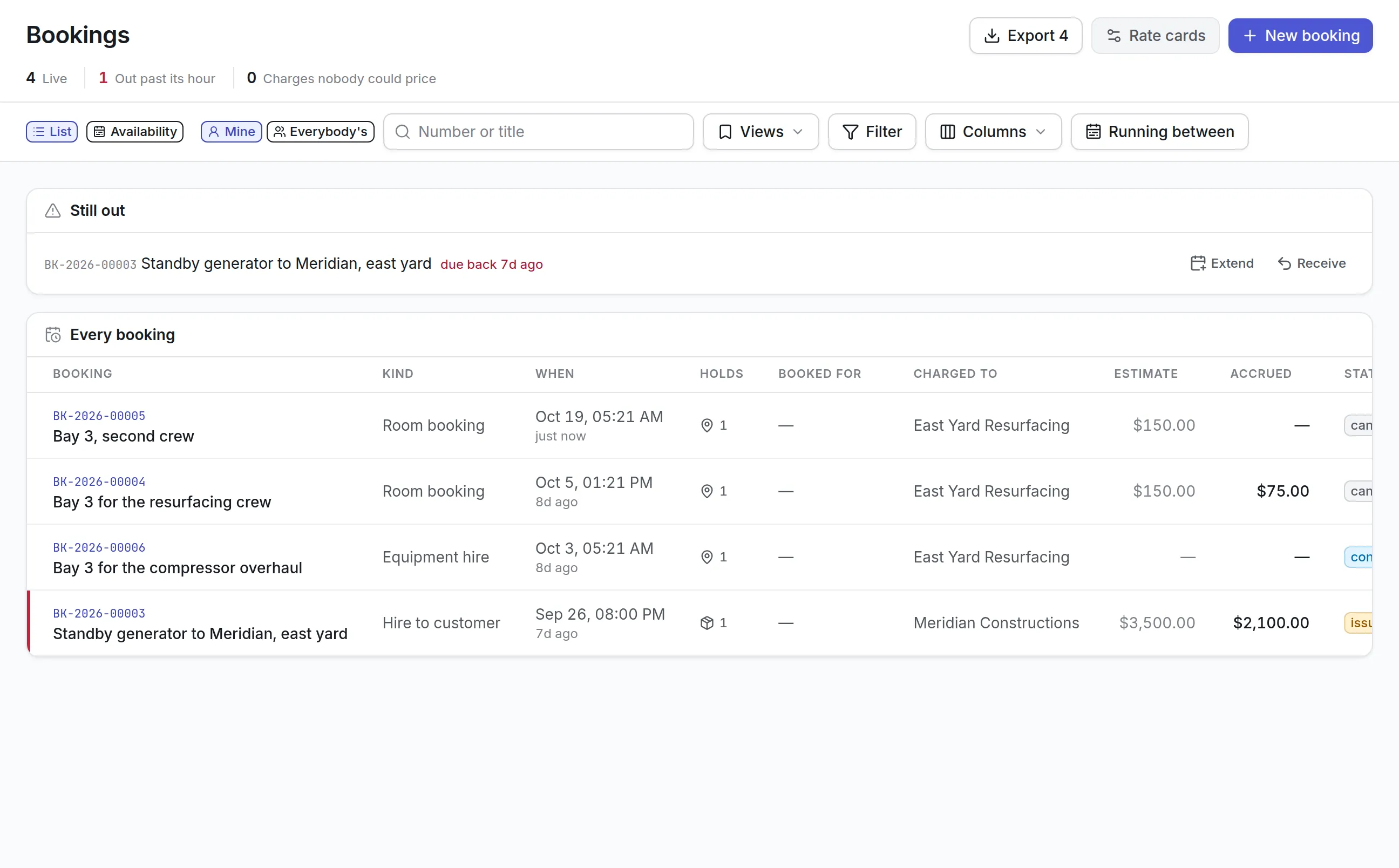
- A booking names the unit, the customer it is charged to and when it goes out and comes back
- Rate cards price the rental, and a customer can have its own card
- Charges accrue as the rental runs, so the estimate and the amount so far sit side by side
- A unit past its return time rises to the top, with Extend and Receive one click away
- The availability view shows which units are free for the dates a customer asks about
More detail
Asset Infinity prices and accrues the rental; your accounting system still sends the invoice. Equipment checkout software covers bookings, clashes and charges in more detail.
Planned visits, inspections and the checks before a rental
A customer’s service agreement is a promise of visits: quarterly on the rooftop units, a monthly load test on the standby generator, filters changed twice a year. In Asset Infinity each one is a maintenance plan on the units it covers, with its own task list, falling due by calendar or by run hours read from a meter. Preventive maintenance software explains triggers and lead times.
More detail
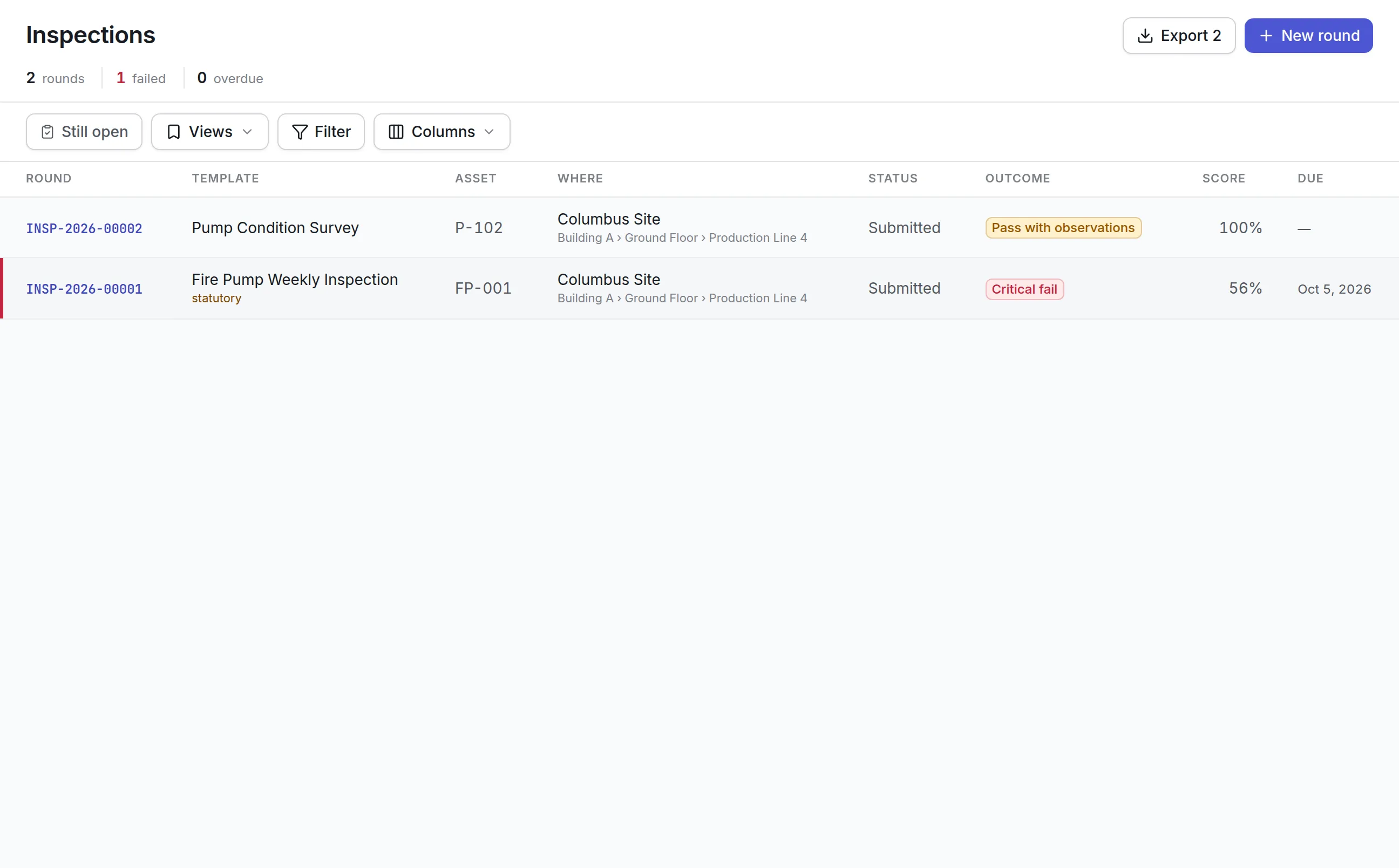
Inspections are graded checklists. A pre-rental inspection can mark “starts first time and runs on test load” as critical, so a generator that fails it is held back and a repair job is raised on it before it goes out. A return inspection records damage and run hours against the rental. A weekly van stock check confirms refrigerant cylinders are in date and the first aid kit is on board.
What should you look for when choosing field service maintenance software?
Field service is maintenance done away from home, on equipment a customer depends on. Use this table to compare products on what decides whether a customer renews.
- Installed base by customer siteA technician needs the unit’s history before arrivingIn Asset InfinityCustomers, their sites and the units at each, with full service history
- Dispatch boardThe nearest free technician wins the breakdownIn Asset InfinityBoard and map with workload, leave, shift and readiness
- Response and fix targetsCustomer agreements are sold on response timeIn Asset InfinityTargets by priority and job type, with escalations before a miss
- Offline mobile appMechanical rooms and basements have no signalIn Asset InfinityiOS and Android app holding jobs, checklists, meters and stock
- Van stockMost second visits are for a missing partIn Asset InfinityVans as stores, with the store asked on every movement
- Planned visitsAgreements promise visits on a scheduleIn Asset InfinityMaintenance plans by calendar or meter, with task lists
- Rental fleetRental units need checks before and after every jobIn Asset InfinityBookings, rate cards, and pre-rental and return inspections
- Vehicle trackingDispatch and van servicing both need location and mileageIn Asset InfinityGPS trackers with trips, alerts and odometer readings
- Supplier contractsYour own suppliers owe you response times tooIn Asset InfinitySupply and subcontract agreements with their SLAs
A customer’s service agreement lives as the plans on their units and the response targets on their jobs, which is where a technician meets it, rather than in a separate register of agreements sold.
See it on your own assets, or price it in two minutes.
Field service maintenance software by kind of business
Each kind of service company starts from the same product and switches on what its work needs.
HVAC and refrigeration contractor
Rooftop units and packaged chillers at shopping centers, office towers and data centers, each with a quarterly service plan and a task list that logs pressures, superheat and supply air temperature against a range. Refrigerant, filters and belts are stocked in each van with reorder points, and a compressor replacement waits on hold until the part and the crane are both booked.
Standby power and UPS service
Generators and UPS systems at hospitals and data centers, where a breakdown gets the shortest response target you sell. Monthly load tests record coolant temperature and oil pressure as readings, run hours come in from a meter, and battery replacements keep their cost on the unit.
Equipment rental yard
Portable generators and spot coolers go out on bookings priced from rate cards. Services fall due every 250 run hours, a pre-rental inspection runs before each rental and a return inspection when the unit comes back, and a damaged return raises its own repair job.
Water cooler and purifier service
Many small units across many customer sites, each on a filter change every six months. Technicians run the day on the phone, scan each unit’s label to open its job, and record cartridges and membranes used from the van.
What field service maintenance software costs with Asset Infinity
The asset register starts at $130 a month for up to 500 units, with unlimited users. Maintenance is $25 per user per month and parts and stock is $20 per user per month. Field service add-ons are flat per organization:
- Job routing and dispatch, $150 a month
- Escalations, $75 a month
- Bookings and reservations, $150 a month
- Reordering, $75 a month
GPS trackers come from the Asset Infinity store and are priced with your tracker model. Build a quote for your own service business.
The field service trial opens with rooftop units, packaged chillers, standby generators, UPS units, water coolers and purifiers across four customer premises, a rental yard of portable generators and spot coolers, and two service vans. It loads a quarterly rooftop unit service, a monthly generator load test, a semiannual water filter change and a 250-hour portable generator service, response targets from a two-hour critical breakdown down, and pre-rental, return and van stock inspections. The trial calls assets “units”, a rename you can keep or change back on the Localization screen.
Getting started with your installed base
Most service companies go live one customer group or one product line at a time:
- Import customers and units from your existing installed-base list, and print labels for the units technicians will scan.
- Set your response targets for each priority and job type, matching what your agreements promise.
- Load the planned visits your agreements already commit you to.
- Set up each van as a store and count what is in it.
After a few weeks of jobs closed on the phone, every unit has a history a technician can read before arriving. If you want to watch it with your own equipment first, book a demo.
What teams in this industry use most
Common questions
What is field service maintenance software?
Field service maintenance software records the equipment a service company maintains at its customers' sites and the work done on it. It sends technicians to breakdowns, schedules planned visits, tracks parts in vans and keeps each unit's service history.
Does the technician app work without a signal?
Yes. Jobs, checklists, meters and stock are held on the phone, so a technician in a basement mechanical room or on a roof can finish the job and the app syncs when it is back in range.
Can I track the response time promised to each customer?
Yes. Response and fix targets are set by priority and job type, each job carries its clock from the moment it is raised, and escalations warn before a target is missed.
Does it manage rental equipment?
Yes. Rental units are booked out to customers, charged from rate cards and received back, and a booking past its return time shows at the top of the list. Pre-rental and return inspections run on each unit.
Does it handle customer service agreements?
A customer's agreement is set up as maintenance plans on the units it covers, with the response targets it promises. The contracts register itself is for agreements with your own suppliers and subcontractors.
How much does field service maintenance software cost?
Asset Infinity's asset register starts at $130 a month for up to 500 units with unlimited users, and maintenance is $25 per user per month. Job routing and dispatch is a $150 monthly add-on for the whole organization.
See it with your own assets
A demo run on an example from your industry. Or start the trial and look around on your own.