


In this article
- What Is CMMS for Asset and Plant Maintenance?
- Why Plants Need CMMS Software
- Asset Tracking in CMMS
- Plant Asset Hierarchy
- Work Order Management
- Preventive Maintenance Scheduling
- Corrective Maintenance
- Breakdown Maintenance
- Asset Maintenance History
- Maintenance Scheduling Calendar
- Technician Management
- Spare Parts Management
- Inventory Integration
- QR Code and Barcode Asset Tracking
- Mobile CMMS
- Inspection Management
- Plant Maintenance Reporting
- Maintenance Budgeting
- Maintenance Cost Tracking
- Downtime Management
- Maintenance Dashboards
- Benefits of CMMS for Asset and Plant Maintenance
- Improves Asset Reliability
- Reduces Equipment Downtime
- Extends Asset Life
- Improves Maintenance Planning
- Controls Maintenance Budgets
- Increases Technician Productivity
- Improves Asset Tracking
- Better Reporting
- Enhances Compliance
- Reduces Emergency Repairs
- CMMS Reporting for Plant Managers
- Industries Using CMMS for Plant Maintenance
- Manufacturing
- Food Processing
- Pharmaceuticals
- Healthcare
- Utilities
- Oil and Gas
- Hospitality
- Warehousing
- CMMS KPIs
- Preventive Maintenance Compliance
- Mean Time Between Failures (MTBF)
- Mean Time to Repair (MTTR)
- Equipment Availability
- Maintenance Cost per Asset
- Emergency Work Percentage
- Work Order Completion Rate
- Maintenance Backlog
- Spare Parts Stockout Rate
- Technician Utilization
- How to Implement CMMS for Plant Maintenance
- Step 1: Create a Complete Asset Register
- Step 2: Define Maintenance Strategies
- Step 3: Configure Maintenance Schedules
- Step 4: Import Historical Data
- Step 5: Configure Spare Parts Inventory
- Step 6: Generate Asset QR Codes
- Step 7: Configure Reports
- Step 8: Train Maintenance Personnel
- Step 9: Launch in Phases
- Step 10: Review KPIs
- Common Mistakes to Avoid
- Features to Look for in a Plant Maintenance CMMS
- Why Choose Asset Infinity for Asset and Plant Maintenance?
- Conclusion
- Frequently Asked Questions
Modern manufacturing plants and industrial facilities depend on hundreds or even thousands of physical assets working together efficiently. Production machines, compressors, boilers, pumps, conveyors, motors, HVAC systems, generators, electrical panels, and utility equipment all require continuous monitoring and maintenance to ensure smooth operations.
A single equipment failure can stop production, delay deliveries, increase maintenance expenses, reduce product quality, and affect customer satisfaction. Managing maintenance manually through spreadsheets, paperwork, emails, or disconnected applications makes it difficult to keep assets operating at peak performance.
As facilities grow, maintenance teams need complete visibility into equipment condition, work orders, technician assignments, spare parts, maintenance costs, downtime, and asset history.
This is where CMMS for asset and plant maintenance becomes an essential business solution.
A Computerized Maintenance Management System (CMMS) centralizes maintenance operations, automates preventive maintenance, tracks assets, manages work orders, controls maintenance budgets, and generates detailed reports that help organizations maximize equipment reliability while reducing operational costs.
This guide explains how CMMS supports asset and plant maintenance, its key features, benefits, implementation process, reporting capabilities, budgeting methods, and best practices.
What Is CMMS for Asset and Plant Maintenance?
CMMS for asset and plant maintenance is a computerized maintenance management solution that helps organizations manage physical assets throughout their operational lifecycle.
It centralizes maintenance information and enables organizations to:
- Track plant assets
- Schedule preventive maintenance
- Generate work orders
- Assign technicians
- Monitor equipment performance
- Record maintenance history
- Manage spare parts
- Control maintenance costs
- Analyze equipment downtime
- Generate maintenance reports
Instead of maintaining separate spreadsheets for each department, the CMMS provides one centralized platform for maintenance planning and execution.
Why Plants Need CMMS Software
Industrial facilities face constant operational challenges, including:
- Unexpected equipment breakdowns
- High maintenance costs
- Production downtime
- Delayed inspections
- Aging assets
- Limited technician availability
- Spare parts shortages
- Poor maintenance visibility
- Compliance requirements
- Inaccurate maintenance records
Without a structured maintenance system, these issues often result in higher operating costs and lower productivity.
CMMS software helps maintenance teams become proactive rather than reactive.
Asset Tracking in CMMS
A successful maintenance program begins with complete asset visibility.
The CMMS maintains a centralized asset register containing:
- Asset ID
- Asset category
- Plant location
- Department
- Equipment hierarchy
- Manufacturer
- Model
- Serial number
- Installation date
- Warranty
- Current condition
- Operating status
- Replacement value
- Maintenance history
Every maintenance activity is linked to the correct asset, creating a complete lifecycle record.
Plant Asset Hierarchy
Industrial equipment rarely operates independently.
A plant hierarchy may include:
Manufacturing Plant
- Production Line
- Conveyor System
- Motors
- Pumps
- Gearboxes
- Compressors
- Sensors
A structured hierarchy helps maintenance teams:
- Understand asset relationships
- Track failures
- Analyze downtime
- Plan maintenance
- Allocate costs
- Improve reporting
Work Order Management
Work orders form the foundation of plant maintenance.
A CMMS automatically creates work orders for:
- Preventive maintenance
- Corrective maintenance
- Breakdown maintenance
- Inspection activities
- Calibration
- Safety checks
- Equipment servicing
Each work order may include:
- Asset information
- Maintenance type
- Priority
- Failure description
- Technician assignment
- Required spare parts
- Estimated labor
- Safety instructions
- Checklists
- Photographs
- Completion notes
- Downtime
- Maintenance cost
Digital work orders improve coordination between planners, supervisors, and technicians.
Preventive Maintenance Scheduling
Preventive maintenance helps reduce equipment failures by servicing assets before problems occur.
Maintenance schedules can be created using:
- Calendar dates
- Operating hours
- Production cycles
- Meter readings
- Manufacturer recommendations
- Asset condition
Examples include:
- Daily inspections
- Weekly lubrication
- Monthly filter replacement
- Quarterly calibration
- Annual overhauls
The CMMS automatically generates work orders when maintenance becomes due.
Corrective Maintenance
Corrective maintenance addresses issues discovered during inspections or routine servicing before they become major failures.
The software records:
- Fault details
- Root cause
- Repair actions
- Parts used
- Labor hours
- Downtime
- Repair costs
This information helps reduce recurring equipment problems.
Breakdown Maintenance
Despite preventive maintenance, unexpected failures may still occur.
A CMMS helps maintenance teams:
- Report failures immediately
- Prioritize emergency work
- Assign technicians
- Track repair progress
- Record downtime
- Analyze root causes
- Measure response times
Emergency work becomes fully documented for future analysis.
Asset Maintenance History
Every maintenance event is permanently stored within the asset record.
Maintenance history includes:
- Preventive maintenance
- Repairs
- Failures
- Inspections
- Calibration
- Spare parts
- Contractors
- Labor
- Costs
- Downtime
- Photographs
- Service reports
Historical information supports better repair and replacement decisions.
Maintenance Scheduling Calendar
A maintenance calendar provides a visual overview of:
- Planned maintenance
- Upcoming inspections
- Technician assignments
- Plant shutdowns
- Equipment availability
- Completed maintenance
Maintenance managers can balance workloads and avoid scheduling conflicts.
Technician Management
CMMS software simplifies workforce planning by assigning work according to:
- Skills
- Certifications
- Availability
- Shift
- Workload
- Plant location
Managers can monitor technician productivity and work completion in real time.
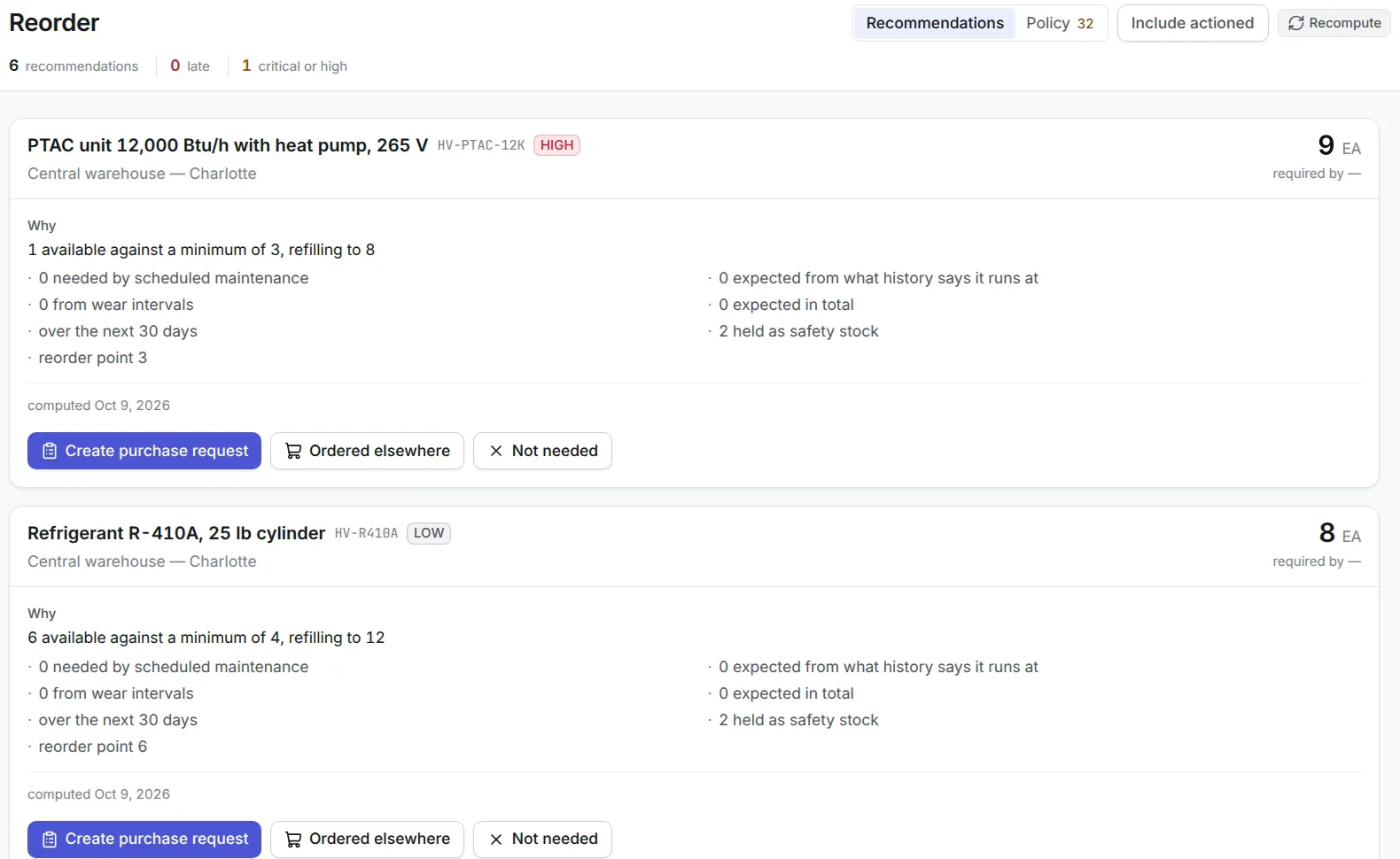
Spare Parts Management
Maintenance delays often occur because spare parts are unavailable.
The CMMS manages:
- Spare parts inventory
- Minimum stock levels
- Reorder points
- Warehouse locations
- Supplier information
- Material issues
- Purchase requests
This ensures parts are available when maintenance is scheduled.
Inventory Integration
Maintenance inventory includes:
- Bearings
- Motors
- Filters
- Belts
- Lubricants
- Electrical components
- Valves
- Pumps
- Sensors
- Safety equipment
Inventory integration helps maintenance teams avoid unnecessary delays.
QR Code and Barcode Asset Tracking
Every plant asset can be tagged using:
- QR codes
- Barcodes
- RFID tags
Technicians can scan equipment to instantly view:
- Asset information
- Maintenance history
- Open work orders
- Inspection checklists
- Warranty details
- Manuals
This improves maintenance efficiency while reducing paperwork.
Mobile CMMS
Mobile applications allow technicians to:
- Receive work orders
- Scan assets
- Record labor
- Complete inspections
- Upload photographs
- Request spare parts
- Update maintenance status
- Close work orders
Real time updates improve communication across maintenance teams.
Inspection Management
Routine inspections help identify problems before equipment fails.
Inspection checklists may include:
- Mechanical condition
- Lubrication
- Vibration
- Temperature
- Electrical connections
- Oil levels
- Safety systems
- Pressure
- Noise
- Wear
Inspection records automatically update the asset history.
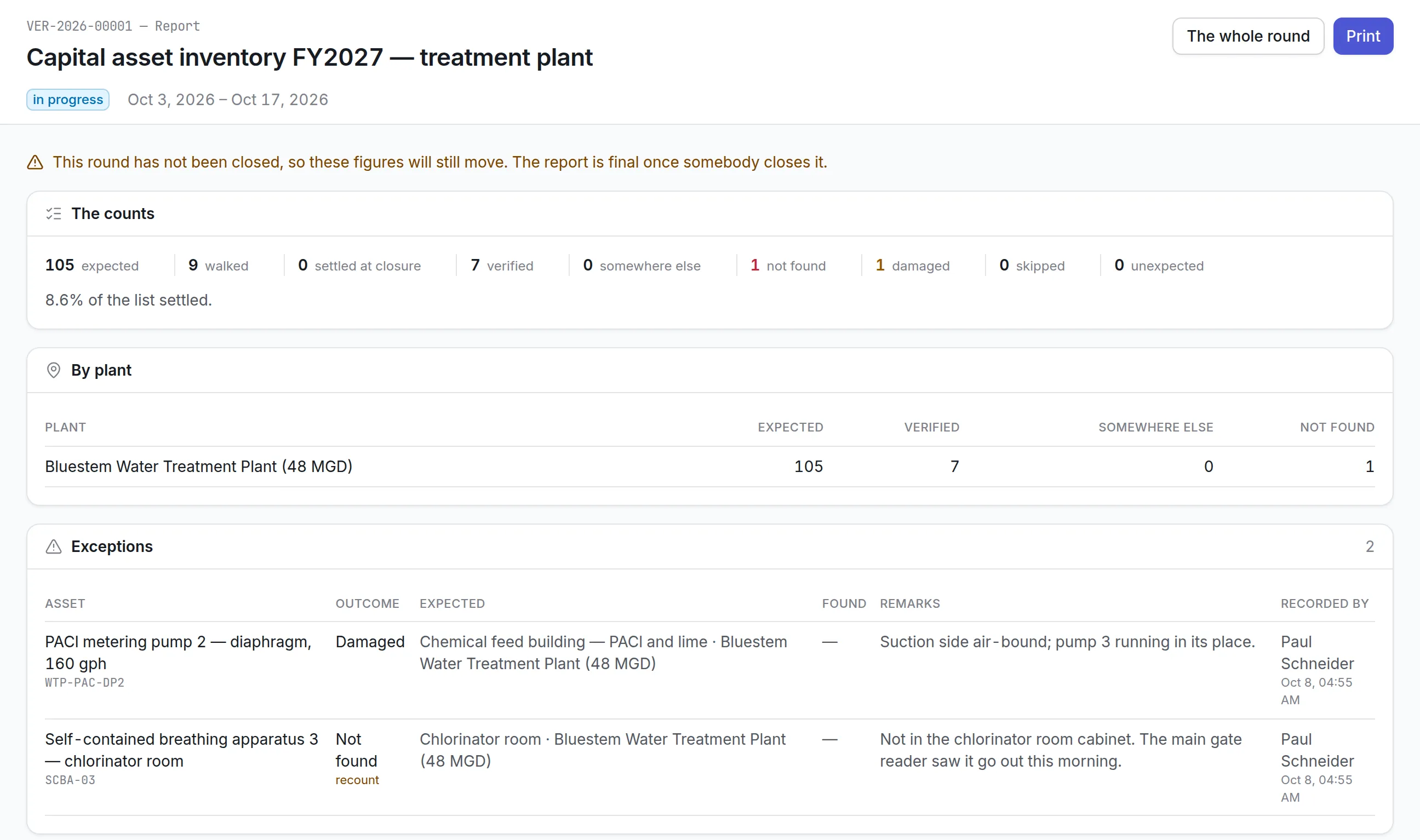
Plant Maintenance Reporting
Maintenance reporting transforms operational data into useful business insights.
Common reports include:
- Asset maintenance report
- Preventive maintenance report
- Work order report
- Technician productivity report
- Downtime report
- Spare parts report
- Maintenance cost report
- Equipment reliability report
- Inspection report
- Failure analysis report
- Budget utilization report
These reports support data driven decision making.
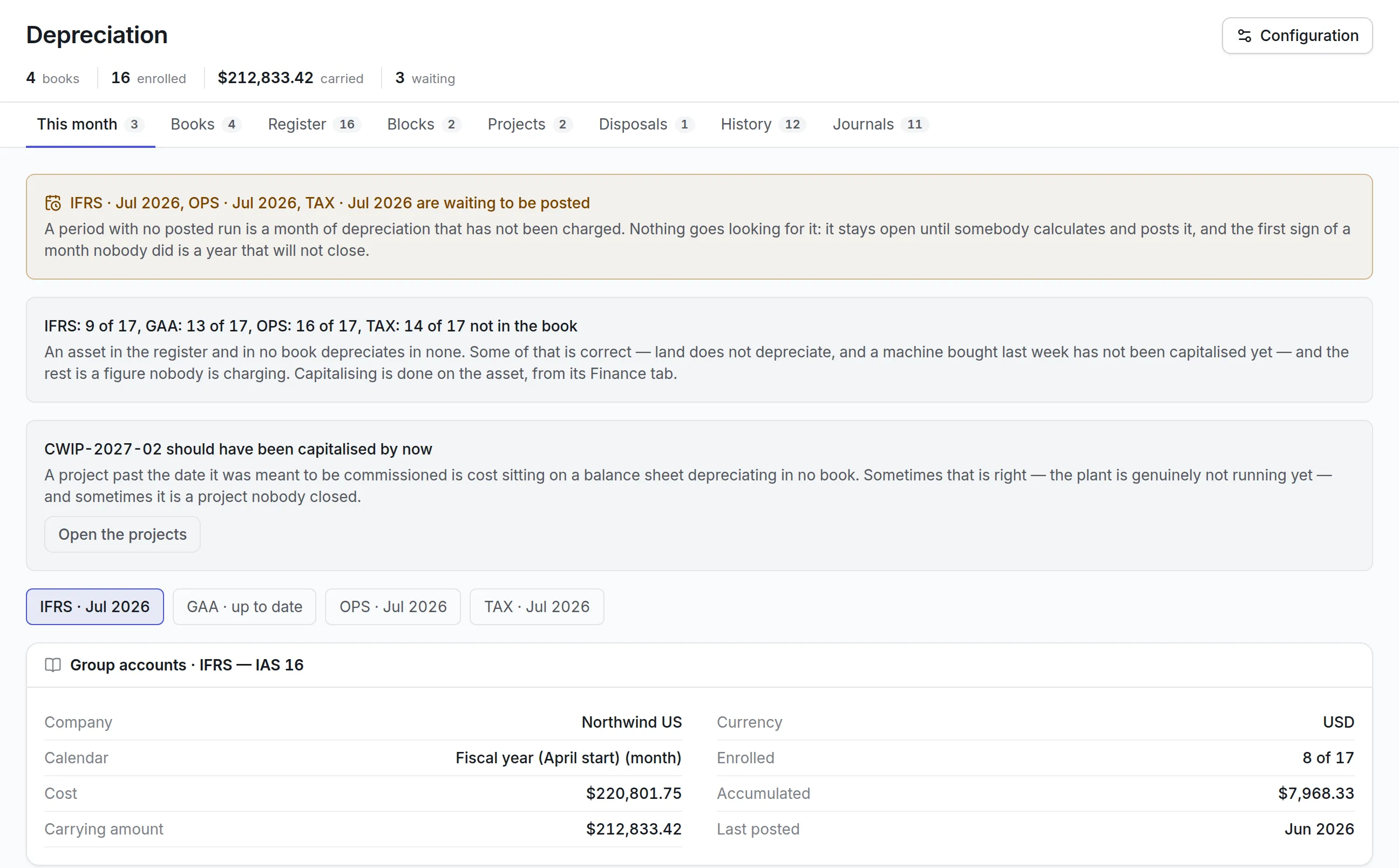
Maintenance Budgeting
Budget control is one of the most valuable benefits of CMMS software.
Organizations can monitor:
- Labor costs
- Spare parts expenses
- Contractor costs
- Service agreements
- Emergency repairs
- Preventive maintenance costs
- Equipment replacement costs
- Maintenance budgets by department
- Cost by asset
- Cost by plant
Historical cost information helps create more accurate maintenance budgets.
Maintenance Cost Tracking
Maintenance expenses may include:
- Internal labor
- Overtime
- Contractors
- Spare parts
- Consumables
- Rental equipment
- Service contracts
- Downtime
- Inspection costs
- Calibration
Linking every expense to an asset provides complete financial visibility.
Downtime Management
Downtime has a direct impact on production and profitability.
The CMMS records:
- Equipment failures
- Downtime duration
- Production loss
- Root cause
- Repair activities
- Restart time
Downtime reports help identify assets requiring improvement.
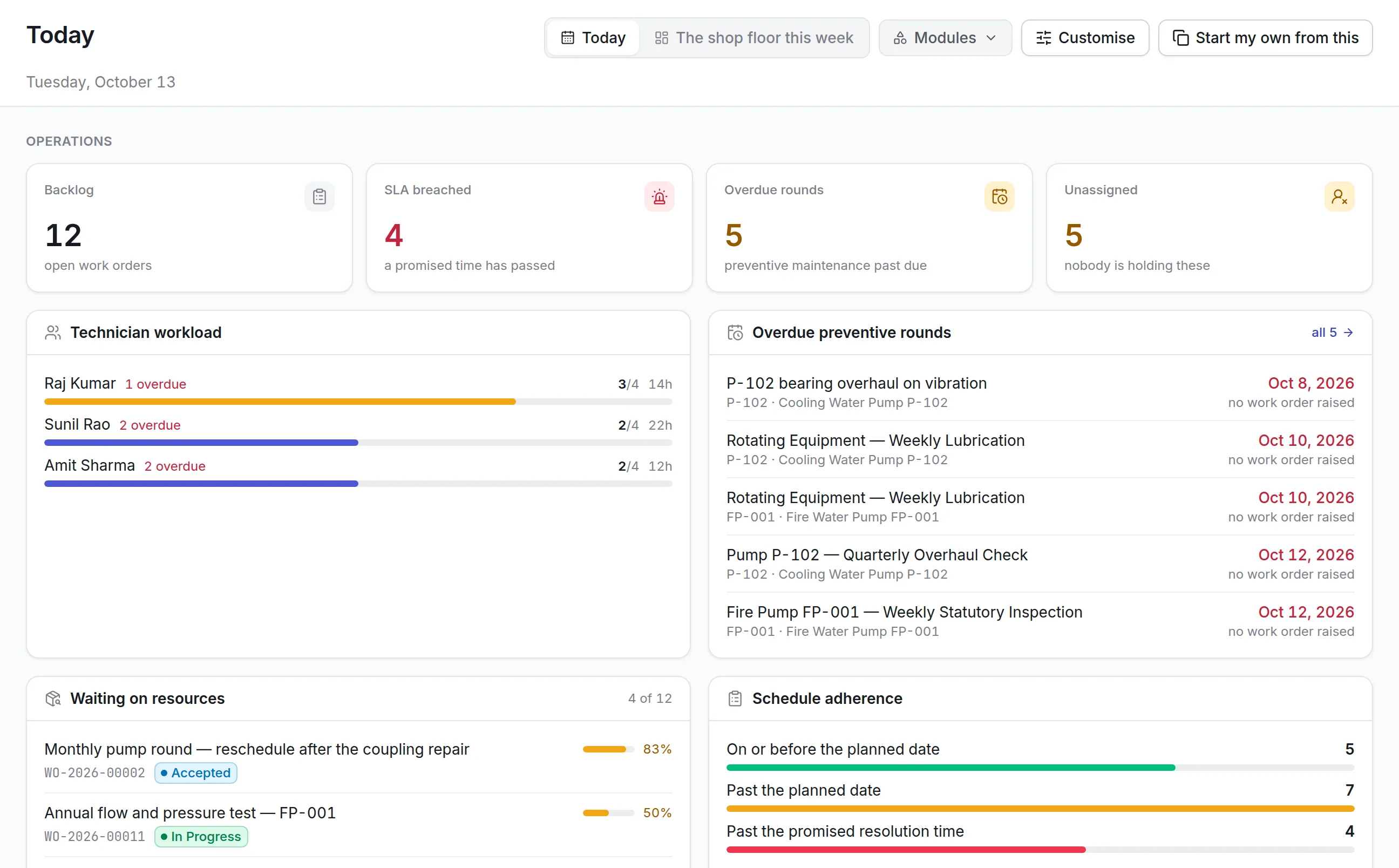
Maintenance Dashboards
Interactive dashboards provide maintenance managers with real time information.
Common dashboards include:
- Open work orders
- Overdue maintenance
- Equipment downtime
- Asset availability
- Technician workload
- Maintenance costs
- Preventive maintenance compliance
- Spare parts inventory
- Asset condition
- Maintenance backlog
Benefits of CMMS for Asset and Plant Maintenance
Improves Asset Reliability
Routine maintenance keeps equipment operating efficiently.
Reduces Equipment Downtime
Preventive maintenance minimizes unexpected failures.
Extends Asset Life
Well maintained assets remain productive for longer.
Improves Maintenance Planning
Automated scheduling reduces manual effort.
Controls Maintenance Budgets
Organizations gain complete visibility into maintenance spending.
Increases Technician Productivity
Digital work orders eliminate unnecessary paperwork.
Improves Asset Tracking
Every maintenance activity is linked to the correct equipment.
Better Reporting
Real time dashboards improve operational decision making.
Enhances Compliance
Inspection records and maintenance documentation remain centralized.
Reduces Emergency Repairs
Preventive maintenance lowers the number of unexpected breakdowns.
CMMS Reporting for Plant Managers
Plant managers require accurate operational information.
Important reports include:
- Maintenance backlog
- Equipment availability
- Plant downtime
- Preventive maintenance compliance
- Asset health
- Maintenance costs
- Technician utilization
- Work order completion
- Spare parts usage
- Budget performance
These reports help prioritize maintenance investments.
Industries Using CMMS for Plant Maintenance
CMMS software supports maintenance across many industries.
Manufacturing
Production equipment and assembly lines.
Food Processing
Packaging equipment, refrigeration, and conveyors.
Pharmaceuticals
Validated manufacturing equipment and utilities.
Healthcare
Medical equipment and hospital infrastructure.
Utilities
Power plants, substations, pumps, and distribution systems.
Oil and Gas
Compressors, pipelines, storage facilities, and processing equipment.
Hospitality
HVAC, elevators, kitchen equipment, and guest facilities.
Warehousing
Conveyors, forklifts, dock equipment, and automation systems.
CMMS KPIs
Maintenance teams should monitor:
Preventive Maintenance Compliance
Percentage of preventive maintenance completed on time.
Mean Time Between Failures (MTBF)
Measures equipment reliability.
Mean Time to Repair (MTTR)
Measures repair efficiency.
Equipment Availability
Indicates operational readiness.
Maintenance Cost per Asset
Measures maintenance spending.
Emergency Work Percentage
Tracks reactive maintenance.
Work Order Completion Rate
Measures maintenance productivity.
Maintenance Backlog
Tracks unfinished maintenance work.
Spare Parts Stockout Rate
Measures inventory shortages affecting maintenance.
Technician Utilization
Measures productive maintenance time.
How to Implement CMMS for Plant Maintenance
Step 1: Create a Complete Asset Register
Record every critical asset with standardized information.
Step 2: Define Maintenance Strategies
Determine preventive, predictive, corrective, and breakdown maintenance plans.
Step 3: Configure Maintenance Schedules
Create recurring maintenance activities.
Step 4: Import Historical Data
Include previous maintenance records.
Step 5: Configure Spare Parts Inventory
Link inventory with maintenance activities.
Step 6: Generate Asset QR Codes
Improve equipment identification.
Step 7: Configure Reports
Create dashboards for maintenance teams.
Step 8: Train Maintenance Personnel
Ensure technicians understand mobile workflows and digital work orders.
Step 9: Launch in Phases
Start with one production area before expanding plant wide.
Step 10: Review KPIs
Continuously improve maintenance performance.
Common Mistakes to Avoid
Organizations often reduce CMMS effectiveness by:
- Maintaining incomplete asset records
- Ignoring preventive maintenance planning
- Delaying work order updates
- Failing to train technicians
- Ignoring maintenance reports
- Poor spare parts management
- Not reviewing maintenance budgets
- Overlooking equipment history
- Tracking only emergency repairs
- Failing to analyze downtime trends
Avoiding these mistakes helps maximize CMMS value.
Features to Look for in a Plant Maintenance CMMS
A modern CMMS should include:
- Asset tracking
- Work order management
- Preventive maintenance
- Maintenance scheduling
- Maintenance calendar
- Asset hierarchy
- QR code and barcode support
- Spare parts inventory
- Mobile application
- Inspection management
- Maintenance reporting
- Budget tracking
- Dashboard analytics
- Technician management
- Warranty management
- Multi location support
- Role based access
- Document management
- API integrations
Why Choose Asset Infinity for Asset and Plant Maintenance?
Asset Infinity provides a powerful CMMS platform that helps organizations manage maintenance operations from one centralized system.
With Asset Infinity, organizations can:
- Build a centralized asset register
- Track plant equipment using QR codes and barcodes
- Schedule preventive maintenance
- Generate digital work orders
- Record maintenance history
- Manage inspections
- Track spare parts inventory
- Monitor maintenance costs
- Control maintenance budgets
- Measure equipment downtime
- Generate maintenance reports
- Monitor KPIs through interactive dashboards
- Manage technicians across multiple facilities
- Integrate maintenance with inventory, procurement, and asset management
By combining asset tracking, maintenance scheduling, reporting, and budgeting, Asset Infinity enables organizations to improve plant reliability, reduce maintenance costs, and maximize equipment performance.
Conclusion
CMMS for asset and plant maintenance is much more than a work order management tool. It serves as the central platform for tracking assets, planning maintenance, assigning technicians, managing spare parts, monitoring costs, and measuring equipment performance.
By replacing manual maintenance processes with digital workflows, organizations can significantly reduce downtime, improve preventive maintenance compliance, extend equipment life, and gain complete visibility into maintenance operations.
A successful implementation depends on accurate asset data, standardized maintenance procedures, trained employees, and continuous KPI monitoring.
With Asset Infinity, organizations can centralize asset tracking, automate maintenance scheduling, control budgets, generate detailed reports, and manage the complete maintenance lifecycle from a single integrated platform.
Frequently Asked Questions
1. What is CMMS for asset and plant maintenance?
CMMS for asset and plant maintenance is a computerized maintenance management system that helps organizations manage asset tracking, work orders, preventive maintenance, scheduling, reporting, budgeting, and maintenance history.
2. How does CMMS improve plant maintenance?
It automates maintenance scheduling, tracks equipment history, manages work orders, improves technician productivity, controls maintenance costs, and reduces equipment downtime.
3. What reports are available in CMMS software?
Common reports include work order reports, maintenance cost reports, downtime reports, preventive maintenance reports, technician productivity reports, asset history reports, and budget utilization reports.
4. Why is maintenance budgeting important in CMMS?
Maintenance budgeting helps organizations monitor labor, spare parts, contractor expenses, preventive maintenance costs, and overall maintenance spending to improve financial planning.
5. How does Asset Infinity support plant maintenance?
Asset Infinity provides asset tracking, preventive maintenance scheduling, digital work orders, spare parts management, mobile inspections, maintenance budgeting, KPI dashboards, reporting, and integrated asset lifecycle management through one centralized platform.