


In this article
- What Is CMMS Software?
- Why Is CMMS Software Important?
- What Does CMMS Stand For?
- Who Uses CMMS Software?
- Types of Assets Managed in a CMMS
- Core Functions of CMMS Software
- Asset Management
- Preventive Maintenance
- Corrective Maintenance
- Reactive Maintenance
- Predictive Maintenance Integration
- Work Order Management
- Maintenance Scheduling
- Maintenance Calendar
- Asset History
- Spare Parts Management
- Inventory Management
- Technician Management
- Mobile CMMS
- QR Code and Barcode Asset Tracking
- Inspection Management
- Preventive Maintenance Checklists
- Vendor and Contractor Management
- Warranty Management
- Document Management
- Notifications and Alerts
- Dashboards and Reports
- Benefits of CMMS Software
- Reduces Equipment Downtime
- Improves Asset Reliability
- Extends Asset Life
- Reduces Maintenance Costs
- Improves Technician Productivity
- Better Maintenance Planning
- Improves Compliance
- Better Decision Making
- Increases Asset Visibility
- Improves Spare Parts Control
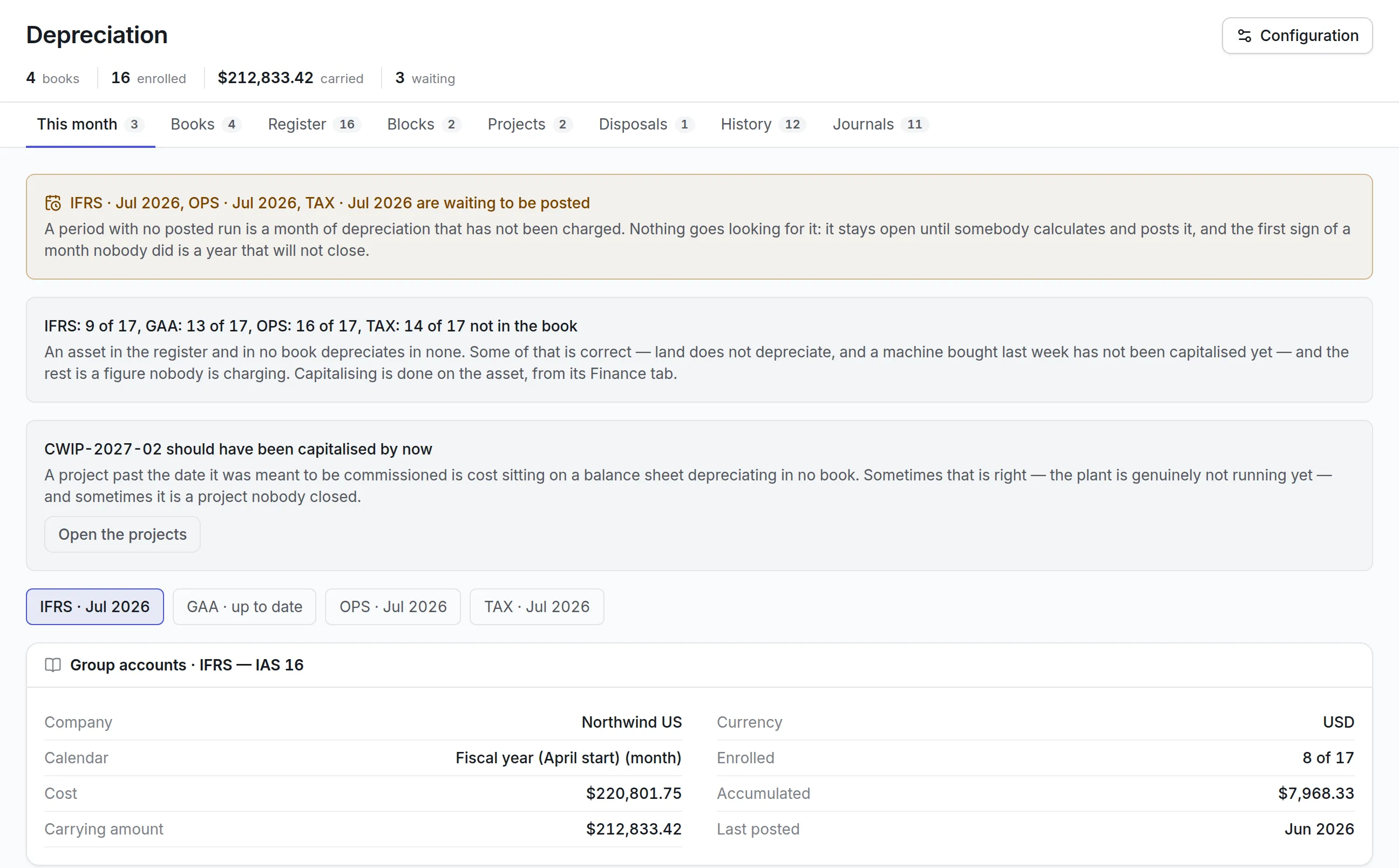
- CMMS Software vs EAM Software
- Industries That Benefit from CMMS Software
- Manufacturing
- Healthcare
- Hospitality
- Education
- Government
- Utilities
- Construction
- Warehousing
- CMMS Implementation Process
- Step 1: Define Business Objectives
- Step 2: Build the Asset Register
- Step 3: Clean Existing Data
- Step 4: Configure Asset Categories
- Step 5: Create Preventive Maintenance Plans
- Step 6: Configure Workflows
- Step 7: Import Maintenance History
- Step 8: Configure Inventory
- Step 9: Generate QR Codes
- Step 10: Train Users
- Step 11: Pilot the System
- Step 12: Go Live
- Step 13: Review KPIs
- Common CMMS Implementation Mistakes
- Poor Asset Data
- No Maintenance Strategy
- Ignoring User Training
- Poor Preventive Maintenance Planning
- No Spare Parts Control
- Weak Management Support
- Over Customization
- Ignoring KPIs
- Delayed Data Updates
- Treating CMMS as Only a Work Order Tool
- CMMS KPIs
- Preventive Maintenance Compliance
- Mean Time Between Failures
- Mean Time to Repair
- Asset Availability
- Maintenance Cost per Asset
- Work Order Completion Rate
- Emergency Maintenance Percentage
- Maintenance Backlog
- Technician Productivity
- Spare Parts Stockout Rate
- Best Practices for Using CMMS Software
- Build a Complete Asset Register
- Standardize Maintenance Procedures
- Automate Preventive Maintenance
- Keep Maintenance History Updated
- Monitor KPIs
- Use Mobile Applications
- Integrate Inventory
- Review Maintenance Costs
- Analyze Failure Trends
- Continuously Improve Maintenance Plans
- Features to Look for in CMMS Software
- How Asset Infinity Helps with CMMS
- Conclusion
- Frequently Asked Questions
Maintenance is one of the most important business functions for organizations that depend on physical assets. Whether managing manufacturing equipment, hospital devices, facility infrastructure, construction machinery, fleet vehicles, utility systems, or production assets, maintenance directly affects productivity, safety, operational costs, and customer satisfaction.
Unfortunately, many organizations still rely on spreadsheets, paper work orders, emails, or disconnected systems to manage maintenance activities. These manual processes often lead to missed preventive maintenance, delayed repairs, poor asset visibility, excessive downtime, rising maintenance costs, and limited reporting.
As organizations grow, maintenance operations become increasingly complex. Hundreds or even thousands of assets require inspections, servicing, spare parts, technician assignments, warranties, and compliance records. Without a centralized maintenance system, controlling these activities becomes extremely difficult.
This is where CMMS software becomes essential.
A Computerized Maintenance Management System, commonly known as CMMS software, helps organizations centralize maintenance operations, automate preventive maintenance, manage work orders, monitor asset performance, track maintenance costs, and improve equipment reliability.
This guide explains everything you need to know about CMMS software, including its features, benefits, implementation process, common mistakes, key performance indicators, and best practices.
What Is CMMS Software?
CMMS software is a digital maintenance management solution that helps organizations plan, schedule, execute, monitor, and optimize maintenance activities throughout the asset lifecycle.
Instead of relying on manual records, a CMMS centralizes maintenance information into a single platform.
The software helps organizations manage:
- Asset records
- Preventive maintenance
- Corrective maintenance
- Work orders
- Maintenance schedules
- Spare parts
- Inventory
- Technicians
- Inspection checklists
- Maintenance costs
- Equipment history
- Vendor information
- Compliance records
- Maintenance reports
A CMMS becomes the central source of maintenance information for maintenance managers, technicians, planners, operations teams, and management.
Why Is CMMS Software Important?
Every asset deteriorates over time.
Without proper maintenance, organizations may experience:
- Unexpected equipment failures
- Production downtime
- Higher repair costs
- Missed inspections
- Poor maintenance planning
- Increased safety risks
- Asset failures
- Lost productivity
- Equipment replacement before expected life
- Poor maintenance documentation
- Regulatory non compliance
CMMS software helps organizations move from reactive maintenance to planned, preventive, and data driven maintenance.
What Does CMMS Stand For?
CMMS stands for Computerized Maintenance Management System.
It is designed to organize maintenance operations by digitizing maintenance records, automating maintenance schedules, improving technician productivity, and providing complete visibility into maintenance performance.
Who Uses CMMS Software?
CMMS software is used by organizations across many industries.
Common users include:
- Manufacturing plants
- Healthcare organizations
- Hotels
- Facility management companies
- Educational institutions
- Government organizations
- Warehouses
- Logistics companies
- Construction firms
- Energy companies
- Utility providers
- Food processing facilities
- Pharmaceutical companies
- Aviation organizations
- Retail chains
- Commercial buildings
Types of Assets Managed in a CMMS
Organizations can manage almost any physical asset.
Examples include:
- Production machines
- HVAC equipment
- Pumps
- Compressors
- Boilers
- Motors
- Generators
- Electrical panels
- Medical equipment
- Elevators
- Vehicles
- Forklifts
- Laboratory equipment
- Fire safety systems
- Utility infrastructure
- Building assets
- Solar systems
- Water treatment equipment
Core Functions of CMMS Software
A CMMS brings together multiple maintenance processes into one centralized platform.
Asset Management
The software maintains a complete asset register containing:
- Asset ID
- Asset category
- Location
- Manufacturer
- Model
- Serial number
- Purchase date
- Warranty
- Maintenance history
- Condition
- Current status
Having complete asset records improves maintenance planning.
Preventive Maintenance
Preventive maintenance schedules are created based on:
- Calendar dates
- Operating hours
- Production cycles
- Meter readings
- Manufacturer recommendations
- Asset condition
The system automatically generates maintenance work when schedules become due.
Corrective Maintenance
Corrective maintenance addresses identified defects before complete equipment failure.
The CMMS records:
- Fault description
- Technician
- Required parts
- Labor hours
- Repair activities
- Downtime
- Completion status
Reactive Maintenance
Reactive maintenance occurs after equipment failure.
Although reactive work cannot always be eliminated, CMMS software helps reduce its frequency through better planning.
Predictive Maintenance Integration
Modern CMMS platforms can integrate with sensors and IoT devices to support predictive maintenance.
Data sources may include:
- Vibration
- Temperature
- Pressure
- Oil analysis
- Operating hours
- Sensor alerts
Maintenance is triggered based on actual equipment condition.
Work Order Management
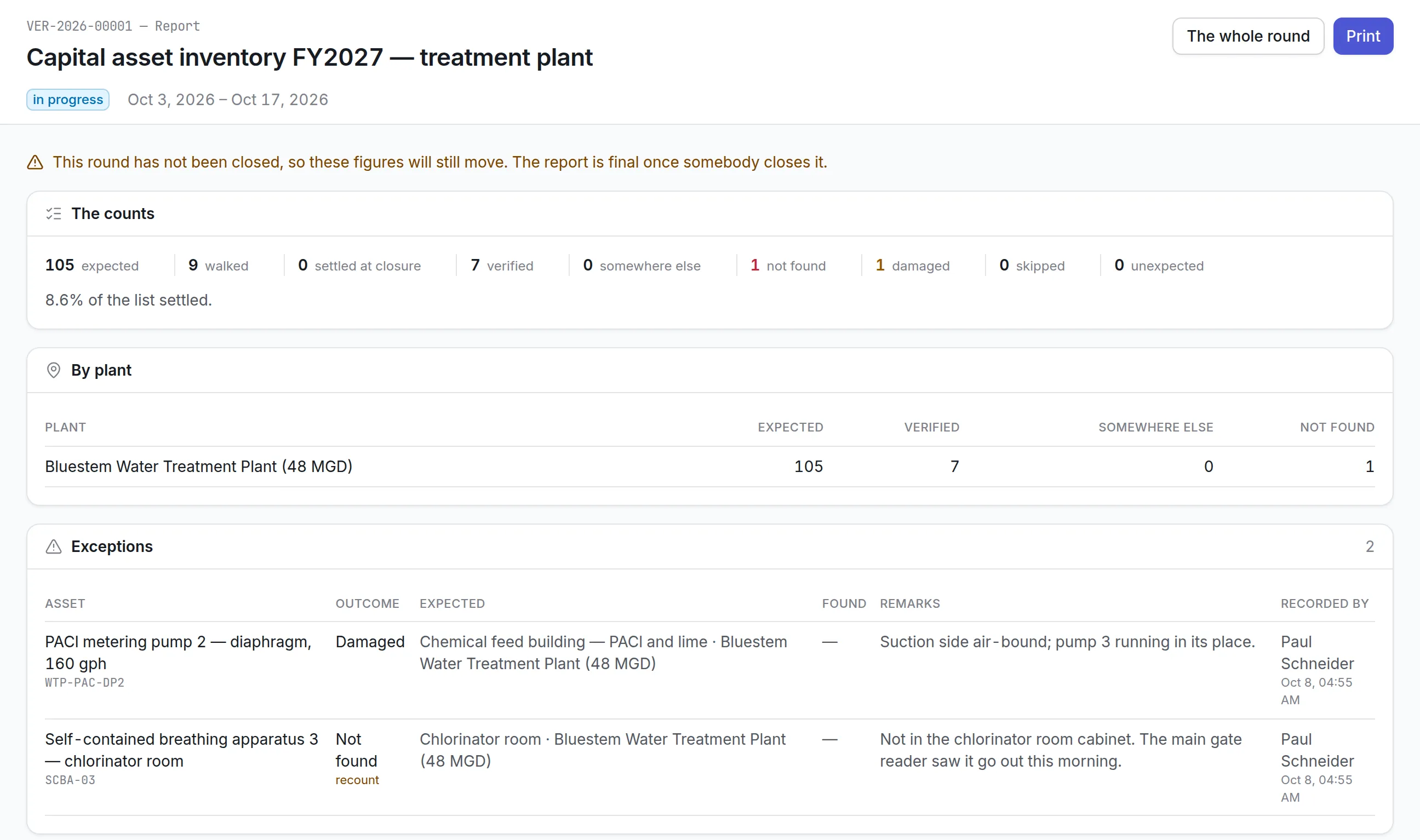
Work orders are one of the most important functions within a CMMS.
Each work order may contain:
- Asset information
- Priority
- Maintenance type
- Fault description
- Assigned technician
- Required tools
- Spare parts
- Estimated labor
- Safety instructions
- Inspection checklist
- Completion notes
- Photographs
- Downtime
- Cost
Digital work orders eliminate paperwork while improving communication.
Maintenance Scheduling
Maintenance planners can schedule:
- Daily maintenance
- Weekly maintenance
- Monthly maintenance
- Quarterly maintenance
- Annual maintenance
- Seasonal maintenance
- Shutdown maintenance
Schedules are automatically generated according to predefined maintenance plans.
Maintenance Calendar
A maintenance calendar provides a visual overview of:
- Upcoming work
- Scheduled inspections
- Technician assignments
- Equipment availability
- Planned shutdowns
This improves workload planning.
Asset History
Every maintenance activity becomes part of the asset history.
The history may include:
- Inspections
- Repairs
- Preventive maintenance
- Spare parts used
- Labor
- Downtime
- Contractors
- Costs
- Failures
- Photographs
Complete history supports better repair and replacement decisions.
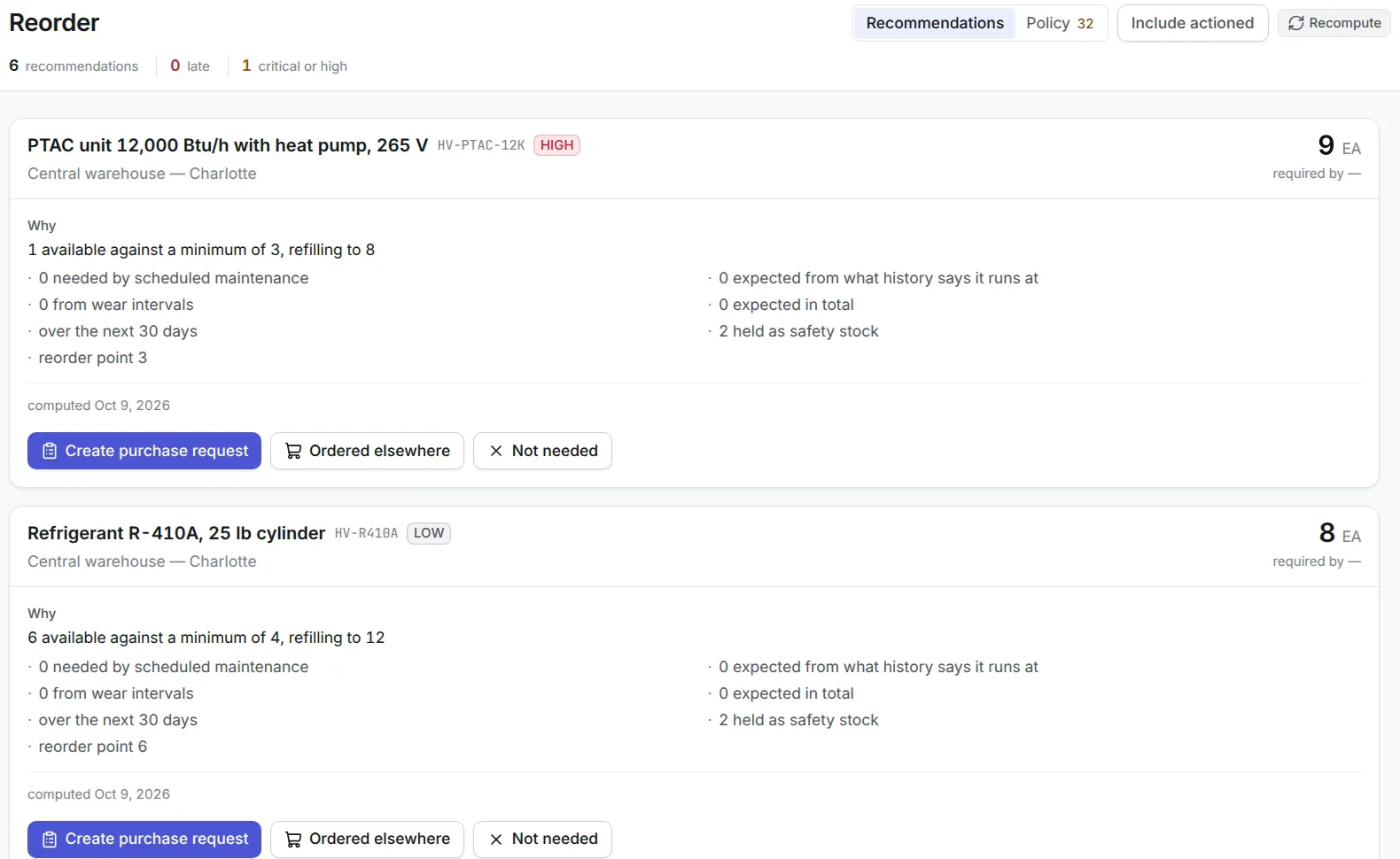
Spare Parts Management
Maintenance depends on spare parts availability.
CMMS software helps manage:
- Spare parts inventory
- Stock levels
- Reorder points
- Warehouse locations
- Purchase requests
- Part usage
- Supplier information
- Critical spares
This reduces maintenance delays caused by missing inventory.
Inventory Management
Inventory features may include:
- Stock tracking
- Material issues
- Returns
- Transfers
- Purchase requests
- Barcode support
- QR code support
- Batch tracking
Inventory integration reduces manual stock management.
Technician Management
The software helps assign maintenance activities according to:
- Skills
- Availability
- Certifications
- Location
- Workload
Managers can monitor technician productivity in real time.
Mobile CMMS
Mobile applications allow technicians to:
- Receive work orders
- Scan QR codes
- View maintenance history
- Record labor
- Capture photographs
- Complete inspections
- Update work status
- Request spare parts
- Work offline
This reduces paperwork and improves data accuracy.
QR Code and Barcode Asset Tracking
Every asset can be identified using:
- QR codes
- Barcodes
- RFID tags
Technicians can scan the asset and instantly access:
- Maintenance history
- Manuals
- Open work orders
- Inspection forms
- Warranty information
Inspection Management
Inspection checklists ensure maintenance consistency.
Examples include:
- Safety inspections
- Equipment inspections
- Calibration
- Fire system checks
- HVAC inspections
- Utility inspections
- Facility inspections
Digital inspections reduce paperwork and improve compliance.
Preventive Maintenance Checklists
Maintenance tasks can include detailed checklists such as:
- Clean equipment
- Inspect bearings
- Lubricate moving parts
- Replace filters
- Measure vibration
- Check pressure
- Inspect electrical connections
- Record readings
- Verify safety systems
Checklists standardize maintenance quality.
Vendor and Contractor Management
CMMS software can maintain:
- Vendor details
- Service contracts
- Annual maintenance contracts
- Warranty providers
- Contractor performance
- Response times
- Service history
This improves contractor management.
Warranty Management
Warranty tracking helps organizations avoid unnecessary repair expenses.
The system can store:
- Warranty period
- Supplier
- Coverage
- Expiration date
- Claims history
Alerts notify users before warranties expire.
Document Management
Documents stored within the CMMS may include:
- Equipment manuals
- Drawings
- Standard operating procedures
- Safety instructions
- Inspection reports
- Certificates
- Contracts
- Warranty documents
Everything remains linked to the correct asset.
Notifications and Alerts
Automated notifications improve maintenance responsiveness.
Examples include:
- Preventive maintenance due
- Overdue work orders
- Equipment failure
- Spare parts shortage
- Warranty expiry
- Inspection due
- Calibration due
- Asset downtime
- Contractor delays
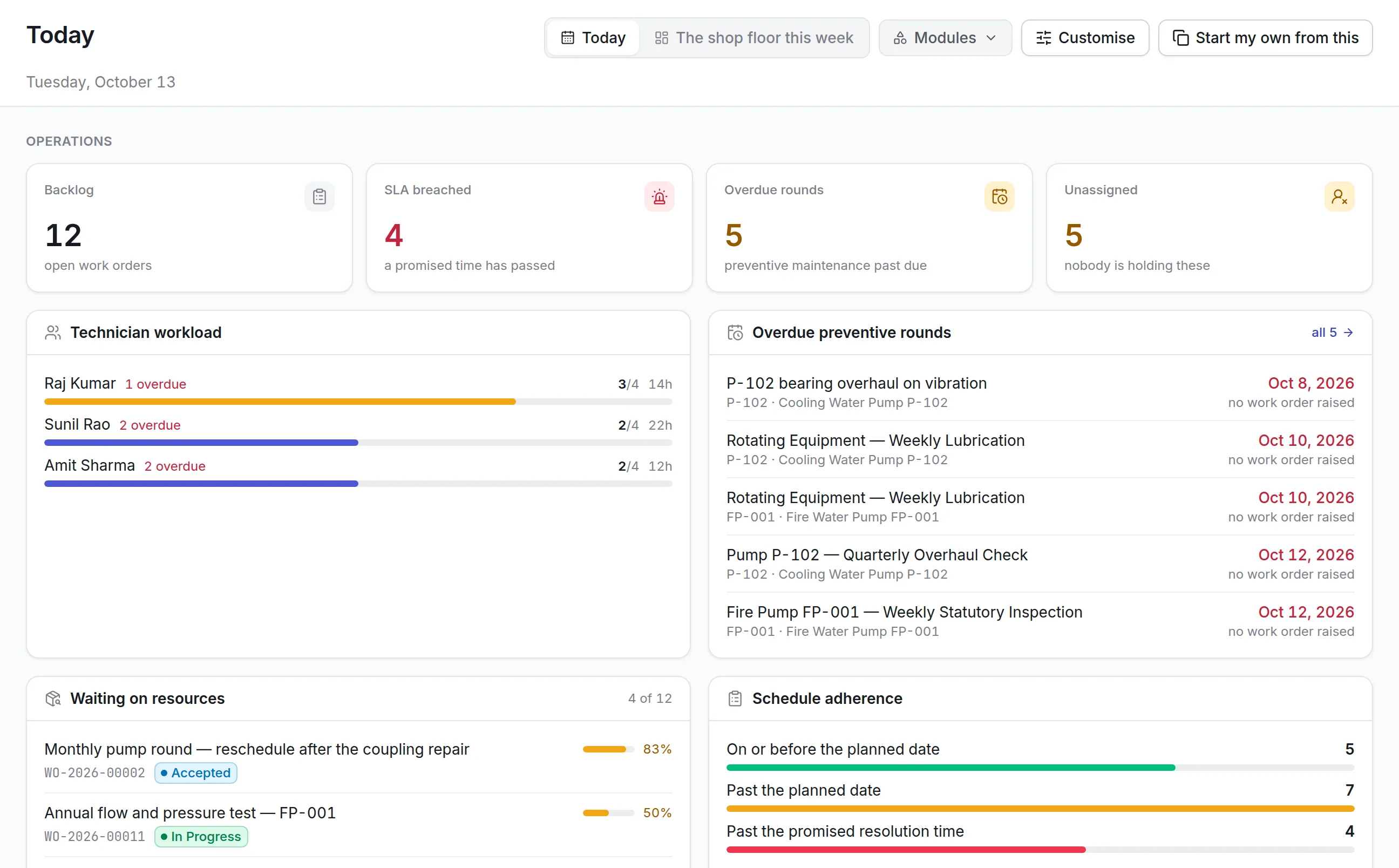
Dashboards and Reports
Managers gain complete visibility into maintenance operations.
Common dashboards include:
- Open work orders
- Maintenance backlog
- Asset availability
- Preventive maintenance compliance
- Equipment downtime
- Technician workload
- Maintenance cost
- Spare parts usage
- Asset health
Benefits of CMMS Software
Reduces Equipment Downtime
Preventive maintenance minimizes unexpected failures.
Improves Asset Reliability
Regular maintenance increases equipment performance.
Extends Asset Life
Proper maintenance delays expensive replacements.
Reduces Maintenance Costs
Organizations reduce emergency repairs and overtime expenses.
Improves Technician Productivity
Technicians receive digital work orders and clear priorities.
Better Maintenance Planning
Maintenance becomes proactive rather than reactive.
Improves Compliance
Inspection records and maintenance documentation remain centralized.
Better Decision Making
Historical data supports repair, replacement, and budgeting decisions.
Increases Asset Visibility
Organizations know where assets are and how they are performing.
Improves Spare Parts Control
Inventory remains available when maintenance is required.
CMMS Software vs EAM Software
Although the terms are sometimes used interchangeably, they serve different purposes.
CMMS Software
Primarily focuses on maintenance operations, including work orders, preventive maintenance, inspections, technicians, and spare parts.
Enterprise Asset Management Software
Provides broader lifecycle management by combining maintenance with procurement, finance, depreciation, contracts, compliance, capital planning, inventory, and asset lifecycle optimization.
Organizations with complex asset lifecycles often integrate CMMS capabilities within a broader EAM platform.
Industries That Benefit from CMMS Software
Manufacturing
Manage production equipment and reduce downtime.
Healthcare
Maintain medical devices and regulatory compliance.
Hospitality
Maintain guest facilities and hotel infrastructure.
Education
Manage campus buildings and laboratory equipment.
Government
Maintain public infrastructure and facilities.
Utilities
Manage substations, pumps, transformers, and distribution assets.
Construction
Maintain heavy equipment and construction machinery.
Warehousing
Maintain conveyors, forklifts, loading equipment, and facility systems.
CMMS Implementation Process
Successful implementation requires structured planning.
Step 1: Define Business Objectives
Identify goals such as reducing downtime or improving preventive maintenance.
Step 2: Build the Asset Register
Collect complete asset information.
Step 3: Clean Existing Data
Remove duplicate or inaccurate records.
Step 4: Configure Asset Categories
Standardize naming conventions.
Step 5: Create Preventive Maintenance Plans
Configure maintenance frequencies and checklists.
Step 6: Configure Workflows
Define work order approvals, priorities, and technician assignments.
Step 7: Import Maintenance History
Preserve historical maintenance records.
Step 8: Configure Inventory
Add spare parts and warehouse information.
Step 9: Generate QR Codes
Tag assets for faster identification.
Step 10: Train Users
Train technicians, supervisors, planners, and administrators.
Step 11: Pilot the System
Start with one department or facility.
Step 12: Go Live
Deploy across the organization.
Step 13: Review KPIs
Monitor performance and optimize processes.
Common CMMS Implementation Mistakes
Many organizations fail to achieve expected results because of avoidable mistakes.
Poor Asset Data
Incomplete asset records reduce system effectiveness.
No Maintenance Strategy
A CMMS cannot replace a well defined maintenance process.
Ignoring User Training
Employees must understand how to use the software correctly.
Poor Preventive Maintenance Planning
Simply copying old schedules without review limits improvement.
No Spare Parts Control
Maintenance delays continue if inventory remains unmanaged.
Weak Management Support
Leadership involvement is critical for successful adoption.
Over Customization
Excessive customization increases complexity and slows implementation.
Ignoring KPIs
Without performance measurement, improvements cannot be evaluated.
Delayed Data Updates
Maintenance records should be updated immediately after work completion.
Treating CMMS as Only a Work Order Tool
A modern CMMS should support asset history, analytics, preventive maintenance, inventory, inspections, and reporting—not just work order management.
CMMS KPIs
Organizations should monitor maintenance performance continuously.
Preventive Maintenance Compliance
Percentage of scheduled maintenance completed on time.
Mean Time Between Failures
Measures equipment reliability.
Mean Time to Repair
Measures repair efficiency.
Asset Availability
Indicates equipment readiness.
Maintenance Cost per Asset
Measures maintenance spending.
Work Order Completion Rate
Tracks completed work orders.
Emergency Maintenance Percentage
Measures reactive maintenance.
Maintenance Backlog
Tracks unfinished maintenance work.
Technician Productivity
Measures completed work relative to available labor.
Spare Parts Stockout Rate
Tracks inventory shortages affecting maintenance.
Best Practices for Using CMMS Software
Build a Complete Asset Register
Maintain accurate asset information.
Standardize Maintenance Procedures
Use digital checklists.
Automate Preventive Maintenance
Reduce manual scheduling.
Keep Maintenance History Updated
Every work order should be documented.
Monitor KPIs
Review performance regularly.
Use Mobile Applications
Enable technicians to update work from the field.
Integrate Inventory
Ensure spare parts availability.
Review Maintenance Costs
Identify expensive assets.
Analyze Failure Trends
Reduce repeat failures.
Continuously Improve Maintenance Plans
Adjust schedules based on actual performance.
Features to Look for in CMMS Software
A modern CMMS should include:
- Asset management
- Preventive maintenance
- Corrective maintenance
- Work order management
- Asset history
- Mobile application
- QR code and barcode support
- Spare parts inventory
- Maintenance calendar
- Technician management
- Inspection management
- Warranty management
- Vendor management
- Dashboard reporting
- KPI monitoring
- Role based permissions
- Document management
- Notifications
- Multi location support
- API integrations
How Asset Infinity Helps with CMMS
Asset Infinity provides a comprehensive CMMS solution that enables organizations to centralize maintenance operations while improving equipment reliability and reducing operational costs.
With Asset Infinity, organizations can:
- Build a centralized asset register
- Schedule preventive maintenance
- Generate digital work orders
- Manage corrective maintenance
- Track maintenance history
- Use QR codes and barcodes for asset identification
- Manage spare parts inventory
- Monitor technician productivity
- Capture inspections through mobile devices
- Track warranties and service contracts
- Store manuals and maintenance documents
- Generate maintenance dashboards
- Monitor maintenance KPIs
- Manage multiple facilities and locations
- Integrate maintenance with procurement, inventory, and asset management
By connecting maintenance, assets, inventory, procurement, and reporting into one platform, Asset Infinity helps organizations improve equipment availability, reduce downtime, and optimize maintenance performance.
Conclusion
CMMS software has become an essential solution for organizations that rely on physical assets to support daily operations. It transforms maintenance from a reactive activity into a structured, data driven process that improves reliability, reduces downtime, and controls maintenance costs.
By centralizing asset information, automating preventive maintenance, managing work orders, tracking spare parts, and monitoring technician performance, organizations gain complete visibility into their maintenance operations.
However, successful implementation depends on more than installing software. Organizations need accurate asset data, standardized maintenance procedures, user training, clearly defined KPIs, and continuous process improvement.
With Asset Infinity, businesses can streamline maintenance management, improve asset performance, automate preventive maintenance, manage work orders, and maintain complete maintenance records through one integrated platform.
Whether managing manufacturing equipment, healthcare assets, facility infrastructure, utility systems, or commercial buildings, Asset Infinity provides the tools organizations need to build an efficient, reliable, and modern maintenance operation.
Frequently Asked Questions
1. What is CMMS software?
CMMS software is a Computerized Maintenance Management System that helps organizations manage maintenance activities, work orders, preventive maintenance, inspections, asset records, spare parts, and maintenance reporting.
2. What are the main benefits of CMMS software?
CMMS software reduces equipment downtime, improves preventive maintenance, extends asset life, lowers maintenance costs, improves technician productivity, and provides complete maintenance visibility.
3. What industries use CMMS software?
Manufacturing, healthcare, hospitality, education, government, utilities, logistics, construction, retail, and facility management organizations commonly use CMMS software.
4. What is the difference between CMMS and EAM software?
CMMS primarily focuses on maintenance operations, while Enterprise Asset Management software includes maintenance along with procurement, finance, contracts, compliance, lifecycle management, and capital planning.
5. How does Asset Infinity support CMMS?
Asset Infinity provides digital work orders, preventive maintenance scheduling, asset tracking, QR code identification, mobile inspections, spare parts management, maintenance reporting, KPI dashboards, and integrated asset lifecycle management through a centralized platform.